







Question: The following question pertains to Python. Consider the following Python bar chart script below. Modify the bar chart script to read data from a file
The following question pertains to Python.
Consider the following Python bar chart script below.
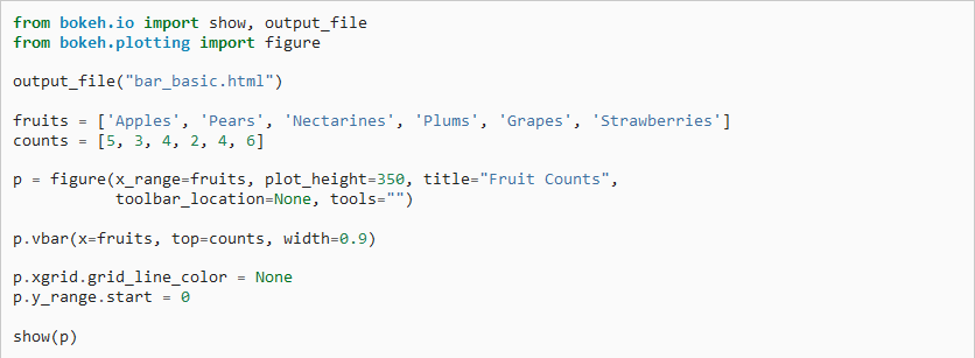
Modify the bar chart script to read data from a file called "names.txt" by doing the following:
- Modify the Python script by adding code that reads in the names and ages file into two arrays: "names" and "ages."
- Erase the fruits and counts arrays from the original script.
- Pass the names and ages arrays to the figure() and vbar() functions instead of the fruits and counts arrays.
- In the figure() function, change the title of the chart from Fruit Counts to Person Ages.
Notice that modifying the python script to read the names and ages is by adding lines of code to perform these steps:
- Open the names.txt file in reading mode.
- Call the readline() function to read the header line and ignore it.
- Create two empty arrays, names=[] and ages = []
- Create a for loop that scans the file line by line. For each line:
- Split it into name and age using the split() function and the \t tab delimiter.
- Add the name to the names array and the age to the ages array using the append() function.
- Close the names.txt file.
from bokeh.io import show, output_file from bokeh.plotting import figure output_file("bar_basic.html") fruits = ['Apples', 'Pears', 'Nectarines', 'Plums', 'Grapes', 'Strawberries'] counts = [5, 3, 4, 2, 4, 6] p = figure(x_range=fruits, plot_height=350, title="Fruit Counts", toolbar_location=None, tools="") p.vbar(x=fruits, top=counts, width=0.9) p.xgrid.grid_line_color = None p.y_range. start = 0 show(p)
Step by Step Solution
There are 3 Steps involved in it

Get step-by-step solutions from verified subject matter experts
 Study Help