







Question: The function to count all the Access products. =COUNTIF(B3:B9,Access)=COUNT(B3:B9)=COUNTIFS(B3:B9,Access)=COUNTIF(Access,B3:B9)
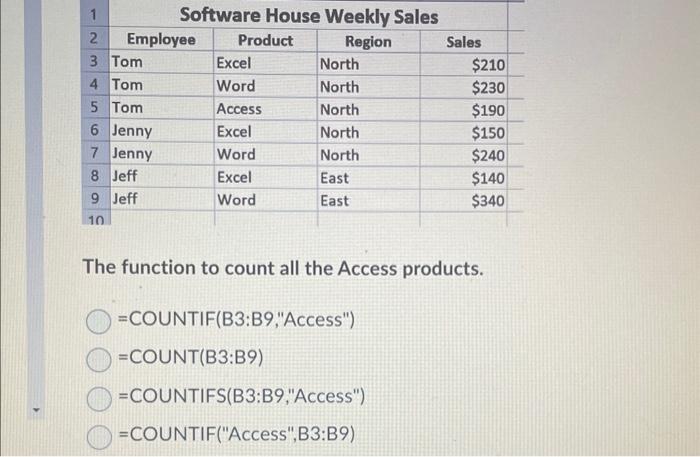
The function to count all the Access products. =COUNTIF(B3:B9,"Access")=COUNT(B3:B9)=COUNTIFS(B3:B9,"Access")=COUNTIF("Access",B3:B9)
Step by Step Solution
There are 3 Steps involved in it
1 Expert Approved Answer
Step: 1 Unlock

Question Has Been Solved by an Expert!
Get step-by-step solutions from verified subject matter experts
Step: 2 Unlock
Step: 3 Unlock
 Study Help