







Question: The ginput function is useful for picking distances off a graph. Demonstrate this feature by doing the following: Create a graph of a circle by
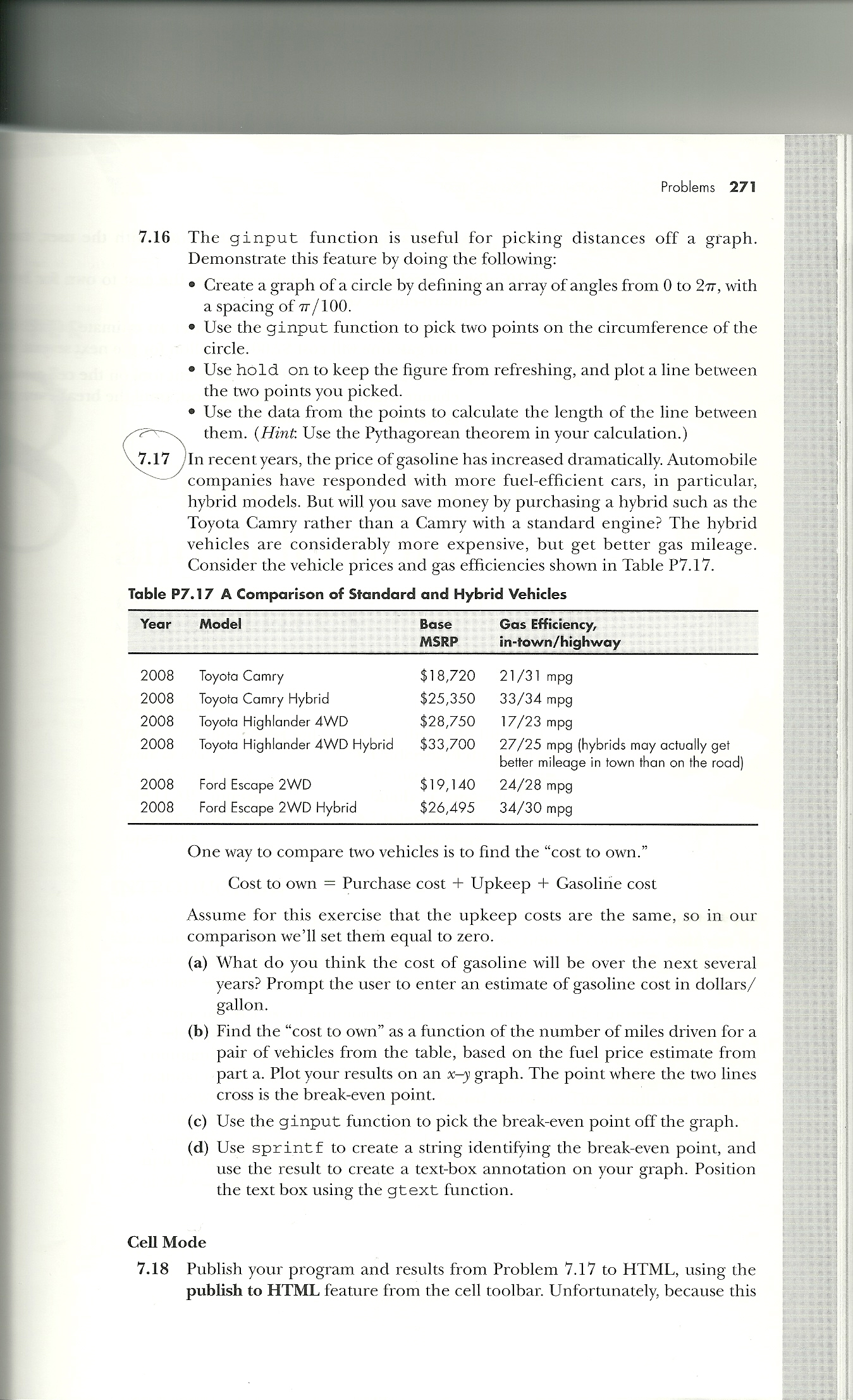
The ginput function is useful for picking distances off a graph. Demonstrate this feature by doing the following: Create a graph of a circle by defining an array of angles from 0 to 2 pi, with a spacing of pi /100. Use the ginput function to pick two points on the circumference of the circle. Use hold on to keep the figure from refreshing, and plot a line between the two points you picked. Use the data from the points to calculate the length of the line between them. (Hint Use the Pythagorean theorem in your calculation.) In recent years, the price of gasoline has increased dramatically. Automobile companies have responded with more fuel-efficient cars, in particular, hybrid models. But will you save money by purchasing a hybrid such as the Toyota Camry rather than a Camry with a standard engine? The hybrid vehicles are considerably more expensive, but get better gas mileage. Consider the vehicle prices and gas efficiencies shown in Table P7.17. One way to compare two vehicles is to find the "cost to own." Cost to own = Purchase cost + Upkeep H + Gasoline cost Assume for this exercise that the upkeep costs are the same, so in our comparison we'll set them equal to zero. What do you think the cost of gasoline will be over the next several years? Prompt the user to enter an estimate of gasoline cost in dollars/ gallon. Find the "cost to own" as a function of the number of miles driven for a pair of vehicles from the table, based on the fuel price estimate from part a. Plot your results on an x-y graph. The point where the two lines cross is the break-even point. Use the ginput function to pick the break-even point off the graph. Use sprintf to create a string identifying the break-even point, and use the result to create a text-box annotation on your graph. Position the text box using the gtext function. Publish your program and results from Problem 7.17 to HTML, using the publish to HTML feature from the cell toolbar. Unfortunately, because this
Step by Step Solution
There are 3 Steps involved in it

Get step-by-step solutions from verified subject matter experts
 Study Help