







Question: The goal in the 4th Programming Assignment is to practice: How to reuse previously implemented classes Observe how to use Graphics to Draw on JPanel
The goal in the 4th Programming Assignment is to practice:
How to reuse previously implemented classes
Observe how to use Graphics to Draw on JPanel
To extract java files from a jar file
Observe how to use mouse events
You are going to implement a GUI to draw certain objects on the Drawing Panel. I provided you the toolbar, panel creation piece of code, hence all you need to do is implement the paint functions of the classes Circle, Cube and Square. Also, please explore in detail the project. Observe how OO paradigm is applied and how it makes the life easy in terms of modularity, reusability and maintenance.
In the implementation, I reused my solution to the 3rd Assignment, and modified it tiny-bit. I added position information on the panel, abstract paint function and also updated the mSide and mRadius types to int from float according to needs of the current assignment.
A small note: I used a black boundary color for the square and the circle, but it is completely optional.
Run Scenario:
Select an object on the toolbar
Click a point on the blue drawing panel
Selected object is drawn on the drawing panel:
Circle center at the clicked point
Square top-left corner at the clicked point
Cube front-top-left corner at the clicked point
Sample output :
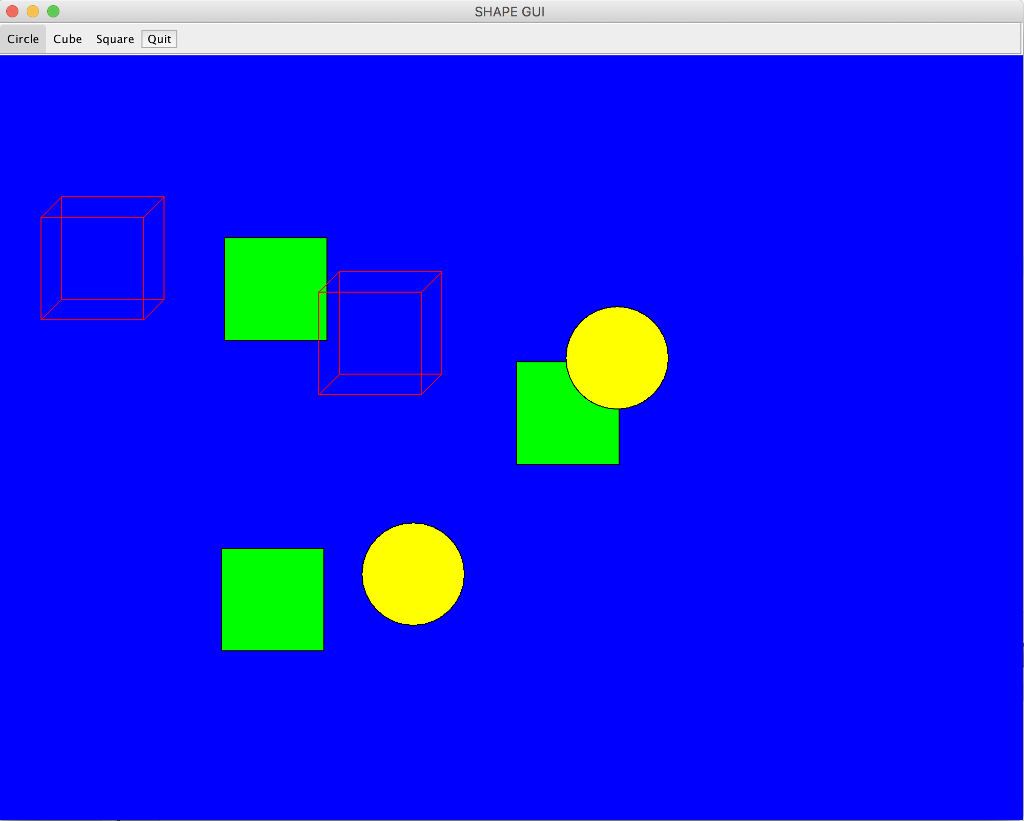
You are going to build upon this project :
assignment4.java:
package ShareWithStudents;
//Imports are listed in full to show what's being used
//could just import javax.swing.* and java.awt.* etc..
import java.awt.BorderLayout;
import java.awt.Color;
import java.awt.Graphics;
import javax.swing.JButton;
import java.awt.event.ActionListener;
import java.awt.event.ActionEvent;
import java.awt.event.ItemEvent;
import java.awt.event.ItemListener;
import java.awt.event.MouseEvent;
import java.util.ArrayList;
import javax.swing.JPanel;
import javax.swing.JToggleButton;
import javax.swing.JToolBar;
import javax.swing.JFrame;
import javax.swing.border.EtchedBorder;
enum ShapeSelected{
None, Circle, Square, Cube;
};
public class Assignment4 extends javax.swing.JFrame implements java.awt.event.MouseListener{
final int NUMBER_OF_SHAPES = 3;
JToolBar mToolbar;
ShapeSelected mSelectedAction;
JToggleButton mCircleButton;
JToggleButton mCubeButton;
JToggleButton mSquareButton;
DrawPanel mDrawPanel;
static ArrayList mShapes = new ArrayList();
public static void main(String[] args) {
new Assignment4();
}
private JToggleButton addButton(String title, ShapeSelected shapeSelected){
JToggleButton button = new JToggleButton(title);
button.addItemListener(new ItemListener() {
public void itemStateChanged(ItemEvent ev) {
if(ev.getStateChange()==ItemEvent.SELECTED){
// First if there is a button previously selected, reset it
switch (mSelectedAction){
case Circle:
mCircleButton.setSelected(false);
break;
case Cube:
mCubeButton.setSelected(false);
break;
case Square:
mSquareButton.setSelected(false);
break;
}
// Update the selected button shape
mSelectedAction = shapeSelected;
} else if(ev.getStateChange()==ItemEvent.DESELECTED){
mSelectedAction = ShapeSelected.None;
}
}
});
this.mToolbar.add(button);
return (button);
}
public Assignment4()
{
final int WIDTH = 1000;
final int HEIGHT = 800;
this.mSelectedAction = ShapeSelected.None;
JFrame guiFrame = new JFrame();
//make sure the program exits when the frame closes
guiFrame.setDefaultCloseOperation(JFrame.EXIT_ON_CLOSE);
guiFrame.setTitle("SHAPE GUI");
guiFrame.setSize(WIDTH, HEIGHT);
//This will center the JFrame in the middle of the screen
guiFrame.setLocationRelativeTo(null);
// Create a toolbar and give it an etched border.
this.mToolbar = new JToolBar();
this.mToolbar.setBorder(new EtchedBorder());
this.mDrawPanel = new DrawPanel();
this.mDrawPanel.setBackground(Color.blue);
this.mDrawPanel.paintDisplay(this.mShapes);
guiFrame.add(mDrawPanel);
guiFrame.add(this.mToolbar, BorderLayout.NORTH);
this.mCircleButton = addButton("Circle", ShapeSelected.Circle);
this.mCubeButton = addButton("Cube", ShapeSelected.Cube);
this.mSquareButton = addButton("Square", ShapeSelected.Square);
// Add the Exit Action
JButton button = new JButton("Quit");
button.setToolTipText("Quit the program");
button.addActionListener(new ActionListener() {
public void actionPerformed(ActionEvent e) {
System.exit(0);
}
});
mToolbar.add(button);
guiFrame.addMouseListener(this);
//make sure the JFrame is visible
guiFrame.setVisible(true);
}
@Override
public void mouseClicked(MouseEvent e) {
int x = e.getX();
int y = e.getY();
switch(this.mSelectedAction){
case Circle:
Circle circle = new Circle(Color.yellow, "crl", 50);
circle.setPos(x, y - 50);
mShapes.add(circle);
break;
case Cube:
Cube cube = new Cube(Color.red, "cb", 100);
cube.setPos(x, y - 50);
mShapes.add(cube);
break;
case Square:
Square square = new Square(Color.green, "sq", 100);
square.setPos(x, y - 50);
mShapes.add(square);
break;
}
this.mDrawPanel.paintDisplay(mShapes);
}
@Override
public void mousePressed(MouseEvent e) {
}
@Override
public void mouseReleased(MouseEvent e) {
}
@Override
public void mouseEntered(MouseEvent e) {
}
@Override
public void mouseExited(MouseEvent e) {
}
}
class DrawPanel extends JPanel{
ArrayList mShapes;
@Override
public void paintComponent(Graphics g){
super.paintComponent(g);
for (Shape s : mShapes){
s.paint(g);
}
}
public void paintDisplay(ArrayList shapes){
mShapes = shapes;
repaint();
}
}
Circle.java:
package ShareWithStudents;
import java.awt.Color; import java.awt.Graphics;
/** * * @author neslisah */ public class Circle extends Shape implements I_twoD{ private int mRadius;
public Circle(Color color, String name, int radius) { super(color, name); this.mRadius = radius; mX = -1; mY = -1; }
@Override public float computeArea() { return (float) (Math.PI * this.mRadius * this.mRadius); }
@Override public float computePerimeter() { return (float)(2.f * Math.PI * this.mRadius); }
@Override public void print() { System.out.println("Circle ("+this.mName+") radius : "+this.mRadius+" and color : "+this.mColor.toString()); }
public void paint(Graphics g) { } }
Cube.java:
package ShareWithStudents;
import java.awt.Color; import java.awt.Graphics;
/** * * @author neslisah */ public class Cube extends Square implements I_threeD{
public Cube(Color color, String name, int side) { super(color, name, side); }
@Override public float computeVolume() { return (this.mSide * this.mSide * this.mSide); } public void print(){ System.out.println("Cube ("+this.mName+") side : "+this.mSide+" and color : "+this.mColor.toString()); } public void paint(Graphics g) { final int step = 20; } }
I_threeD.java:
package ShareWithStudents;
public interface I_threeD { float computeVolume(); }
I_two.java:
package ShareWithStudents;
public interface I_twoD { float computeArea(); float computePerimeter(); }
Shape.java:
package ShareWithStudents;
import java.awt.Color; import java.awt.Graphics;
/** * * @author neslisah */ public abstract class Shape { protected Color mColor; String mName; protected int mX; protected int mY; public Shape (Color color, String name){ this.mColor = color; this.mName = name; } public String getName(){ return (this.mName); } public Color getColor(){ return (this.mColor); } public void setName(String name){ this.mName = name; } public void setColor(Color color){ this.mColor = color; } public abstract void print(); public abstract void paint(Graphics g); public void setPos(int x, int y){ mX = x; mY = y; } }
Square.java:
package ShareWithStudents;
import java.awt.Color; import java.awt.Graphics;
/** * * @author neslisah */ public class Square extends Shape implements I_twoD{ protected int mSide;
Square(Color color, String name, int side){ super (color, name); this.mSide = side; } @Override public float computeArea() { return (this.mSide * this.mSide); }
@Override public float computePerimeter() { return (4.f * this.mSide); } public void print(){ System.out.println("Square ("+this.mName+") side : "+this.mSide+" and color : "+this.mColor.toString()); }
@Override public void paint(Graphics g) { } }
DrawPanel.class:
package ShareWithStudents;
import java.awt.Graphics; import java.util.ArrayList; import javax.swing.JPanel;
class DrawPanel extends JPanel {
ArrayList mShapes;
DrawPanel() { // /* 0: aload_0 * 1: invokespecial javax/swing/JPanel."":()V * 4: return * */ // }
public void paintComponent(Graphics g) { // /* 0: aload_0 * 1: aload_1 * 2: invokespecial javax/swing/JPanel.paintComponent:(Ljava/awt/Graphics;)V * 5: aload_0 * 6: getfield ShareWithStudents/DrawPanel.mShapes:Ljava/util/ArrayList; * 9: invokevirtual java/util/ArrayList.iterator:()Ljava/util/Iterator; * 12: astore_2 * 13: aload_2 * 14: invokeinterface java/util/Iterator.hasNext:()Z * 19: ifeq 40 * 22: aload_2 * 23: invokeinterface java/util/Iterator.next:()Ljava/lang/Object; * 28: checkcast ShareWithStudents/Shape * 31: astore_3 * 32: aload_3 * 33: aload_1 * 34: invokevirtual ShareWithStudents/Shape.paint:(Ljava/awt/Graphics;)V * 37: goto 13 * 40: return * */ // }
public void paintDisplay(ArrayList shapes) { // /* 0: aload_0 * 1: aload_1 * 2: putfield ShareWithStudents/DrawPanel.mShapes:Ljava/util/ArrayList; * 5: aload_0 * 6: invokevirtual ShareWithStudents/DrawPanel.repaint:()V * 9: return * */ // } }
ShapeSelected.class:
package ShareWithStudents;
enum ShapeSelected { None, Circle, Square, Cube
private ShapeSelected() { // compiled code }
SHAPE GUI Circle Cube Square Quit
Step by Step Solution
There are 3 Steps involved in it

Get step-by-step solutions from verified subject matter experts
 Study Help