



Question: The image below shows the Time Codes worksheet. The following VLOOKUP function was entered into the Base Data worksheet which is in the same workbook
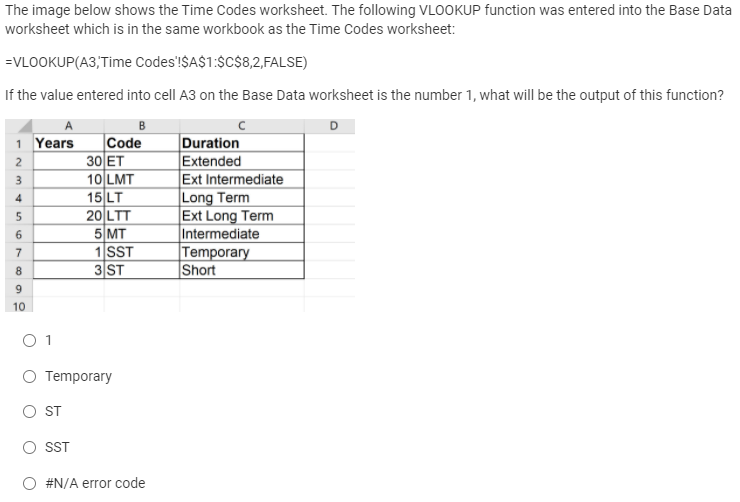
The image below shows the Time Codes worksheet. The following VLOOKUP function was entered into the Base Data worksheet which is in the same workbook as the Time Codes worksheet: =VLOOKUP(A3, Time Codes'!$A$1:$C$8,2,FALSE) If the value entered into cell A3 on the Base Data worksheet is the number 1, what will be the output of this function? B D 1 Years Code Duration 30 ET Extended 3 10 LMT Ext Intermediate 15 LT Long Term 20 LTT Ext Long Term 5 MT Intermediate 1 SST Temporary 3 ST Short 2 u N 4 5 6 7 8 9 10 O1 O Temporary ST SST #N/A error code
Step by Step Solution
There are 3 Steps involved in it
1 Expert Approved Answer
Step: 1 Unlock

Question Has Been Solved by an Expert!
Get step-by-step solutions from verified subject matter experts
Step: 2 Unlock
Step: 3 Unlock