







Question: The Java Drawing commands shown below are incomplete; they are missing key objects and / or numbers in them. Fill in all of the missing
The Java Drawing commands shown below are incomplete; they are missing key objects andor
numbers in them. Fill in all of the missing inputs in such a way so the commands would create the
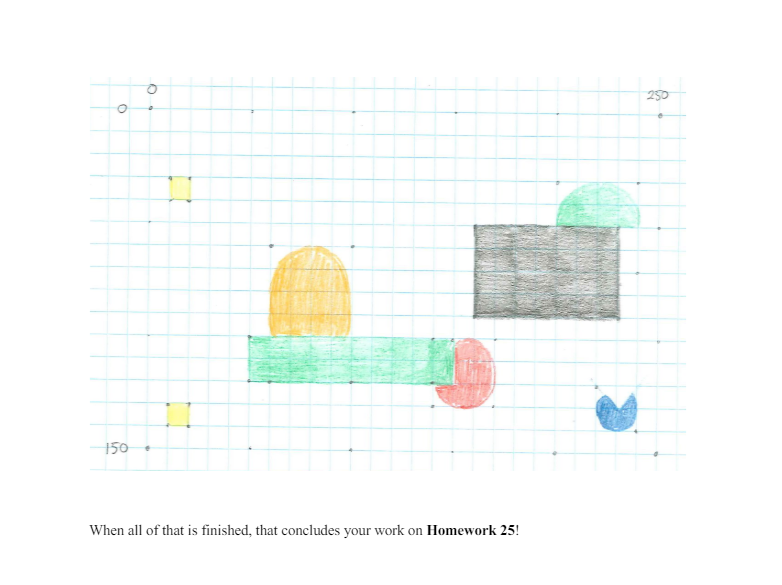
colorful object shown on the next page. If you are working from a paper copy of this assignment, please
look up the image in Talon to see it in full color! Of course, the gridlines will not show up on your
drawing; they are included here for your reference to get the positions and sizes of all of the shapes
correct. Also please forgive Shayne for the curved edges in the image he is an engineer and not an
artist!
gsetColorColor;
gfilloval;
gsetColor COLOr GKEEN;
gfillArc ;
gfillRect
gsetColorColor;
gfiliArc;
gsetColorColor;
gfillect ;
gfillRect ;When all of that is finished, that concludes your work on Homework
Step by Step Solution
There are 3 Steps involved in it
1 Expert Approved Answer
Step: 1 Unlock

Question Has Been Solved by an Expert!
Get step-by-step solutions from verified subject matter experts
Step: 2 Unlock
Step: 3 Unlock
 Study Help