



Question: The language is C++ and everything has to be displayed correctly I would like a program that will read in student's information and allow me
The language is C++ and everything has to be displayed correctly
I would like a program that will read in student's information and allow me to print a summary based on different options
Specifications:
This program will consist of two parts. The first part will read in a Students information from standard in (user entered). The second part of the program is a menu that will allow the user to interact with the students information
1st part:
- Ask the user for how many students are in the class
- Using the Vector library create a vector of Strings to hold the students names.
- Create a vector of type double to hold a students grade average
- Loop through the users input and fill in the student and grade vectors
- When asking the user for student info make sure to print Please enter student (First Last Grade) info:
- Users input must have the following format:
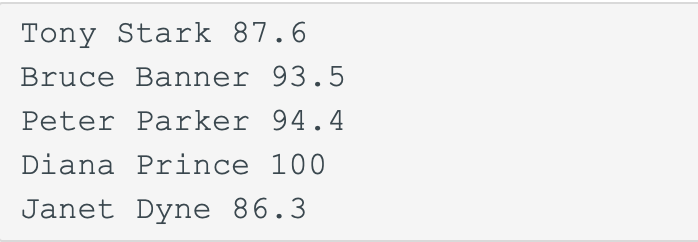
- NOTE: When storing first and last name in the vector they must be in the same element for each student. For example if I were to execute student_vector.at(0) I would get back "Tony Stark".
Part 2
- Print the following to the user and read in their selection:
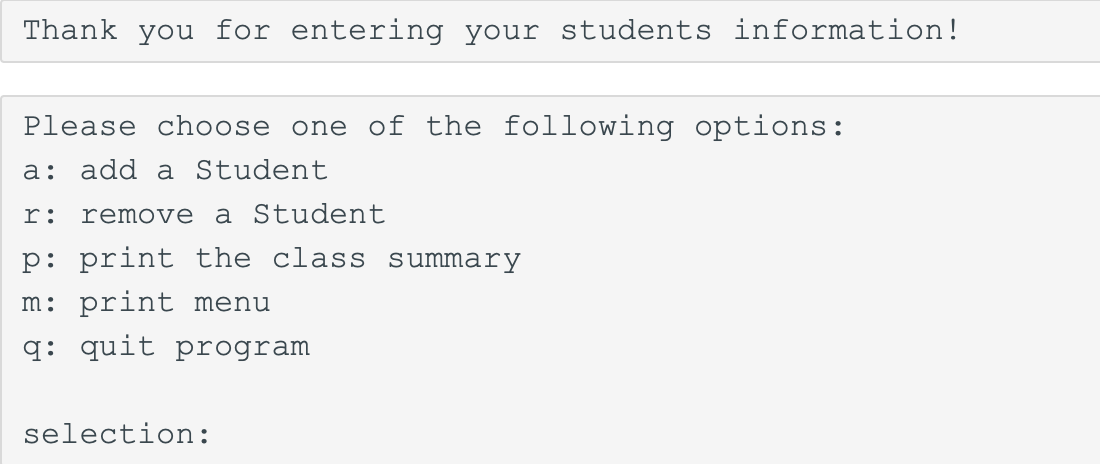
- a: add a student
- Add a student to the end of the Student Vector and their grade to the end of the grade vector
- When asking the user for student info make sure to print Please enter student (First Last Grade) info:
- r: remove a student
- Ask the user for the name of the student they would like to remove
- When removing a student make sure that the corresponding grade is also removed from the grade vector
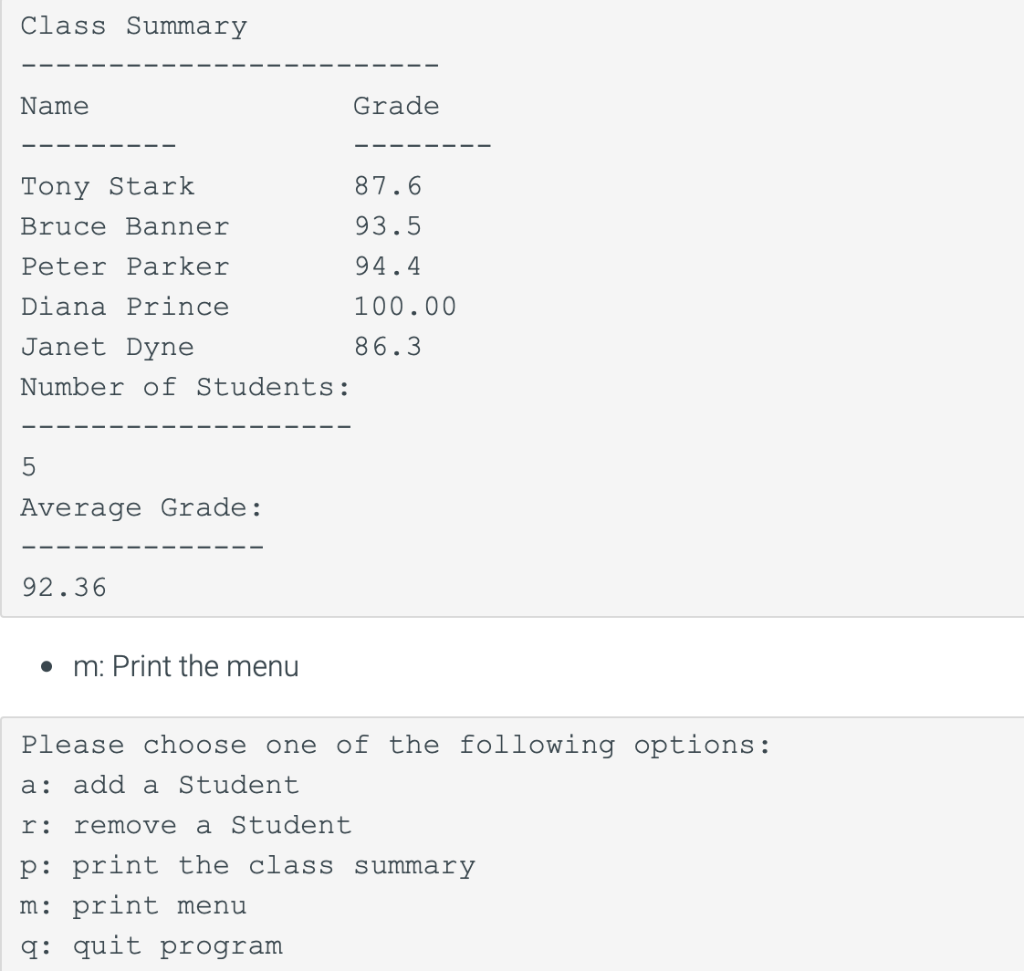
- p: Print the class summary
- q: Quit the program (exit the loop)
- NOTE: Print Not a valid selection. if the user types something other than these options
- You can assume Student names will be less than or equal to 20 characters in length
- iomanip and setw can be used to create the columns
- Average Grade must be printed with 2 decimal places. For example 100 must be printed as 100.00
- Fixed and Set Precision can be used to accomplish this
- You can assume Student names will be less than or equal to 20 characters in length
The input is:
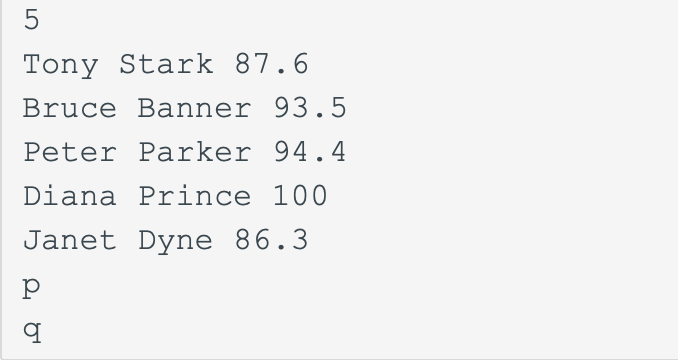
The output MUST be:
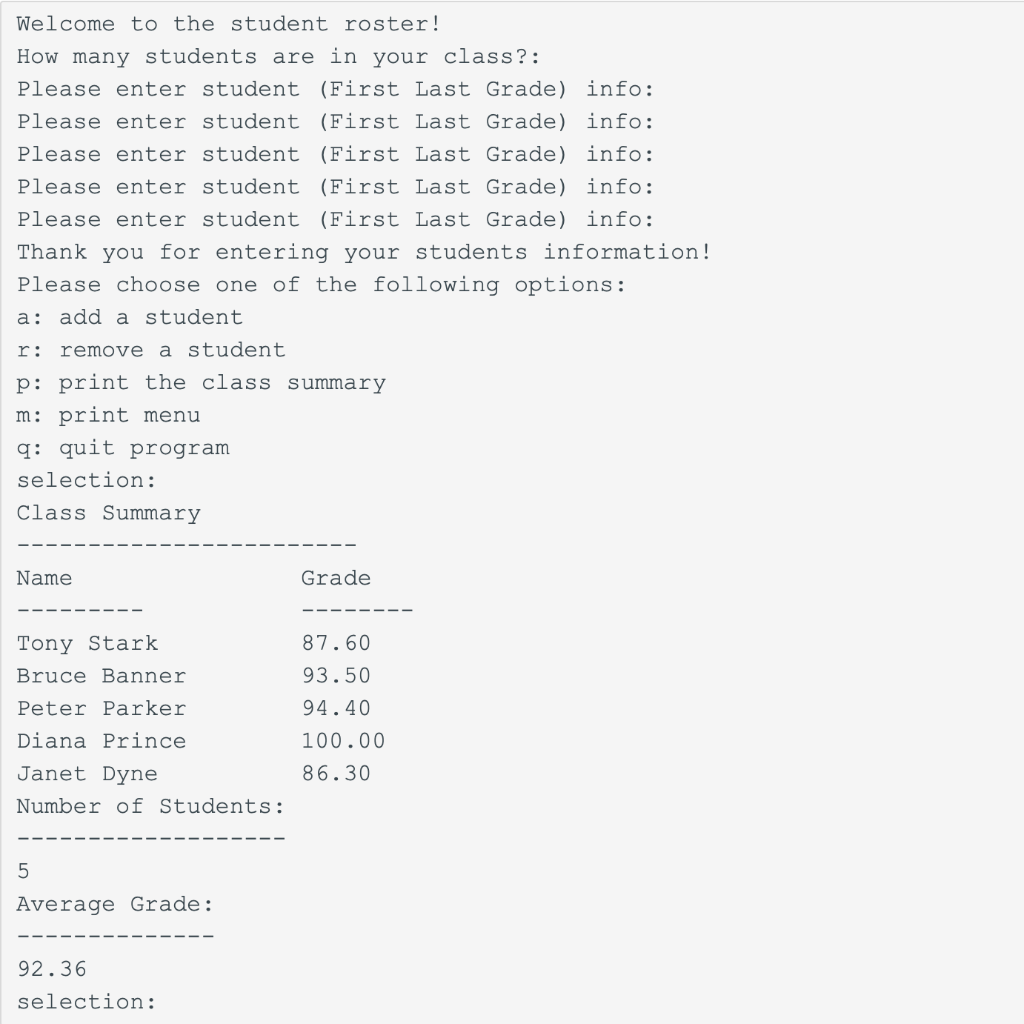
Note: take in consideration capital letters and the lines must be shown exactly the same
Tony Stark 87.6 Bruce Banner 93.5 Peter Parker 94.4 . Diana Prince 100 Janet Dyne 86.3 Thank you for entering your students information! Please choose one of the following options: a: add a Student r: remove a Student p: print the class summary m: print menu q: quit program selection: Class Summary Name Grade Tony Stark 87.6 Bruce Banner 93.5 Peter Parker 94.4 Diana Prince 100.00 Janet Dyne 86.3 Number of Students: 5 Average Grade: 92.36 m: Print the menu a: Please choose one of the following options: add a Student r: remove a Student p: print the class summary m: print menu q: quit program 5 Tony Stark 87.6 Bruce Banner 93.5 Peter Parker 94.4 Diana Prince 100 Janet Dyne 86.3 Welcome to the student roster! How many students are in your class?: Please enter student (First Last Grade) info: Please enter student (First Last Grade) info: Please enter student (First Last Grade) info: Please enter student (First Last Grade) info: Please enter student (First Last Grade) info: Thank you for entering your students information! Please choose one of the following options: a: add a student r: remove a student p: print the class summary m: print menu q: quit program selection: Class Summary Name Grade 87.60 93.50 Tony Stark Bruce Banner Peter Parker Diana Prince Janet Dyne Number of Students: 94.40 100.00 86.30 5 Average Grade: 92.36 selection
Step by Step Solution
There are 3 Steps involved in it

Get step-by-step solutions from verified subject matter experts