







Question: ***The language needed is Python. Project 2: Grocery List Introduction Your task for this project is to create a very simple grocery list script. This
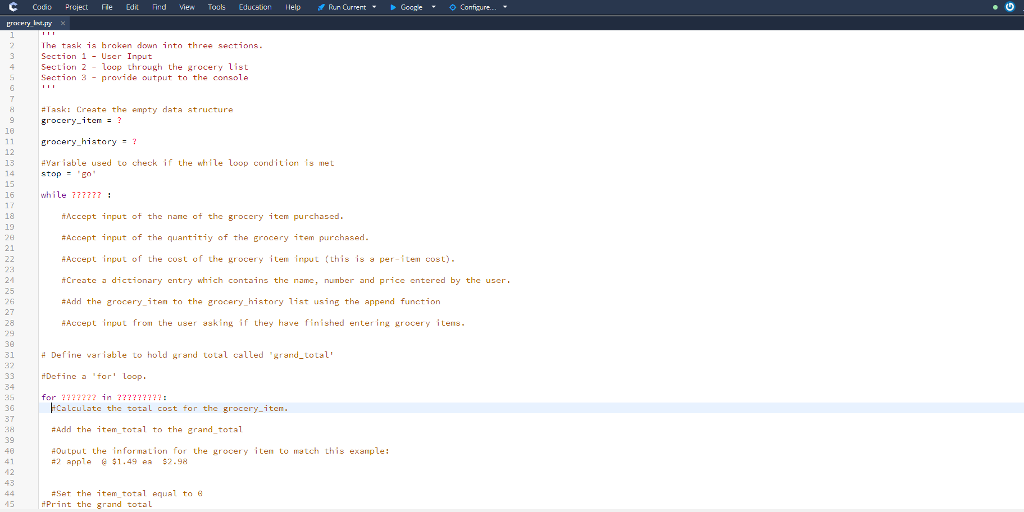
***The language needed is Python.
Project 2: Grocery List
Introduction
Your task for this project is to create a very simple grocery list script. This script also emphasizes the importance of using lists, dictionaries and loop types within your script and how the use of those functions shapes your approach in creating a script.
The task is broken down into three sections:
User Input
Loop through the grocery list
Provide output to the console
As you work through the project guide, be aware that before you submit the script draft you will need to add comments to meet the requirements found in the IT-140 Project Two Guidelines and Rubric: Grocery List Script Draft document. Although these comments can be added after you complete the guide, you will likely find it useful to add as much as possible while you work through the script.
Data Structure
The structure of the data for this project is extremely important.
Each grocery item is a dictionary with the following key-value pairs
a name of the grocery item with the key identifier 'name'
the number of grocery items purchased with the key identifier 'number'
the cost of the grocery item with the key identifier 'price'
{'name': 'milk', 'number': int(1), 'price': float(2.99)}
grocery_history is a list of grocery item dictionary elements.
grocery_history=[{'name': 'milk', 'number': int(1), 'price': float(2.99)}, {'name': 'eggs', 'number': 2, 'price': 3.99}, {'name': 'onions', 'number': 4, 'price': 0.79}] Task: Create the empty data structure
Create an empty dictionary with the variable name grocery_item
Create an empty list with the variable name grocery_history
Control Structure
The variable stop will be used with a while loop to check if the loop condition is true (and the loop will continue) or if the loop condition is false (and the loop will exit).
In this script, the loop will end when the user enters q
As the code in the while loop should run at least once, set the stop variable to anything other that 'q, e.g. 'go' or True
stop = 'go'
Write a loop that will be used to collect user input.
The While loop will use the stop variable to determine if the user has completed entering their grocery items.
The following steps will all be completed if the loop condition is met (i.e., the user has not entered 'q'):
Accept input of the name of the grocery item purchased.
Prompt: "Item name: " Variable: item_name
Accept input of the quantity of the grocery item purchased.
Prompt: "Quantity purchased: " Variable: quantity
Accept input of the cost of the grocery item input (this is a per-item cost).
Prompt: "Price per item: " Variable: cost
Create a dictionary entry which contains the name, number and price entered by the user. Assign the entry to a variable named grocery_item
The format will be:
{'name':item_name, 'number': int(quantity), 'price': float(cost)}
Add the grocery_item to the grocery_history list using the append function
Prompt the user for input asking if they have finished entering grocery items. Use the prompt:
"Would you like to enter another item? Type 'c' for continue or 'q' to quit: "
Looping Through the List
In this section, you will loop through the grocery_history list. For each item, you will:
Your results will look similar to this:
2 apple @ $1.49 ea $2.98 1 milk @ $3.99 ea $3.99 Grand total: $6.97
Print the number of that item purchased
Print the name of the item
Print the price paid for all of those items purchased
Add this price to the grand total for the entire list
Print the List
Inside the for loop:
Define variable to hold grand total called grand_total
Define a 'for' loop. This loop will examine each element in the grocery_history list.
The loop will use the 'for in' convention. Each grocery_history list element will be assigned to a variable named 'grocery_item'
| Output | 2 | apple | @ | $1.49 | ea | $2.98 |
| Variable | number | name | price | item_total |
Reminder
Your can use the %.2f formatting expression to format the dollar amounts
Calculate the total cost for the grocery_item.The calculation is:
item_total = number * price
Add the item_total to the grand_total
Output the information for the grocery item to match this example:
Set the item_total equal to 0
Finally, after printing all the items, print the grand total!
C codo Project rae Edit Find View Tools Educator llelp ,Pan Current+ Google Comfgure 3 Section 1-Uscr Input Section 2 -loop through the grocery list Section 3 provide output to the console grocery item? grocery_history? #Variable used to check if the while loop condition | mel 10 12 13 stopE 15 16 while 72?727 #Accept input of the nane of the grocery item purchased #Accept input of the quantitiy of the Erncary item purcha5Ad Accept input of Lhe cost of the grocery item irgu 1 (this is per-, Lencos l) Create dictionary entry which contains the name, number and price entered by the user #Add the grocery-iten t the grocery-hist ry list using the append function Accept input from lhe user asking if they have finished entering grocery 'lens 18 21 24 27 28 30 31 # De firie variable Lo hold grand total called "grand-LOLal' 33 Define 'forLoop. for ?22?222 in ?2??222 Calculate the total cost for the grocery-item. #Add the item-total to the erand-total #Output the informalion for the grocery iten to much Lhis example : 37 39 #2 App1 @ $1.49 ea S2.98 12 #Set the item total equal t Print the grand totsL 15
Step by Step Solution
There are 3 Steps involved in it

Get step-by-step solutions from verified subject matter experts
 Study Help