







Question: the left hand side TextArea (while is scrollable), allows the user to either type of copy and paste the text to be processed. Your text
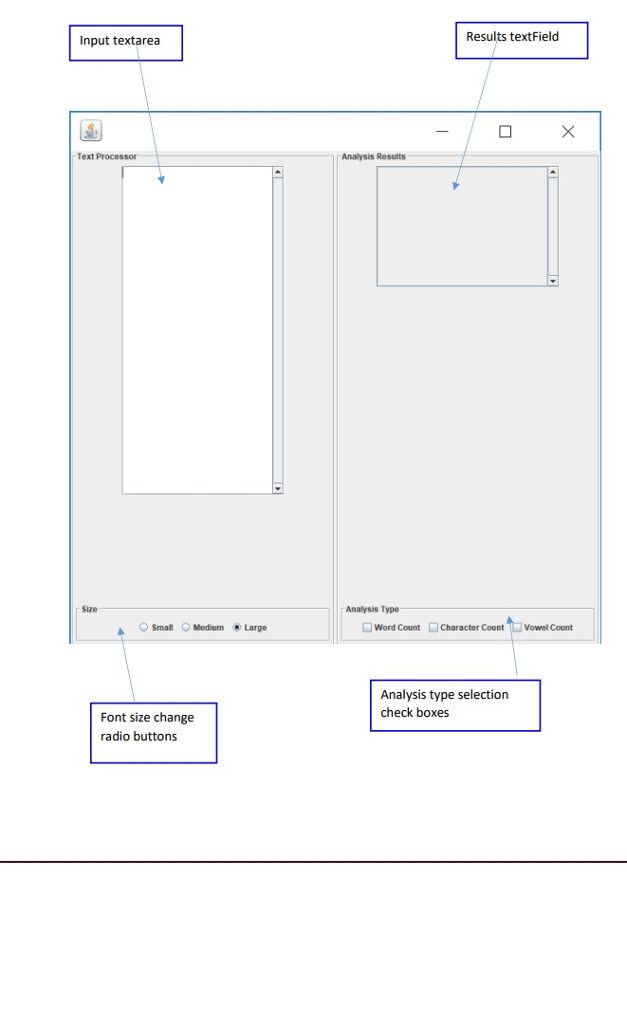
the left hand side TextArea (while is scrollable), allows the user to either type of copy and paste the text to be processed. Your text processor allows the user the change the font size of the text based on the Radio button selections. As the user is selecting the appropriate font size button, the textArea will change font size of the text. Large is selected by default Analysis can be done in three ways, word count, vowel count, and character count. The analysis type is given as check boxes. The user can select one, two, or all three analysis types. As, the user select this option, the analysis results textField shows the analysis results.
Results textField Input textarea Text Processor Analysis Results Size Analysis Type - Smal Medium Large Word Count Character Count Vowel Count Analysis type selection check boxes Font size change radio buttons
Step by Step Solution
There are 3 Steps involved in it

Get step-by-step solutions from verified subject matter experts
 Study Help