







Question: The missing number in the table is 7641. Please show the solution steps in Excel The PP4S Company assembles automotive batteries for both light and
The missing number in the table is 7641.
The PP4S Company assembles automotive batteries for both light and heavy vehicles. The projected demand over the first eight months is: Month Workdays Forecasted Demand in Aggregate Units January 5900 February March April 20 7245 May June 22 July 17 August 22 20 23 6365 7805 19 6685 6830 6615 23 A normal work-day is eight hours. Hiring costs are OMR 750 per worker and firing costs are OMR 1750 per worker. Holding costs are OMR 0.875 per aggregate unit held per month, and backorder cost is OMR 12 per aggregate unit per month. A time study showed that it takes 3 workers an average of 57 minutes to assemble one battery. The ending inventory in December of the previous year was 105 batteries, and the manager wants to have at least 150 batteries on hand in inventory at the end of August. The workforce at the end of December in the previous year was 109 workers. Workers are paid OMR 4.5 per hour for regular time labor. Overtime labor costs OMR 6 per worker per hour, and the maximum overtime that is allowed is 3 hours per worker cach day. (a) Find the minimum constant workforce plan for the eight months, and the total cost of the plan. The firm does not want any stockouts. The plan should show the production levels, workforce levels, number hired, number fired, and ending inventory for each month. You may hire or fire workers only at the beginning of January, and no overtime can be used. What is the cost of this plan? (b) Find a constant workforce plan for the eight months and the total cost of the plan, if backorders are permitted. You may hire or fire workers only at the beginning of January. What is the cost of this plan? Determine the zero inventory (chase) plan that hires and fires workers each month to match demand as closely as possible, and the cost of that plan. No stockouts or overtime is allowed. (c)
Please show the solution steps in Excel 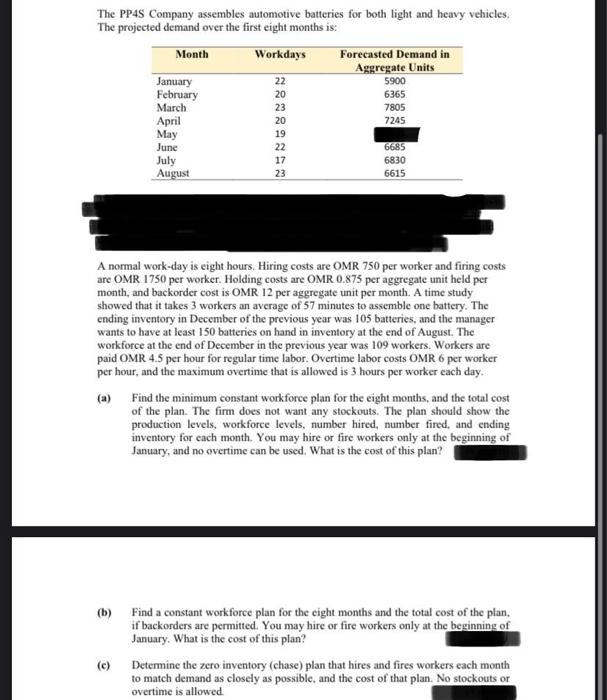
Step by Step Solution
There are 3 Steps involved in it
1 Expert Approved Answer
Step: 1 Unlock

Question Has Been Solved by an Expert!
Get step-by-step solutions from verified subject matter experts
Step: 2 Unlock
Step: 3 Unlock
 Study Help