



Question: The Municipaity database (cont.) You are working for a certain county and you want to convert the records of the county's register of real property
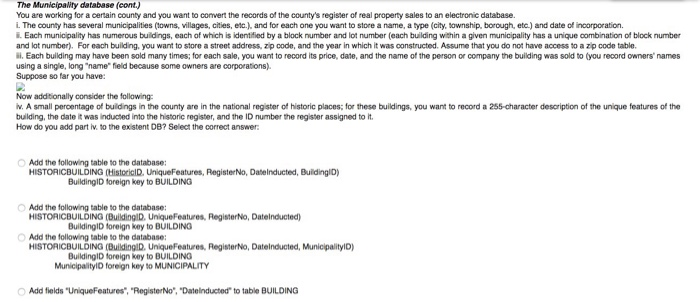
The Municipaity database (cont.) You are working for a certain county and you want to convert the records of the county's register of real property sales to an electronic database. i. The county has several municipalities (towns, villages, cities, etc.), and for each one you want to store a name, a type (city, sownship, borough, etc.) and date of incorporation. i. Each municipality has numerous buildings, each of which is identified by a block number and lot number (each building within a given municipality has a unique combination of block number and lot number). For each building, you want to store a street address, zip code, and the year in which it was constructed. Assume that you do not have access to a zip code table. i. Each building may have been sold many times; for each sale, you want to record its price, date, and the name of the person or company the building was sold to (you record owners' names using a single, long "name field because some owners are corporations). Suppose so far you have: Now addtionally consider the following v. A small percentage of buildings in the oounty are in the national register of historic places; for these buildings, you want to record a 255-character description of the unique features of the building, the date it was inducted into the historic register, and the ID number the register assigned to it. How do you add part iv. to the ex stent DB? Select the correct answer Add the following table to the database: HISTORICBUILDINGHistorialD UniqueFeatures, RegisterNo, Datelnducted. Buidingi) BuildinglD toreign key to BUILDING Add the following table to the database: HISTORICBUILDING (BuildingID, UniqueFeatures, RegisterNo, Datelnducted) BuildinglD foreign key to BUILDING Add the following table to the database: HISTORICBUILDING (BuildingD, UniqueFeatures, RegisterNo, Datelnducted, MunicipalityID) BuildinglD foreign key to BUILDING MunicipalitylD foreign key to MUNICIPALITY Add fields "UniqueFeatures, "RegisterNo", "Datelnducted to table BUILDING The Municipaity database (cont.) You are working for a certain county and you want to convert the records of the county's register of real property sales to an electronic database. i. The county has several municipalities (towns, villages, cities, etc.), and for each one you want to store a name, a type (city, sownship, borough, etc.) and date of incorporation. i. Each municipality has numerous buildings, each of which is identified by a block number and lot number (each building within a given municipality has a unique combination of block number and lot number). For each building, you want to store a street address, zip code, and the year in which it was constructed. Assume that you do not have access to a zip code table. i. Each building may have been sold many times; for each sale, you want to record its price, date, and the name of the person or company the building was sold to (you record owners' names using a single, long "name field because some owners are corporations). Suppose so far you have: Now addtionally consider the following v. A small percentage of buildings in the oounty are in the national register of historic places; for these buildings, you want to record a 255-character description of the unique features of the building, the date it was inducted into the historic register, and the ID number the register assigned to it. How do you add part iv. to the ex stent DB? Select the correct answer Add the following table to the database: HISTORICBUILDINGHistorialD UniqueFeatures, RegisterNo, Datelnducted. Buidingi) BuildinglD toreign key to BUILDING Add the following table to the database: HISTORICBUILDING (BuildingID, UniqueFeatures, RegisterNo, Datelnducted) BuildinglD foreign key to BUILDING Add the following table to the database: HISTORICBUILDING (BuildingD, UniqueFeatures, RegisterNo, Datelnducted, MunicipalityID) BuildinglD foreign key to BUILDING MunicipalitylD foreign key to MUNICIPALITY Add fields "UniqueFeatures, "RegisterNo", "Datelnducted to table BUILDING
Step by Step Solution
There are 3 Steps involved in it

Get step-by-step solutions from verified subject matter experts