





Question: the n needs to change so the code can work it is Arduino Araucho.n> #include // Creates an instance of the U8X8_SSD1306_128X64_NONAME_HW_I2C' class auto display
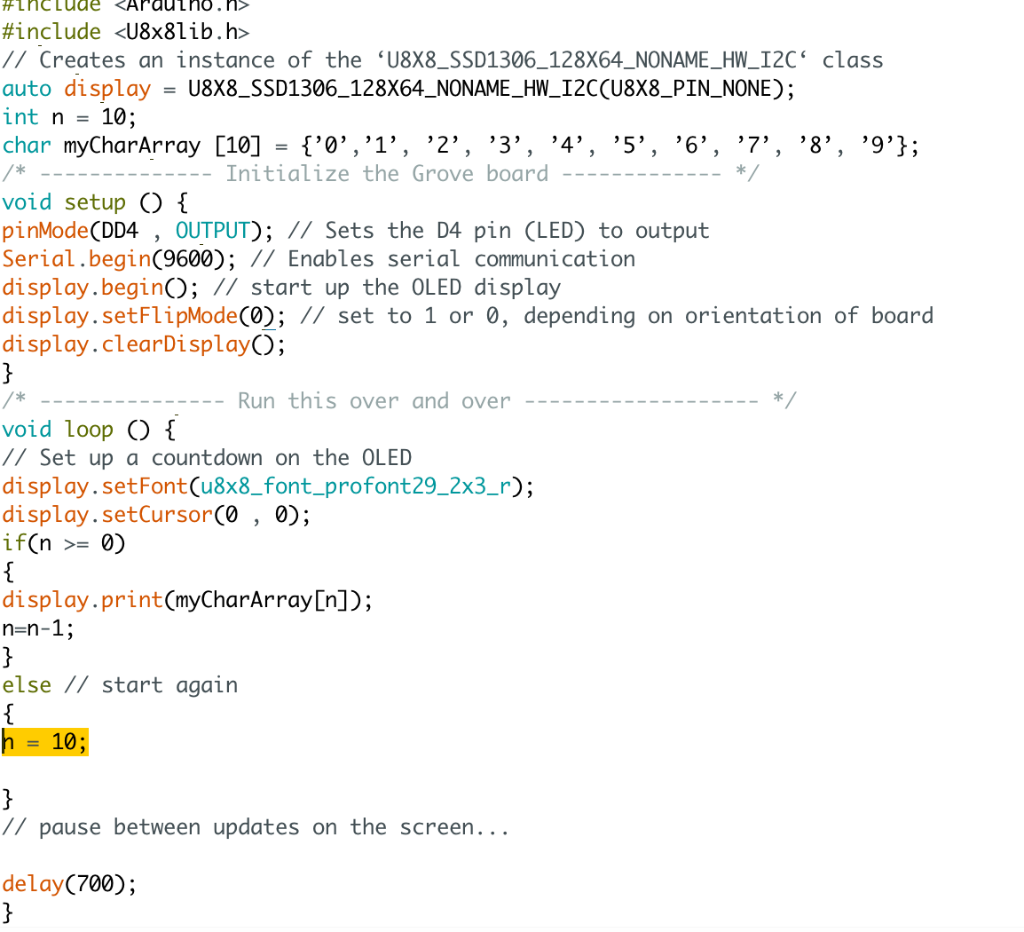
 the n needs to change so the code can work it

the n needs to change so the code can work it is Arduino

Araucho.n> #include // Creates an instance of the U8X8_SSD1306_128X64_NONAME_HW_I2C' class auto display = U8X8_SSD1306_128X64_NONAME_HW_I2C(U8X8_PIN_NONE); int n = 10; char myCharArray [10] = {'0','1', '2', '3', '4', '5', '6', '7', '8', '9'}; Initialize the Grove board */ void setup() { pinMode(DD4 , OUTPUT); // Sets the D4 pin (LED) to output Serial.begin(9600); // Enables serial communication display.begin(); // start up the OLED display display.setFlipMode(0); // set to 1 or 0, depending on orientation of board display.clearDisplay(); } /* Run this over and over void loop() { // Set up a countdown on the OLED display.setFont(u8x8_font_profont29_2x3_r); display.setCursor(0, 0); if(n >= 0) { display.print(myCharArray[n]); n=n-1; } else // start again { n = 10; } // pause between updates on the screen... delay(700); }

Step by Step Solution

There are 3 Steps involved in it

1 Expert Approved Answer
Step: 1 Unlock blur-text-image
Question Has Been Solved by an Expert!

Get step-by-step solutions from verified subject matter experts

Step: 2 Unlock
Step: 3 Unlock

Students Have Also Explored These Related Databases Questions!