



Question: The objective of this competency exercise is to demonstrate your ability to use an Excel Spreadsheet for a simple exercise demonstrating the savings of an
The objective of this competency exercise is to demonstrate your ability to use an Excel Spreadsheet for a simple exercise demonstrating the savings of an individual at retirement, depending on such factors as amount saved, interest rate, etc.
All necessary information is given. Your job is to type in the spreadsheet exactly, step by step as given below and follow the directions to complete the retirement projections. Also, once you are done, note the ease of changing the assumptions, and doing "whatifsensitivity analysis on the result! The reason that this is easy is the way that we have shown you to separate the assumptions parameters from the formulas in the model.
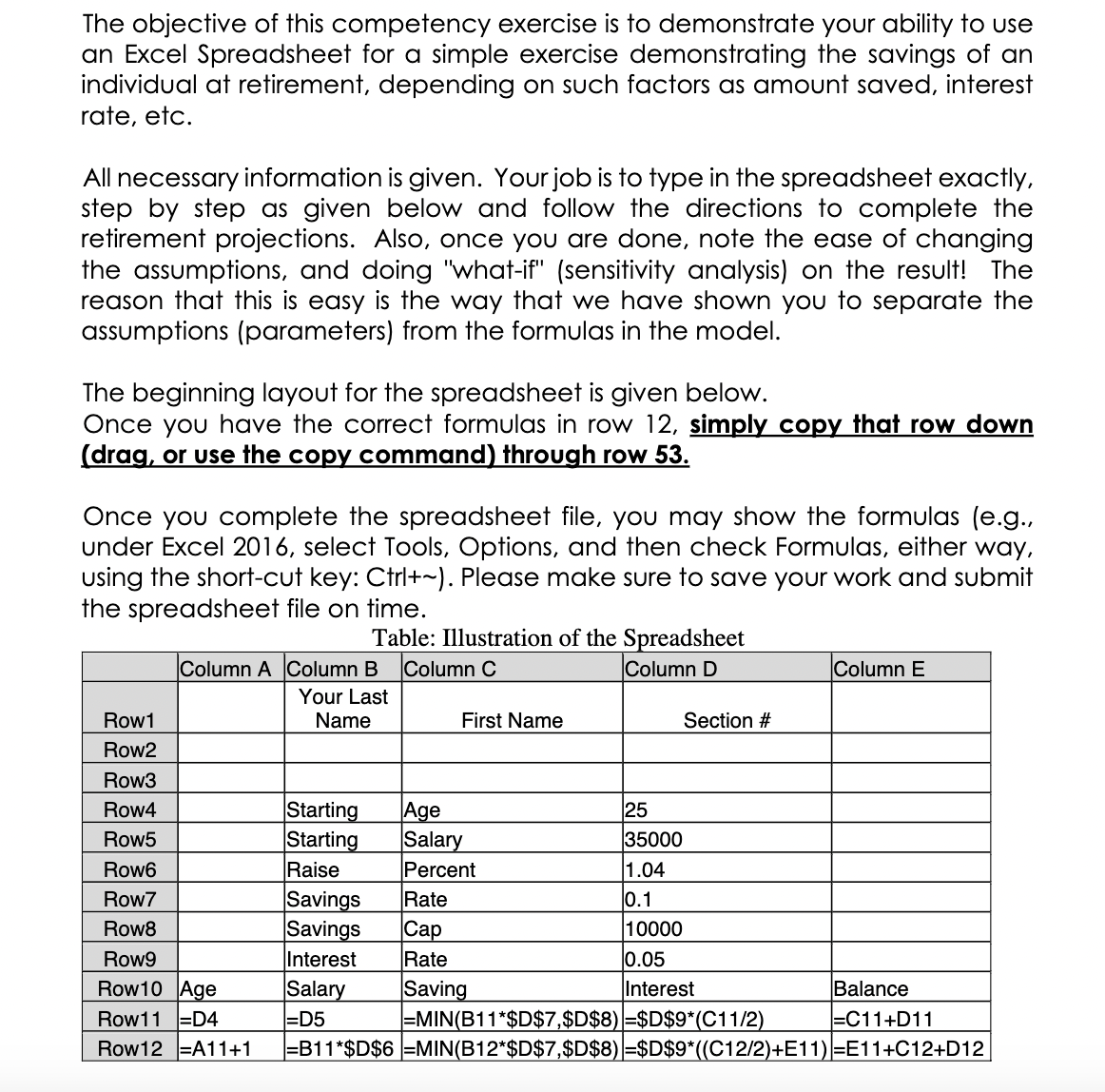
The beginning layout for the spreadsheet is given below.
Once you have the correct formulas in row simply copy that row down drag or use the copy command through row
Once you complete the spreadsheet file, you may show the formulas eg under Excel select Tools, Options, and then check Formulas, either way, using the shortcut key: Ctrl Please make sure to save your work and submit the spreadsheet file on time.
Table: Illustration of the Spreadsheet
tableColumn AColumn BColumn CColumn DColumn ERowtableYour LastNameFirst Name,Section #RowRowRowStarting,Age,RowStarting,Salary,RowRaise,Percent,RowSavings,Rate,RowSavings,Cap,RowInterest,Rate,RowAge,Salary,Saving,Interest,BalanceRowDDMINB: $D$$D$$D$CCDRowAB$D$MINB$D$$D$$D$CEECD
CAN YOU PLEASE HELP ME WITH EXEL SHEET
Step by Step Solution
There are 3 Steps involved in it
1 Expert Approved Answer
Step: 1 Unlock

Question Has Been Solved by an Expert!
Get step-by-step solutions from verified subject matter experts
Step: 2 Unlock
Step: 3 Unlock