







Question: The parameter query allows the user or operator to manually enter the value of a variable used as criteria in the WHERE clause. The query
 The parameter query allows the user or operator to manually enter the value of a variable used as criteria in the WHERE clause. The query below asks the user/operator to input a star number, and displays the stars name that matches that ID number. NOTE: Be sure to write your own SQL for all of these exercises! Do not use the Wizard or Design View. No points will be given for code that has been generated using anything but your brain! Use the alias tables technique in your SQL code
Ex. 1. Create a query that requests the user input the Starnum and the output includes the Starname, Birthplace, DOB and Sex.
For the Starnum, enter 8 for Jimmy Stewart. Copy screen captures of your SQL code and results below:
Ex. 2. Modify the previous query you just created to request the user to input the Name of a Star. However, since you sometimes dont know how to spell the stars name, you will need to use LIKE and wild cards to obtain the results. (Hint: You will need to use multiple wild cards * and the & character with your parameter statement.)
When you run this query, enter Brad to obtain the results.
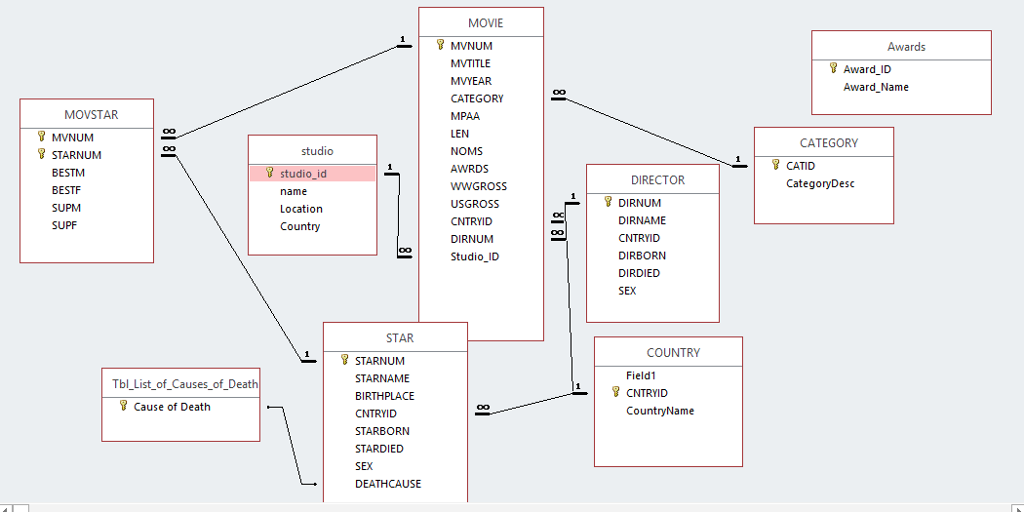
Ex. 3. Study the relationships between tables carefully. You will need to determine which tables will be used for to create the following query properly. Also, you will use the same field name from multiple tables. Therefore, you should be explicit in your field designations. For example, star.starnum and movstar.starnum both refer to the starnum field in two different tables. This exercise will have two parts.
Part A. Create a query that displays a list movie stars and the movies they stared in. There should be two columns of results. NOTE: You may NOT use an INNER JOIN statement in this exercise (which is the default syntax of design view in Access). You must use a natural join. This is not a parameter query. Copy your code and paste the first few records displayed below:
Part B. Modify your query in Part A to request the user to input a stars name and then displays a list of movies for that star. Use Liz for your search. Copy and paste your code and results here:
MOVIE MVNUM MVTITLE MVYEAR CATEGORY MPAA LEN NOMS AWRDS WWGROSS USGROSS CNTRYID DIRNUM Studio ID Awards Award_ID Award Name MOVSTAR MVNUM CATEGORY STARNUM studio 1CATID studio_id BESTM BESTF SUPM SUPF DIRECTOR CategoryDesc name Location Country DIRNUM DIRNAME CNTRYID DIRBORN DIRDIED SEX STAR COUNTRY 1STARNUM Field1 1CNTRYID STARNAME BIRTHPLACE CNTRYID STARBORN STARDIED SEX DEATHCAUSE Tbl List of Causes of Death Cause of Death CountryName
Step by Step Solution
There are 3 Steps involved in it

Get step-by-step solutions from verified subject matter experts
 Study Help