







Question: . The ParkCode column should include only the first four characters in the string. Add a LENGTH statement in the proper place in the DATA
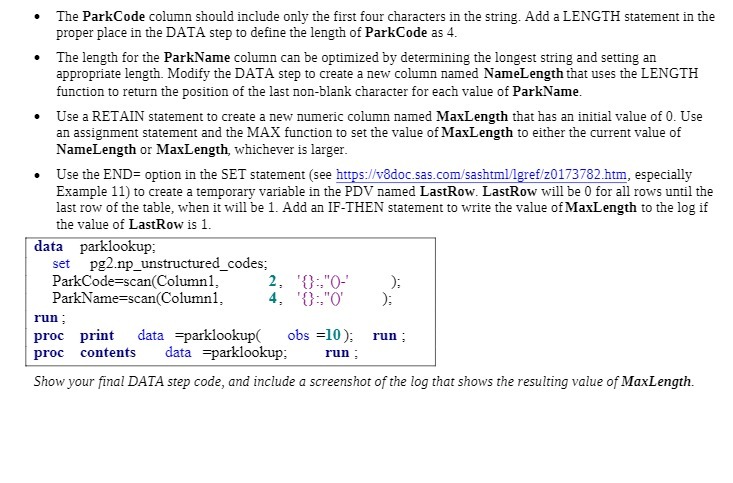
. The ParkCode column should include only the first four characters in the string. Add a LENGTH statement in the proper place in the DATA step to define the length of ParkCode as 4. . The length for the ParkName column can be optimized by determining the longest string and setting an appropriate length. Modify the DATA step to create a new column named NameLength that uses the LENGTH function to return the position of the last non-blank character for each value of ParkName. . Use a RETAIN statement to create a new numeric column named MaxLength that has an initial value of 0. Use an assignment statement and the MAX function to set the value of MaxLength to either the current value of NameLength or MaxLength, whichever is larger. . Use the END= option in the SET statement (see https://v8doc.sas.com/sashtml/lgref/z0173782.htm, especially Example 11) to create a temporary variable in the PDV named LastRow. LastRow will be 0 for all rows until the last row of the table, when it will be 1. Add an IF-THEN statement to write the value of MaxLength to the log if the value of LastRow is 1. data parklookup; set pg2.mp_unstructured_codes; ParkCode=scan(Column1, 2. '0:"0- ParkName=scan(Column], 4. '0:"0' run : proc print data =parklookup( obs =10 ); run ; proc contents data =parklookup; run : Show your final DATA step code, and include a screenshot of the log that shows the resulting value of MaxLength
Step by Step Solution
There are 3 Steps involved in it

Get step-by-step solutions from verified subject matter experts
 Study Help