







Question: The pdf attached is the assignment I have due for my class. However, I have barely any coding knowledge, and had to find a computer
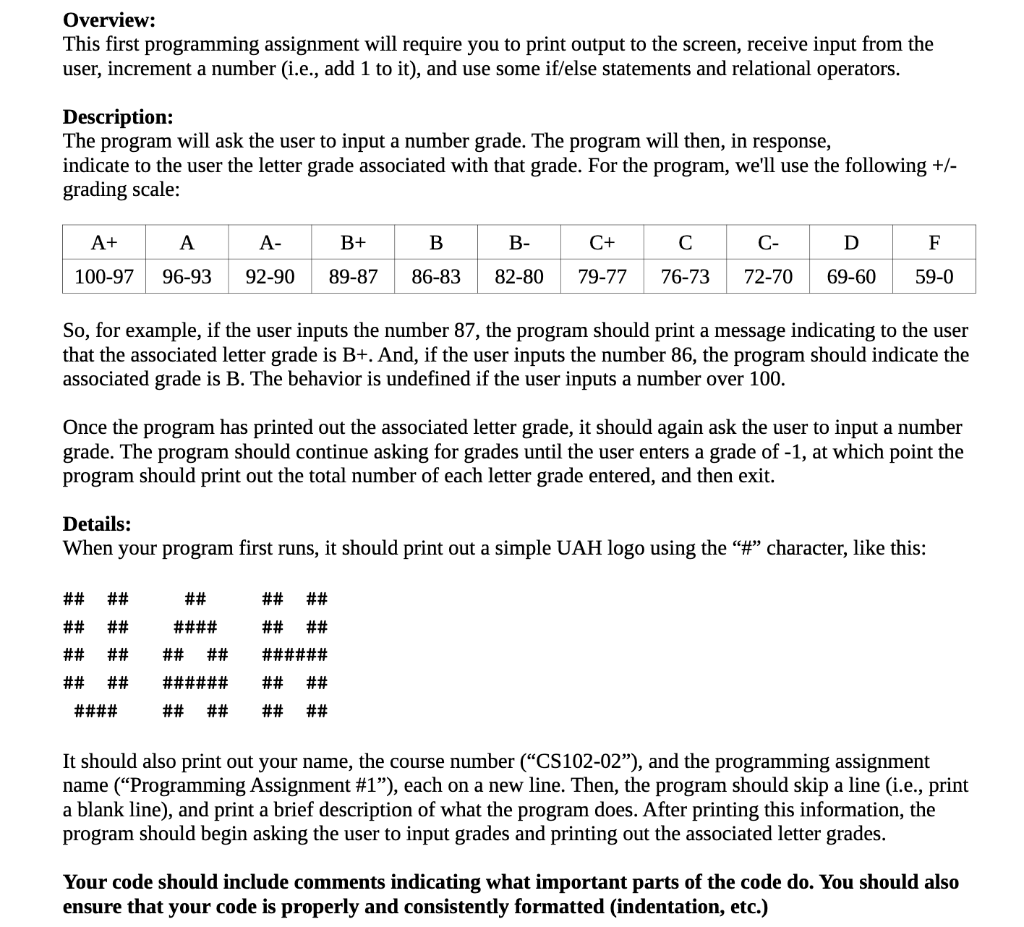
The pdf attached is the assignment I have due for my class. However, I have barely any coding knowledge, and had to find a computer after it was assigned since I have a Mac and the teacher said the program would not work the same, so I was not able to follow along as well in the class without the program.
Overview: This first programming assignment will require you to print output to the screen, receive input from the user, increment a number (i.e., add 1 to it), and use some if/else statements and relational operators. Description: The program will ask the user to input a number grade. The program will then, in response, indicate to the user the letter grade associated with that grade. For the program, we'll use the following +/- grading scale: A+ A- B+ B- C+ C- 92-90 76-73 72-70 69-60 100-97 96-93 89-87 86-83 82-80 79-77 59-0 So, for example, if the user inputs the number 87, the program should print a message indicating to the user that the associated letter grade is B+. And, if the user inputs the number 86, the program should indicate the associated grade is B. The behavior is undefined if the user inputs a number over 100. Once the program has printed out the associated letter grade, it should again ask the user to input a number grade. The program should continue asking for grades until the user enters a grade of -1, at which point the program should print out the total number of each letter grade entered, and then exit. Details: When your program first runs, it should print out a simple UAH logo using the #" character, like this: VAH ## #### ## ## ###### ## ## ###### ## ## #### ## ## It should also print out your name, the course number (CS102-02"), and the programming assignment name (Programming Assignment #1"), each on a new line. Then, the program should skip a line (i.e., print a blank line), and print a brief description of what the program does. After printing this information, the program should begin asking the user to input grades and printing out the associated letter grades. Your code should include comments indicating what important parts of the code do. You should also ensure that your code is properly and consistently formatted (indentation, etc.)
Step by Step Solution
There are 3 Steps involved in it

Get step-by-step solutions from verified subject matter experts
 Study Help