







Question: The pictures are the code in visual studio. The last pictures is the answers the comment that I need in the code. Please read the
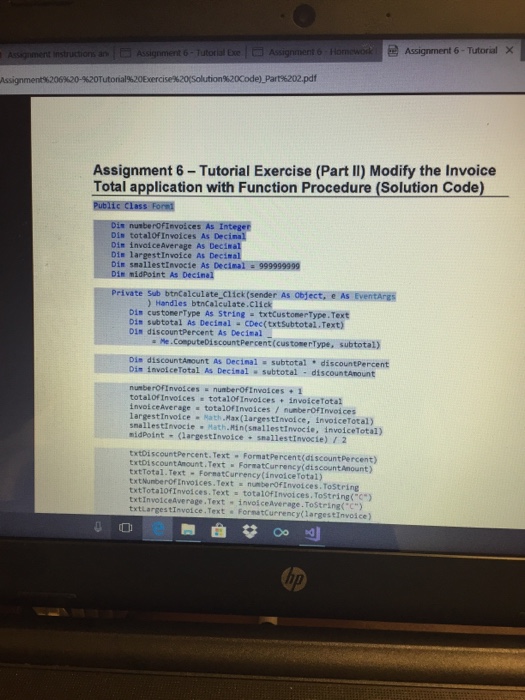
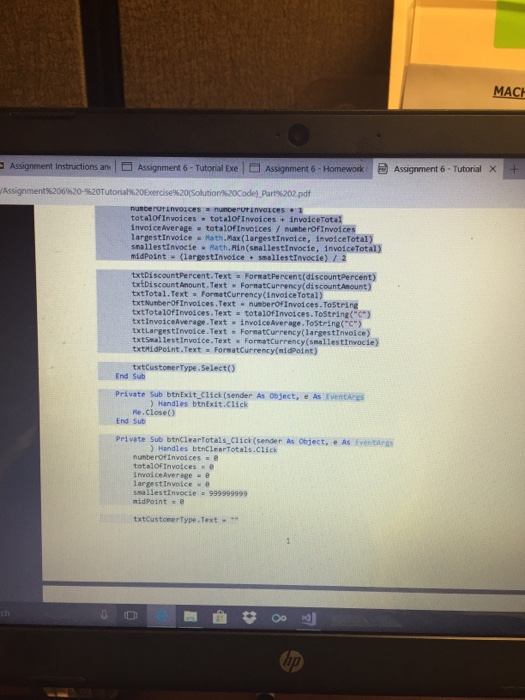
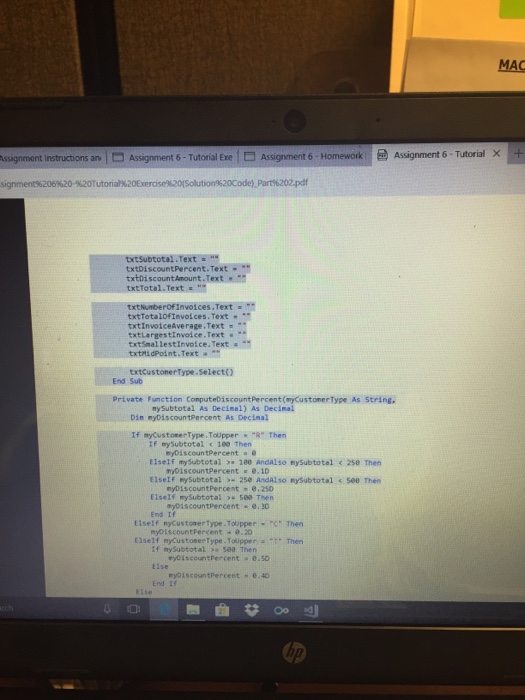
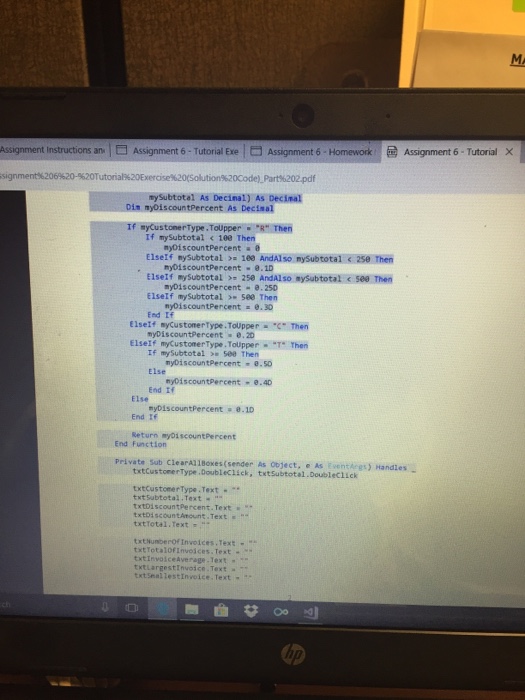
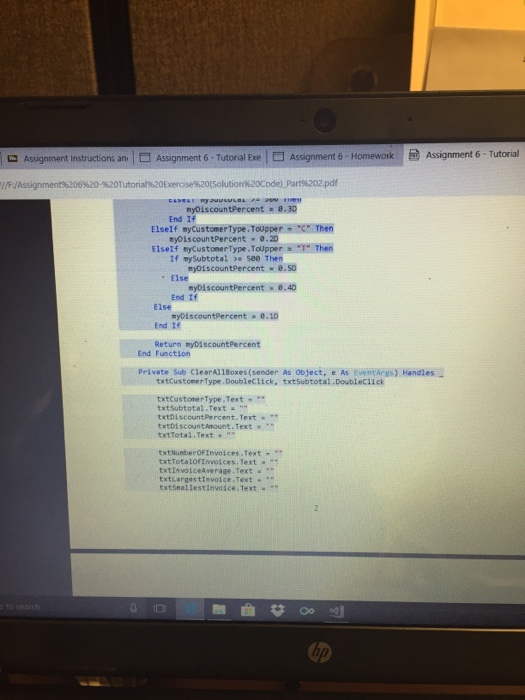
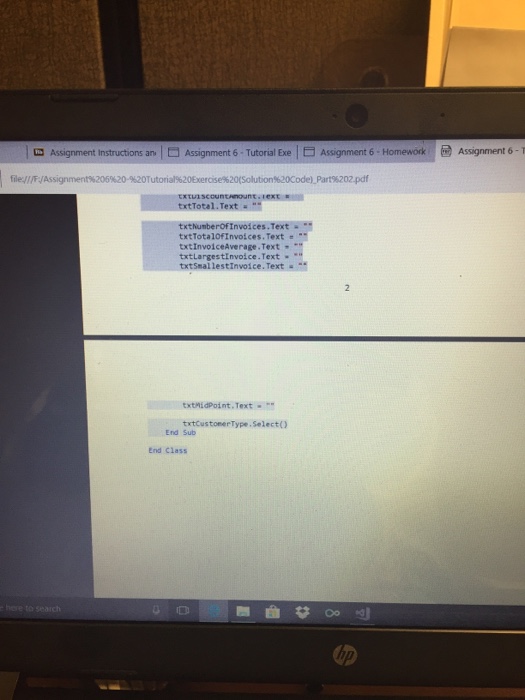
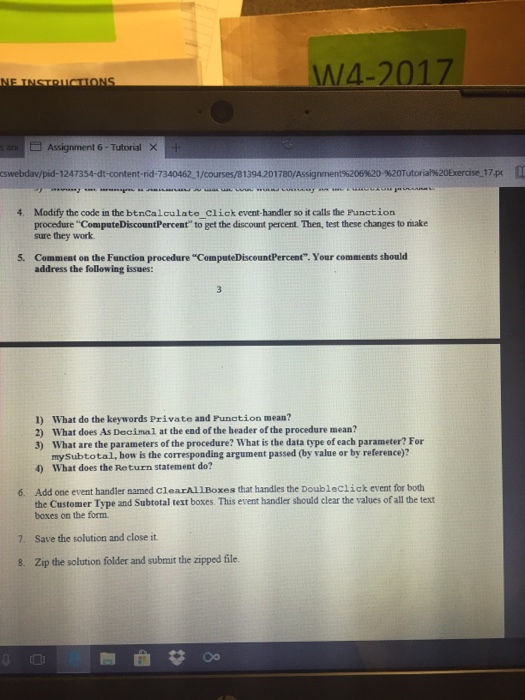
t instructions ar. O Assignment 6-Tutorial Exe Assignment 6-1 Homewod Assignment 6-Tutorial Assignment%206%20-%20Tutorial%20Exercise%20Solution%20Code).Part%202.pdf Assignment 6-Tutorial Exercise (Part II) Modify the Invoice Total application with Function Procedure (Solution Code) nusbe Din totalofInvoices As Decinal Dim invoiceAverage As Decin Dis largestInvoice As Decimal Din smallestinvocie As Decimal: 999999999 Dim midPoint As Decinal Private Sub btnCalculate_click(sender As object, e As EventArgs ) Handles btnCalculate.Click Di" cus tone rType As StringtxtCustoneeTypeText Din subtotal As Decimnal cDec(txt Subtotal.Text) Din discountPercent As Decinal a Me.ComputeDiscountPercent(cus tone rType, subtotal) discountAmount As Decina! = subtotal * discountpercent involceTotal As Decimal subtotal - discountAnount numberOFInvoices numberOfInvoices+ 1 totalof Invoices totalOfInvoices invocetota) involceaverage totalofInvoices / numberOfInvoices largestInvoice Math.Hax(largestInvolce, invoiceTotal) snallestInvocie Math.Min(snallestInvocie, invoiceTotal) nidPoint-largestInvoice . snailestinvocie) / 2 txtoiscountPercent. Text Format Percent(di scountPercent) txtDi scountAnount.Text FormatCurrency(discountAnount) txtTotal. Text FormatCurrency(invoiceTotal) txtNumberoOfInvoices.Text numberOfInvotces. ToString txtTotalofInvoices. Text totalOfInvoices. ToString("") txtInvolceAverage.Text invos ceaverage.ToString(") txtlarge s tInvoice.Text FormatCurrency(largestInvoice) t instructions ar. O Assignment 6-Tutorial Exe Assignment 6-1 Homewod Assignment 6-Tutorial Assignment%206%20-%20Tutorial%20Exercise%20Solution%20Code).Part%202.pdf Assignment 6-Tutorial Exercise (Part II) Modify the Invoice Total application with Function Procedure (Solution Code) nusbe Din totalofInvoices As Decinal Dim invoiceAverage As Decin Dis largestInvoice As Decimal Din smallestinvocie As Decimal: 999999999 Dim midPoint As Decinal Private Sub btnCalculate_click(sender As object, e As EventArgs ) Handles btnCalculate.Click Di" cus tone rType As StringtxtCustoneeTypeText Din subtotal As Decimnal cDec(txt Subtotal.Text) Din discountPercent As Decinal a Me.ComputeDiscountPercent(cus tone rType, subtotal) discountAmount As Decina! = subtotal * discountpercent involceTotal As Decimal subtotal - discountAnount numberOFInvoices numberOfInvoices+ 1 totalof Invoices totalOfInvoices invocetota) involceaverage totalofInvoices / numberOfInvoices largestInvoice Math.Hax(largestInvolce, invoiceTotal) snallestInvocie Math.Min(snallestInvocie, invoiceTotal) nidPoint-largestInvoice . snailestinvocie) / 2 txtoiscountPercent. Text Format Percent(di scountPercent) txtDi scountAnount.Text FormatCurrency(discountAnount) txtTotal. Text FormatCurrency(invoiceTotal) txtNumberoOfInvoices.Text numberOfInvotces. ToString txtTotalofInvoices. Text totalOfInvoices. ToString("") txtInvolceAverage.Text invos ceaverage.ToString(") txtlarge s tInvoice.Text FormatCurrency(largestInvoice)
Step by Step Solution
There are 3 Steps involved in it

Get step-by-step solutions from verified subject matter experts
 Study Help