







Question: The previous guessing game program allowed the user to guess the computer's randomly generated number between 1 and 100 and then displays to the user
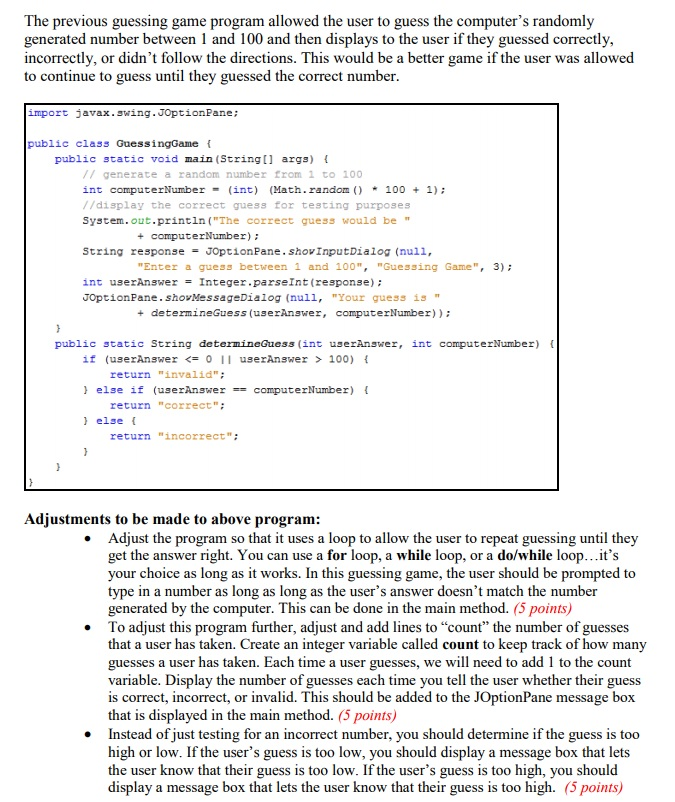
The previous guessing game program allowed the user to guess the computer's randomly generated number between 1 and 100 and then displays to the user if they guessed correctly, incorrectly, or didn't follow the directions. This would be a better game if the user was allowed to continue to guess until they guessed the correct number import javax.swing.JOptionPane; public class GuessingGame f public static void main (String [ args) // generate a random number from 1 to 100 int computerNumber = (int) (Math . random() * 100 + 1); //display the correct guess for testing purposes System.out.println ("The correct guess would be " + computerNumber) String response = JOptionPane. Show!nputDialog (null, Enter a guess between 1 and 100", "Guessing Game",3) int userAnswer = Integer.parseInt (response); JOptionPane.shovMessageDialog (null, "Your guess is" + determineGuess (userAnswer, computerNumber)) public static String determineGuess (int userAnswer, int computerNumber) ( if (userAnswer 100) { return "invalid" else if (userAnswercomputerNumber) return "correct" l else t return "incorrect": Adjustments to be made to above program Adjust the program so that it uses a loop to allow the user to repeat guessing until they get the answer right. You can use a for loop, a while loop, or a do/while loop...it's your choice as long as it works. In this guessing game, the user should be prompted to type in a number as long as long as the user's answer doesn't match the number generated by the computer. This can be done in the main method. (5 points) To adjust this program further, adjust and add lines to "count" the number of guesses that a user has taken. Create an integer variable called count to keep track of how many guesses a user has taken. Each time a user guesses, we will need to add 1 to the count variable. Display the number of guesses each time you tell the user whether their guess is correct, incorrect, or invalid. This should be added to the JOptionPane message box that is displayed in the main method. (5 points) Instead of just testing for an incorrect number, you should determine if the guess is too high or low. If the user's guess is too low, you should display a message box that lets the user know that their guess is too low. If the user's guess is too high, you should display a message box that lets the user know that their guess is too high. (5 points)
Step by Step Solution
There are 3 Steps involved in it

Get step-by-step solutions from verified subject matter experts
 Study Help