







Question: The program continuously prompts users to enter a new course code till one of the below is satisfied: The student enters quit: Go to Payment
The program continuously prompts users to enter a new
course code till one of the below is satisfied:
The student enters "quit": Go to "Payment Calculation"
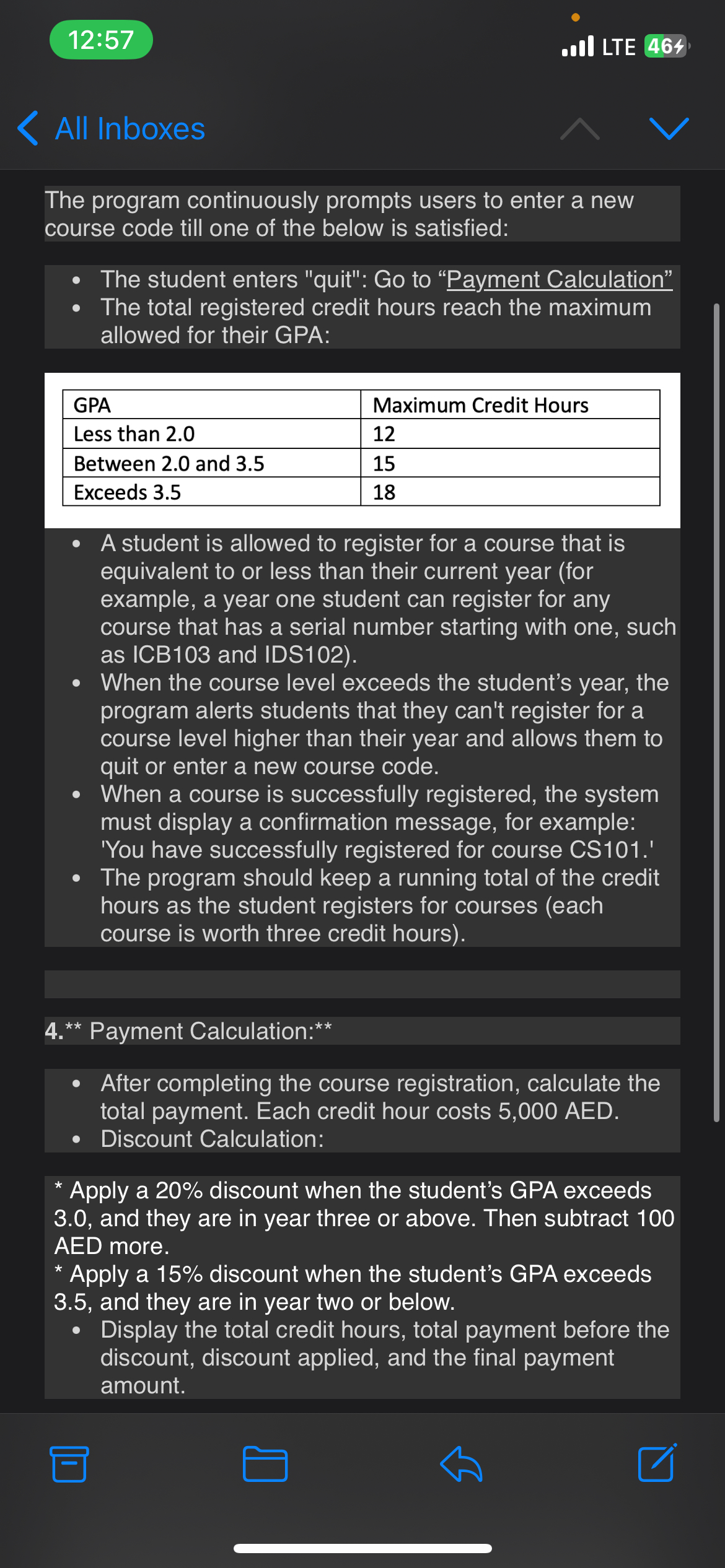
The total registered credit hours reach the maximum
allowed for their GPA:
A student is allowed to register for a course that is
equivalent to or less than their current year for
example, a year one student can register for any
course that has a serial number starting with one, such
as ICB and IDS
When the course level exceeds the student's year, the
program alerts students that they can't register for a
course level higher than their year and allows them to
quit or enter a new course code.
When a course is successfully registered, the system
must display a confirmation message, for example:
'You have successfully registered for course CS
The program should keep a running total of the credit
hours as the student registers for courses each
course is worth three credit hours
Payment Calculation:
After completing the course registration, calculate the
total payment. Each credit hour costs AED.
Discount Calculation:
Apply a discount when the student's GPA exceeds
and they are in year three or above. Then subtract
AED more.
Apply a discount when the student's GPA exceeds
and they are in year two or below.
Display the total credit hours, total payment before the
discount, disCount applied, and the final payment
amount.
Step by Step Solution
There are 3 Steps involved in it
1 Expert Approved Answer
Step: 1 Unlock

Question Has Been Solved by an Expert!
Get step-by-step solutions from verified subject matter experts
Step: 2 Unlock
Step: 3 Unlock
 Study Help