







Question: The program should take user input for name of a text file and the string to be searched in it. The file has semi-colon
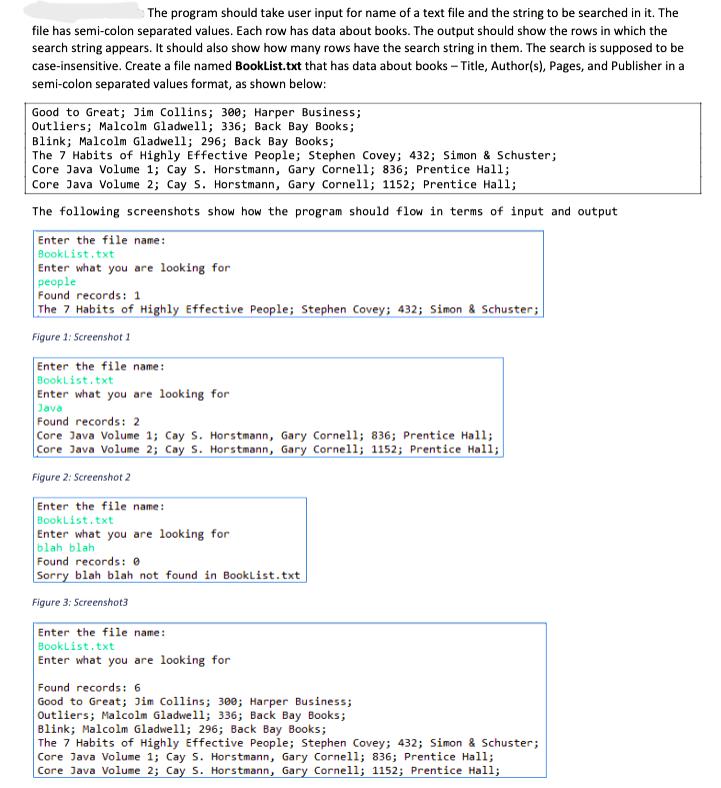
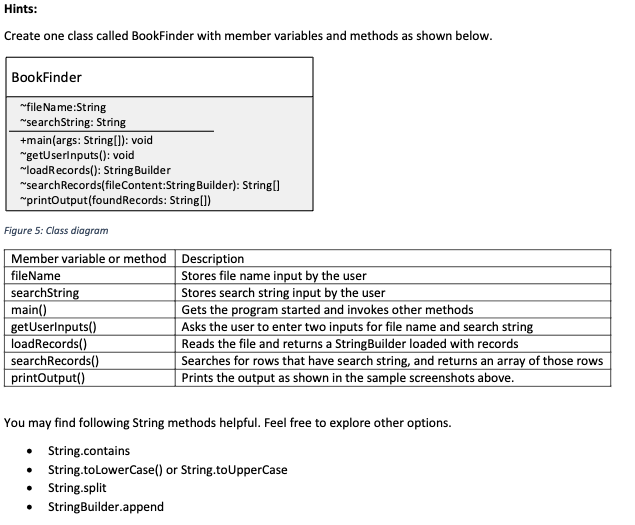
The program should take user input for name of a text file and the string to be searched in it. The file has semi-colon separated values. Each row has data about books. The output should show the rows in which the search string appears. It should also show how many rows have the search string in them. The search is supposed to be case-insensitive. Create a file named BookList.txt that has data about books - Title, Author(s), Pages, and Publisher in a semi-colon separated values format, as shown below: Good to Great; Jim Collins; 300; Harper Business; Outliers; Malcolm Gladwell; 336; Back Bay Books; Blink; Malcolm Gladwell; 296; Back Bay Books; The 7 Habits of Highly Effective People; Stephen Covey; 432; Simon & Schuster; Core Java Volume 1; Cay S. Horstmann, Gary Cornell; 836; Prentice Hall; Core Java Volume 2; Cay S. Horstmann, Gary Cornell; 1152; Prentice Hall; The following screenshots show how the program should flow in terms of input and output Enter the file name: Booklist.txt Enter what you are looking for people Found records: 1 The 7 Habits of Highly Effective People; Stephen Covey; 432; Simon & Schuster; Figure 1: Screenshot 1 Enter the file name: BookList.txt Enter what you are looking for Java Found records: 2 Core Java Volume 1; Cay S. Horstmann, Gary Cornell; 836; Prentice Hall; Core Java Volume 2; Cay S. Horstmann, Gary Cornell; 1152; Prentice Hall; Figure 2: Screenshot 2 Enter the file name: BookList.txt Enter what you are looking for blah blah Found records: Sorry blah blah not found in BookList.txt Figure 3: Screenshot3 Enter the file name: BookList.txt Enter what you are looking for Found records: 6 Good to Great; Jim Collins; 300; Harper Business; Outliers; Malcolm Gladwell; 336; Back Bay Books; Blink; Malcolm Gladwell; 296; Back Bay Books; The 7 Habits of Highly Effective People; Stephen Covey; 432; Simon & Schuster; Core Java Volume 1; Cay S. Horstmann, Gary Cornell; 836; Prentice Hall; Core Java Volume 2; Cay S. Horstmann, Gary Cornell; 1152; Prentice Hall; Hints: Create one class called BookFinder with member variables and methods as shown below. BookFinder ~file Name:String "searchString: String +main(args: String[]):void "getUserInputs(): void ~loadRecords(): StringBuilder "searchRecords(fileContent:StringBuilder): String[] "printOutput(found Records: String[]) Figure 5: Class diagram Member variable or method Description fileName searchString main() getUserInputs() loadRecords() searchRecords() printOutput() Stores file name input by the user Stores search string input by the user Gets the program started and invokes other methods Asks the user to enter two inputs for file name and search string Reads the file and returns a StringBuilder loaded with records Searches for rows that have search string, and returns an array of those rows Prints the output as shown in the sample screenshots above. You may find following String methods helpful. Feel free to explore other options. String.contains String.toLowerCase() or String.toUpperCase String.split StringBuilder.append
Step by Step Solution
3.54 Rating (151 Votes )
There are 3 Steps involved in it
Heres the implementation of the BookFinder class according to the given requirements import javaioBufferedReader import javaioFileReader import javaio... View full answer

Get step-by-step solutions from verified subject matter experts
 Study Help