







Question: The program you'll be writing for this project is one that can find and display the paths of all of the files in a directory
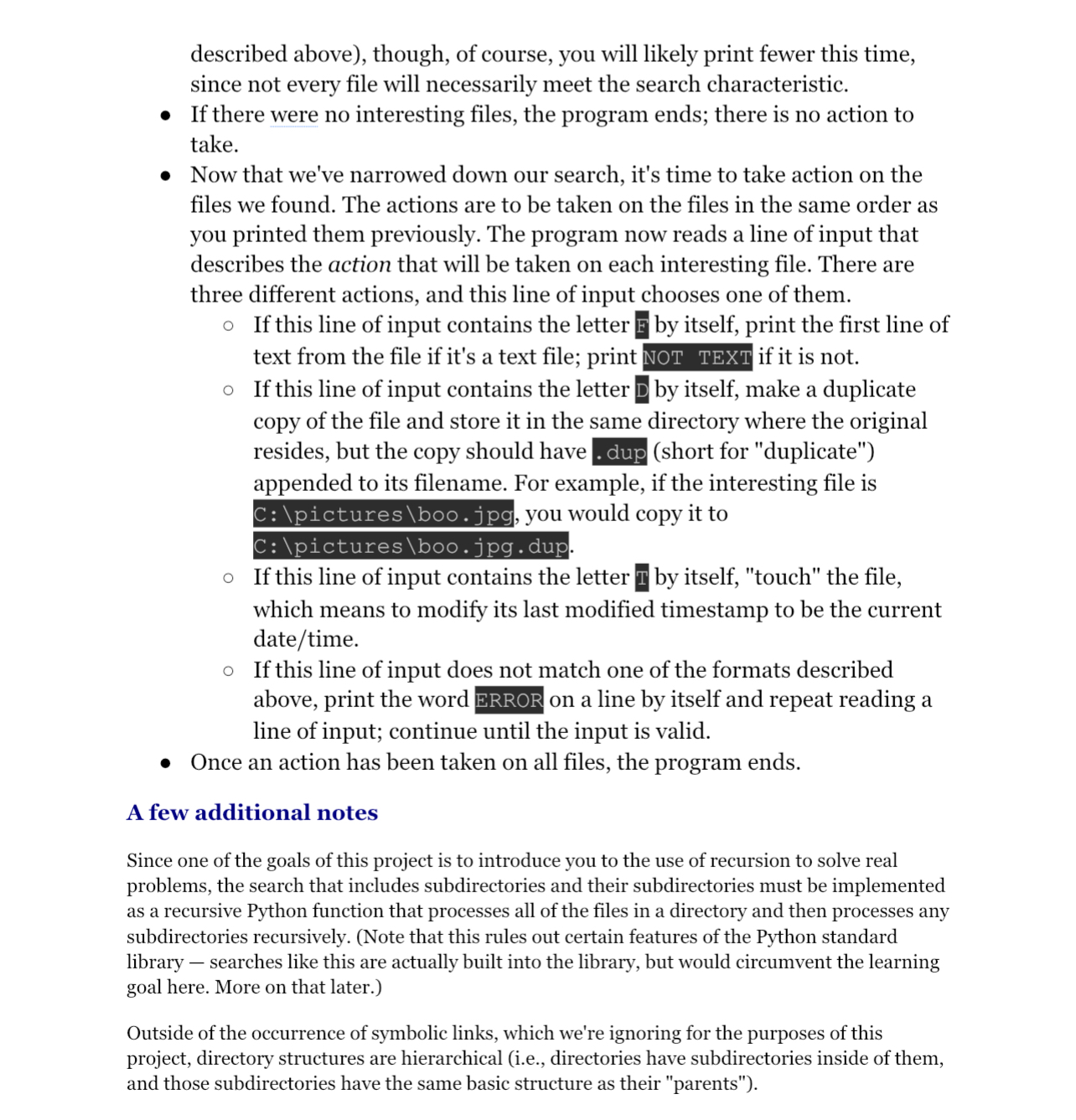
The program you'll be writing for this project is one that can find and display the paths of all of the files in a directory and potentially, all of its subdirectories, and their subdirectories, and so on and then take action on some of those files that have interesting characteristics. Both the notion of interesting characters and taking action will be configurable and each can work in a few different ways, but the core act of finding files will always be the same. One of your goals should be to avoid rewriting the same code over and over again eg multiple functions that each perform a search for files with slightly different characteristics whenever possible; in ICS H we begin to concern ourselves more strictly with design issues, keeping an eye on how best to solve a program, as opposed to writing something that "just works."
The input
Your program will take input from the console in the following format. It should not prompt the user in any way. The intent here is not to write a userfriendly user interface; what you're actually doing is building a program that we can test automatically, so it's vital that your program reads inputs and writes outputs precisely as specified below.
First, the program reads a line of input that specifies which files are eligible to be found. That can be specified in one of two ways:
The letter D followed by a space, followed on the rest of the line by the path to a directory. In this case, all of the files in that directory will be under consideration, but no subdirectories and no files in those subdirectories will beYou can think of the letter D here as standing for "directory."
The letter R followed by a space, followed on the rest of the line by the path to a directory. In this case, all of the files in that directory will be under consideration, along with all of the files in its subdirectories, all of the files in their subdirectories, and so onYou can think of the letter here as standing for "recursive."
If this line of input does not follow this format, or if the directory specified does not exist, print the word ERROR on a line by itself and repeat reading this line of input; continue until the input is valid.
Next, the program prints the paths to every file that is under consideration. Each path is printed on its own line, with no whitespace preceding or following it and with every line ending in a newline. Note, also, that the order in which the files' paths are printed is relevant; you must print them in the following order:
First, the paths to all of the files in the directory are printed. These are printed in lexicographical order of the file's names. More lexicographical order a bit later, but note that this is the default way that strings are sorted.
Next, if the files in subdirectories are being considered, the files in each of the subdirectories are printed according to the same ordering rules here, with all of the files in one subdirectory printed before any of the others, and with the subdirectories printed in lexicographical order of their names.
Now that the program has displayed the paths of every file under consideration, it's time to narrow our search. The program now reads a line of input that describes the search characteristics that will be used to decide whether files are "interesting" and should have action taken on them. There are five different characteristics, and this line of input chooses one of them.
If this line of input is the letter A alone on a line, all of the files found in the previous step are considered interesting.
If this line of input begins with the letter the search will be for files whose names exactly match a particular name. The will be followed by a space; after the space, the rest of the line will indicate the name of the files to be searched for.
Note that filenames include extensions, so a search for boo would not find a file named boo.doc.
If this line of input begins with the letter E the search will be for files whose names have a particular extension. The E will be follwed by space, the rest of the line will indicate the desired extension.
For example, if the desired extension is py all files whose names end in py will be considered interesting. The desired extension may be specified with or without a dot preceding it eg E py or E py would mean the same thing in the input and your search should behave the same either way.
Note, also, that there is a difference between what you might call a name ending and an extension. In our program, if the search is looking for files with the extension oc a file named iliveinthe.oc would be found, but a file named invoice.doc would not.
If this line of input begins with the letter T the search will be for text files that contain the given text. The T
will be followed by a space;
Step by Step Solution
There are 3 Steps involved in it
1 Expert Approved Answer
Step: 1 Unlock

Question Has Been Solved by an Expert!
Get step-by-step solutions from verified subject matter experts
Step: 2 Unlock
Step: 3 Unlock
 Study Help