



Question: The purpose of this assignment Given two tables, determine the relationship, modify the tables to meet the requirements of the relationship, and diagram the relationship.
The purpose of this assignment
Given two tables, determine the relationship, modify the tables to meet the requirements of the relationship, and diagram the relationship.
Note that you will be asked to modify tables within the Excel file, and then diagram the relationships in Visio or a similar tool. You will also be asked to create screen snippets of each of your diagrams and paste them on the appropriate spreadsheet tab to illustration the relationship.
 To create tables: https://www.lucidchart.com/pages/usecase/education
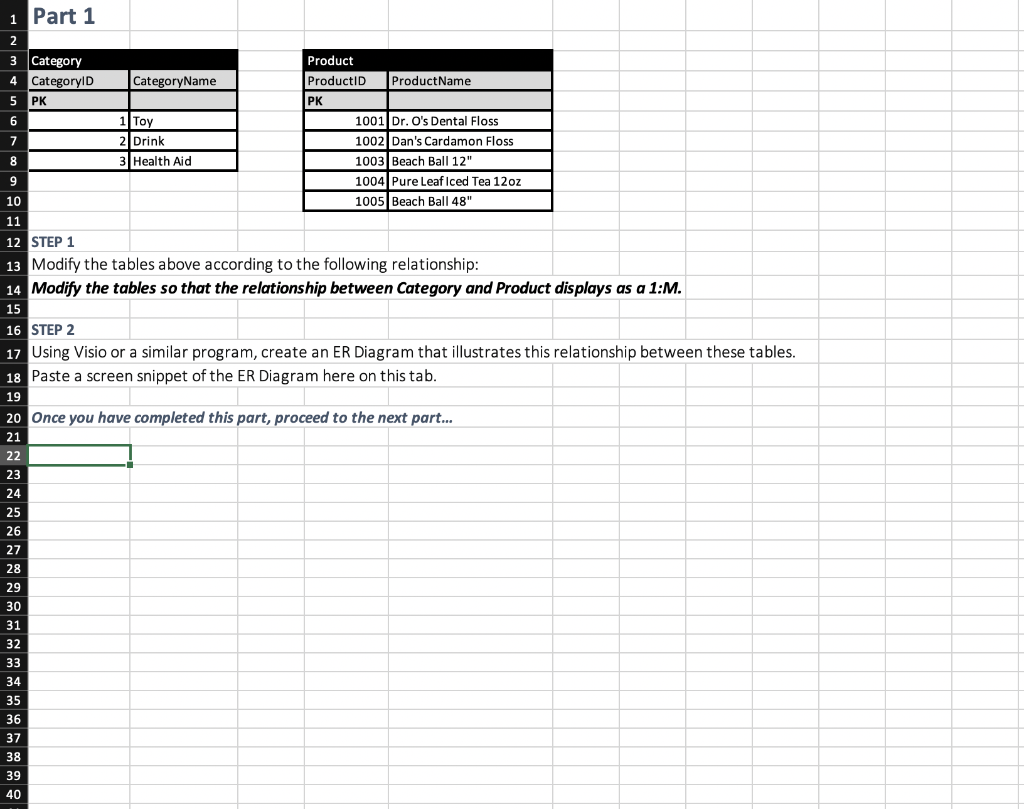
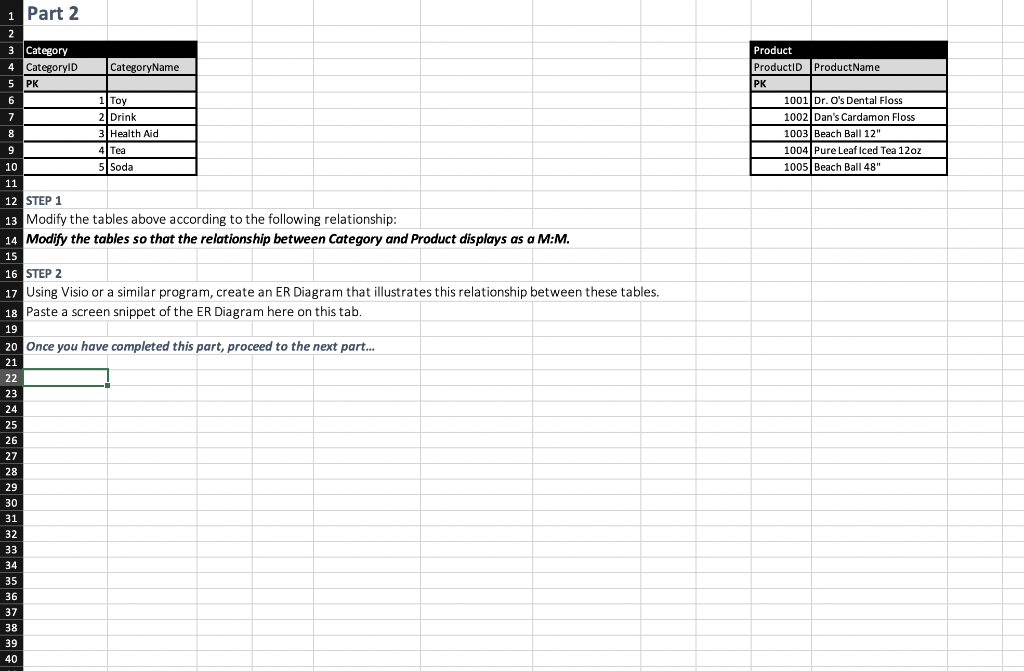
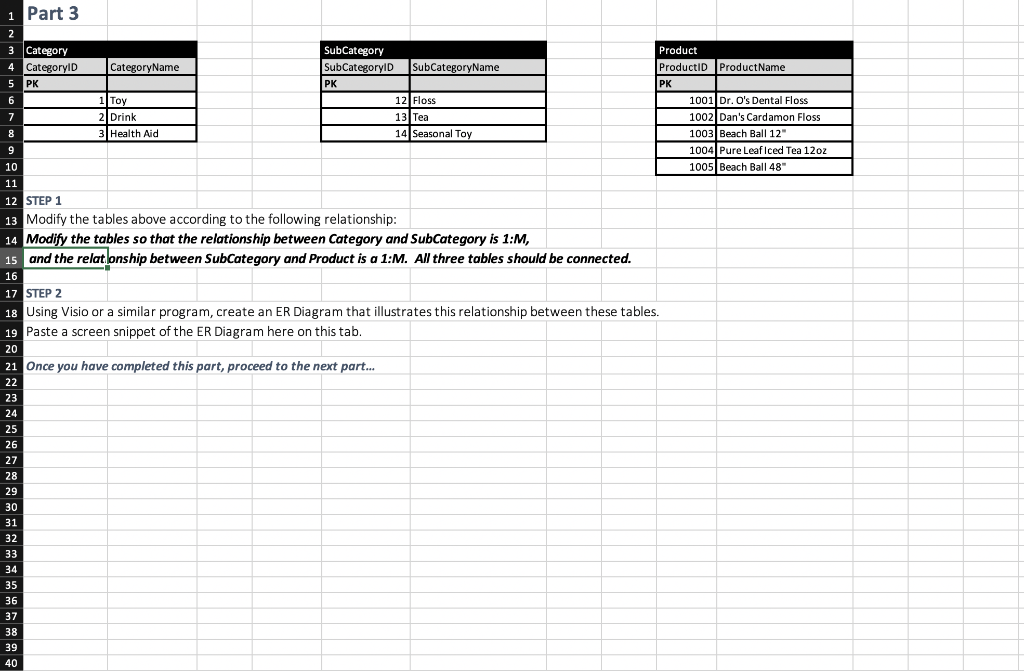
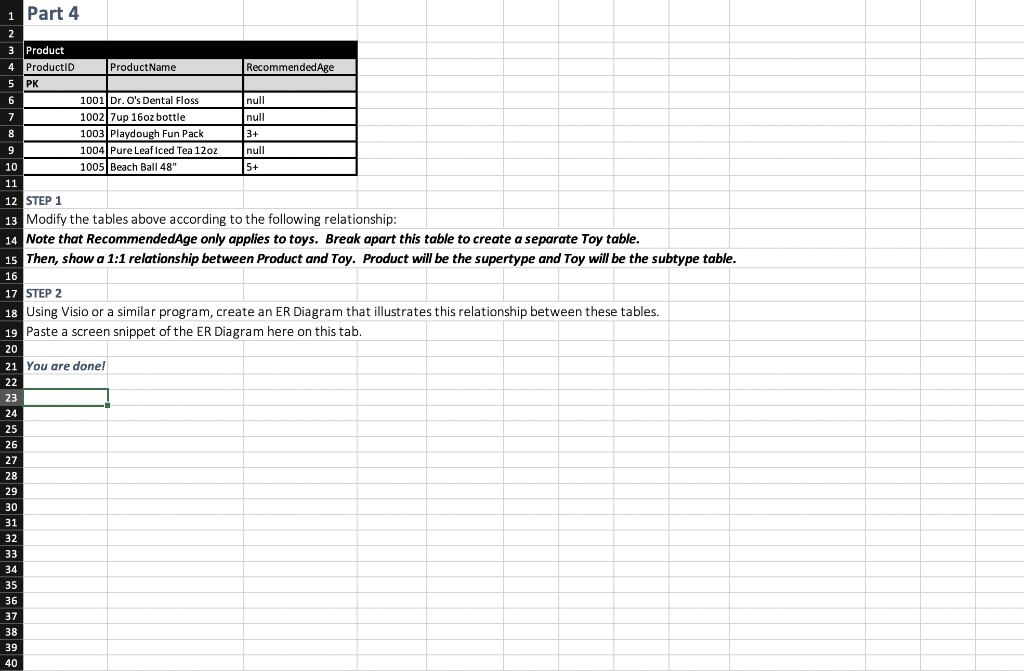
7 9 1 Part 1 2 3 Category Product 4 CategoryID CategoryName ProductID Product Name 5 PK PK 6 1 Toy 1001 Dr. O's Dental Floss 2 Drink 1002 Dan's Cardamon Floss 8 3 Health Aid 1003 Beach Ball 12" 1004 Pure Leaf Iced Tea 12oz 10 1005 Beach Ball 48" 11 12 STEP 1 13 Modify the tables above according to the following relationship: 14 Modify the tables so that the relationship between Category and Product displays as a 1:M. 15 16 STEP 2 17 Using Visio or a similar program, create an ER Diagram that illustrates this relationship between these tables. 18 Paste a screen snippet of the ER Diagram here on this tab. 19 20 Once you have completed this part, proceed to the next part... 21 22 23 24 25 26 27 28 29 30 31 32 33 34 35 36 37 38 39 40 1 Part 2 2 Product ProductID Product Name PK 1001 Dr. O's Dental Floss 1002 Dan's Cardamon Floss 1003 Beach Ball 12 1004 Pure Leaf Iced Tea 12oz 1005 Beach Ball 48" 8 9 3 Category 4 CategoryID CategoryName 5 PK 6 1 Toy 7 2. Drink 3 Health Aid 4 Tea 10 5 Soda 11 12 STEP 1 13 Modify the tables above according to the following relationship: 14 Modify the tables so that the relationship between Category and Product displays as a M:M. 15 16 STEP 2 17 Using Visio or a similar program, create an ER Diagram that illustrates this relationship between these tables. 18 Paste a screen snippet of the ER Diagram here on this tab. 19 20 Once you have completed this part, proceed to the next part... 21 22 23 24 25 25 26 27 28 29 30 31 32 33 2 34 25 35 36 37 38 39 40 PK 8 9 1 Part 3 2 3 Category SubCategory Product 4 CategoryID CategoryName SubCategoryID SubCategoryName ProductID Product Name 5 PK PK 6 1 Toy 12 Floss 1001 Dr. O's Dental Floss 7 2. Drink 13 Tea 1002 Dan's Cardamon Floss 3 Health Aid 14 Seasonal Toy 1003 Beach Ball 12" 1004 Pure Leaf Iced Tea 12oz 10 1005 Beach Ball 48" 11 12 STEP 1 13 Modify the tables above according to the following relationship: 14 Modify the tables so that the relationship between Category and SubCategory is 1:M, 15 and the relatonship between SubCategory and Product is a 1:M. All three tables should be connected. 16 17 STEP 2 18 Using Visio or a similar program, create an ER Diagram that illustrates this relationship between these tables. 19 Paste a screen snippet of the ER Diagram here on this tab. 20 21 Once you have completed this part, proceed to the next part... 22 23 24 25 26 27 28 28 29 22 30 31 32 33 34 35 36 37 38 39 40 1 Part 4 8 9 2 3 Product 4 ProductID Product Name Recommended Age 5 PK 6 1001 Dr. O's Dental Floss null 7 1002 7up 16oz bottle null 1003 Playdough Fun Pack 3+ 1004 Pure Leaf Iced Tea 12oz null 10 1005 Beach Ball 48" 5+ 11 12 STEP 1 13 Modify the tables above according to the following relationship: 14 Note that RecommendedAge only applies to toys. Break apart this table to create a separate Toy table. 15 Then, show a 1:1 relationship between Product and Toy. Product will be the supertype and Toy will be the subtype table. 16 17 STEP 2 18 Using Visio or a similar program, create an ER Diagram that illustrates this relationship between these tables. 19 Paste a screen snippet of the ER Diagram here on this tab. 20 21 You are donel 22 23 24 25 26 27 28 28 29 22 30 31 32 33 34 35 36 37 38 39 40
Step by Step Solution
There are 3 Steps involved in it

Get step-by-step solutions from verified subject matter experts