







Question: The purpose of this assignment is to use Python to merge several photographic elements into a single photo. 1. Search for and download a photograph
The purpose of this assignment is to use Python to merge several photographic elements into a single photo.
1. Search for and download a photograph of a jackrabbit.
2. Use the web to search and download an image depicting a GCU campuse or event.
3. Locate and use your antelope photograph from Topic 1.
4. Take a head-to-toe photograph of yourself.
5. The textbook outlines several ways to manipulate multiple images using Pyton. Choose one (or more) and use Python to collage the GCU photo (background), along with the jackrabbit and antelope photos (foreground).
6. Trade the antelope horns with the jackrabbit ears to create two possible candidates for Jackalope.
7. Save the resulting (completed) image file.
8. Create an HTML Web document within the GCU virtualization solution that displays the collaged image from Step 7 and plays the blended WAV document that you created in Topic 5. Add a headline "Mythological Jackalope Discovered!"
I successfully created a collage in JES of the rabbit and antelope. I need help making the code for a collage of the new picture and the picture of myself. I also need help with HTML Web document.
My code is attached. Please tell me what changes I need to make.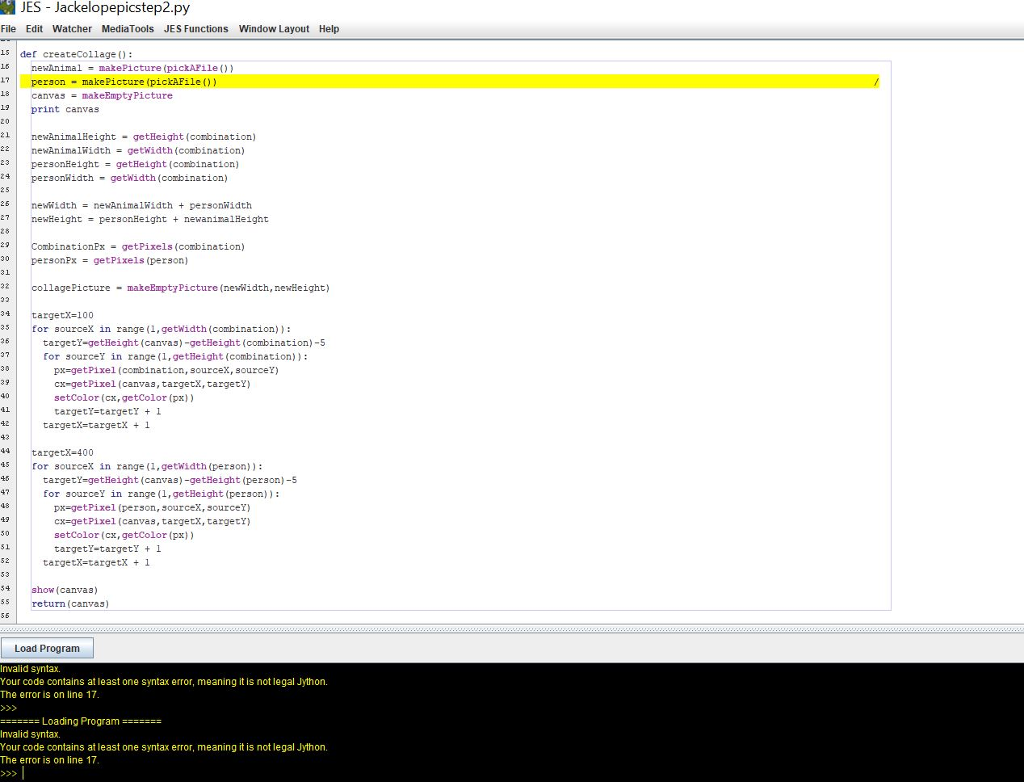
JES Jackelopepicstep2.py File Edit Watcher MediaTools JES Functions Window Layout Help 5der createCollage : 1?person makePicture (pickAFile )) 18canvas makeEmptyPicture print canvas 20 ewAnimalHeight getHeight (conbination) 221 newAnimaliidth= getwidth(combination) 23personHeight-getHeight (corbination) 24 25 5newwidth- newAnimalWidth personwidth 2newHeightpersonHeight newaninalHeight personidth getWidth (corbination) 26 29 30personPx- getPixels (person) inationPgetPixels (combination) 31 221 collage Picture-makeEmptyPicture (ne/idth, newHeight) or sourceX in range (1,getwidth(combination)): 26 targetY-getHeight (canvas)-getHeight (combination)-5 for source in range (1, getieight (combination)): px-getPixel (combination, sourcex, sourcer) cx-getPixel (canvas, targetX, targetY) setcolor (cx,getColor (px)) targetr-targetY I targetx-targetX 1 43 targetX-400 isfor sourceX in range (1,getwidth (person)): targetY-getHeight (canvas)-getHeight (person)-5 for sourceY in range (1,getHeight (person)): getPixel (person, ourceX, 5ourceY cx-getPixel (canvas, targetx, targety) setColor (cx,getColor (px)) targetY-targetY 1 51 targetx-targetX1 4 show (canvas) 5return (canvas) Load Program Invalid syntax. Your code contains atleast one syntax error, meaning it is not legal Jython. The error is on line 17 Loading Progranm Invalid syntax. Your code contains atleast one syntax error, meaning it is not legal Jython. The error is on line 17
Step by Step Solution
There are 3 Steps involved in it

Get step-by-step solutions from verified subject matter experts
 Study Help