







Question: The Question is below. I'm having issues with my code. Any help is appreciated. Add a grid, Draw a List of Mines, Draw a list
The Question is below. I'm having issues with my code. Any help is appreciated.
Add a grid, Draw a List of Mines, Draw a list of numbers
Download the A5Q2template.pde file In this assignment, you will store the row and column numbers for cells in parallel partially filled arrays: one array to store the row numbers, and one array to store the column numbers, where the row and column for a cell are stored at the same position in both arrays. Valid column numbers are 0 (zero) to NUM_COLS-1. Valid row numbers are 0 to NUM_ROWS-1. draw() contains code that will (1) call a function to draw a grid to help the user identify the cells on the game board, (2) fill parallel arrays with row and column numbers representing mine locations and then call the drawMines() function to draw the mines on the game board, and (3) fill parallel arrays with row and column numbers representing numerical cells and then call the drawNums() function to draw the numbers on the game board. Do not change any of thee provided code while working on Question 2.
Write the drawGrid() function that will draw the grid cells on the game board.
Write the drawMines() function such that it accepts two int arrays (column numbers first, row numbers second), and the number of entries in the arrays. This function should call your drawMine() function from Q1 to draw each mine on the game board.
Write the drawNums() function such that it accepts three int arrays (column numbers, then row numbers, then values to be drawn), and the number of entries in the arrays. This function should call your drawNum() function from Q1 to draw each numerical cell on the game board.
The code supplied in draw() will test your new functions. Make sure that your program output appears similar to the image at the right (but with your own mine design).
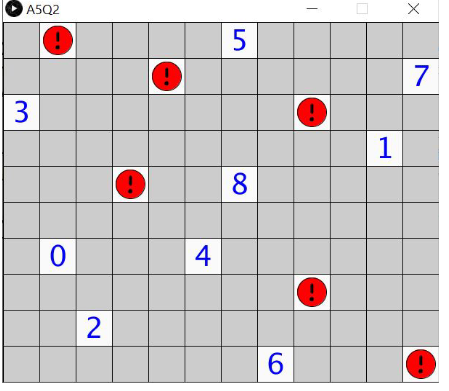
My Code:
/Q1: Set up a grid on the canvas. Draw a "mine" cell // and a "number of mines nearby" cell. //Q2: Add functions to draw the grid, a list of mines and // a list of number cells.
final int CELLSIZE = 50; final int NUM_ROWS = 10; final int NUM_COLS = 12; int x; int y;
void setup() { size(600, 500); //size MUST be (NUM_COLS*CELLSIZE) by (NUM_ROWS*CELLSIZE); noLoop(); //only draw once background(200); }
void draw() { drawGrid();
//create test arrays int[] mineX = {3, 1, 8, 11, 8, 4}; //mine column numbers int[] mineY = {4, 0, 7, 9, 2, 1}; //mine row numbers // drawMines(mineX, mineY, 6); //fill the cells with mines int[] numX = {0, 10, 5, 2, 6, 7, 1, 11, 6}; int[] numY = {2, 3, 6, 8, 0, 9, 6, 1, 4}; int[] numValue = {3, 1, 4, 2, 5, 6, 0, 7, 8}; // drawNums(numX, numY, numValue, 9); }
//**add your drawGrid function here** void drawGrid() {
for (int i=0; i rect(x, y, CELLSIZE, CELLSIZE); } } } //**add your drawMines function here** void drawMines (int [] colNumber, int [] rowNumber, int numMines) { for (int i=0; i //**add your drawNums function here** void drawNums( int[] colNumber, int[] rowNumber, char [] numValue, int numNums) { for (int i=0; i //**add your drawMine function here** void drawMine(int col, int row) { int x = CELLSIZE * col; int y = CELLSIZE * row; fill(0); square(x + CELLSIZE / 6, y + CELLSIZE / 6, 4 * CELLSIZE / 6); fill(255); circle(x + CELLSIZE / 2, y + CELLSIZE / 2, 3 * CELLSIZE / 6); fill(0, 125, 125); rect(x + CELLSIZE / 3, y + 2 * CELLSIZE / 5, CELLSIZE / 3, CELLSIZE / 5); } //**add your drawNum function here** void drawNum(int col, int row, int num) { int x = col * CELLSIZE + CELLSIZE / 2; int y = row * CELLSIZE + CELLSIZE / 2; textAlign(CENTER, CENTER); textSize(30); text("" + num, x, y); } A5Q2 O 5 O 7 3 O 1 O 8 0 4 O 2 6 O
Step by Step Solution
There are 3 Steps involved in it

Get step-by-step solutions from verified subject matter experts
 Study Help