







Question: The question is found in attachment, Please answer the 7 part question in jave using the code provided. CustomerTextFile.java import java.util.*; import java.io.*; import java.nio.file.*;
The question is found in attachment, Please answer the 7 part question in jave using the code provided.
CustomerTextFile.java
import java.util.*; import java.io.*; import java.nio.file.*;
public final class CustomerTextFile implements DAO
private List
private final String FIELD_SEP = "\t";
public CustomerTextFile() { // initialize the class variables }
@Override public List
customers = new ArrayList();
// load the array list with Customer objects created from // the data in the file return customers; }
@Override public Customer get(String email) { for (Customer c : customers) { if (c.getEmail().equals(email)) { return c; } } return null; }
@Override public boolean add(Customer c) { customers.add(c); return this.saveAll(); }
@Override public boolean delete(Customer c) { customers.remove(c); return this.saveAll(); }
@Override public boolean update(Customer newCustomer) { // get the old customer and remove it Customer oldCustomer = this.get(newCustomer.getEmail()); int i = customers.indexOf(oldCustomer); customers.remove(i);
// add the updated customer customers.add(i, newCustomer);
return this.saveAll(); }
private boolean saveAll() { // save the Customer objects in the array list to the file
return true; } }
Customer.java
public class Customer {
private String firstName; private String lastName; private String email;
public Customer() { this("", "", ""); }
public Customer(String firstName, String lastName, String email) { this.firstName = firstName; this.lastName = lastName; this.email = email; }
public void setFirstName(String firstName) { this.firstName = firstName; }
public String getFirstName() { return firstName; }
public void setLastName(String lastName) { this.lastName = lastName; }
public String getLastName() { return lastName; }
public void setEmail(String email) { this.email = email; }
public String getEmail() { return email; }
public String getName() { return firstName + " " + lastName; } }
CustomerManngerApp.java
import java.util.List;
public class CustomerManagerApp {
// declare class variables private static DAO
public static void main(String[] args) { // display a welcome message System.out.println("Welcome to the Customer Manager ");
// set the class variables customerDAO = new CustomerTextFile();
// display the command menu displayMenu();
// perform 1 or more actions String action = ""; while (!action.equalsIgnoreCase("exit")) { // get the input from the user action = Console.getString("Enter a command: "); System.out.println();
if (action.equalsIgnoreCase("list")) { displayAllCustomers(); } else if (action.equalsIgnoreCase("add")) { addCustomer(); } else if (action.equalsIgnoreCase("del") || action.equalsIgnoreCase("delete")) { deleteCustomer(); } else if (action.equalsIgnoreCase("help") || action.equalsIgnoreCase("menu")) { displayMenu(); } else if (action.equalsIgnoreCase("exit")) { System.out.println("Bye. "); } else { System.out.println("Error! Not a valid command. "); } } }
public static void displayMenu() { System.out.println("COMMAND MENU"); System.out.println("list - List all customers"); System.out.println("add - Add a customer"); System.out.println("del - Delete a customer"); System.out.println("help - Show this menu"); System.out.println("exit - Exit this application "); }
public static void displayAllCustomers() { System.out.println("CUSTOMER LIST");
List public static void addCustomer() { String firstName = Console.getLine("Enter first name: "); String lastName = Console.getString("Enter last name: "); String email = Console.getString("Enter customer email: "); Customer customer = new Customer(); customer.setFirstName(firstName); customer.setLastName(lastName); customer.setEmail(email); customerDAO.add(customer); System.out.println(); System.out.println(firstName + " " + lastName + " has been added. "); } public static void deleteCustomer() { String email = Console.getString("Enter email to delete: "); Customer c = customerDAO.get(email); System.out.println(); if (c != null) { customerDAO.delete(c); System.out.println(c.getName() + " has been deleted. "); } else { System.out.println("No customer matches that email. "); } } } DAO.jave import java.util.List; public interface DAO StringUtils.java public class StringUtils { public static String padWithSpaces(String s, int length) { if (s.length() 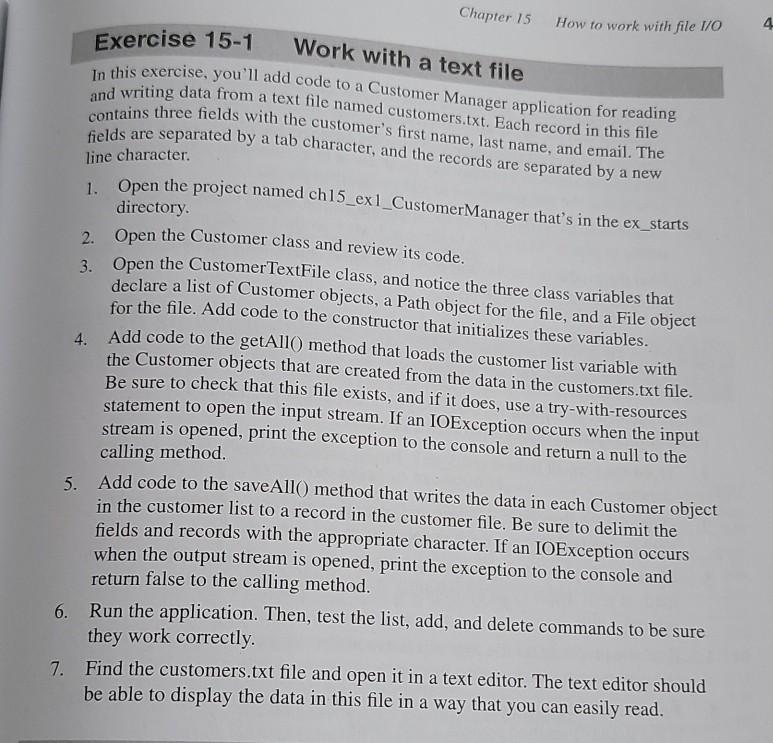
Step by Step Solution
There are 3 Steps involved in it

Get step-by-step solutions from verified subject matter experts
 Study Help