







Question: The question should be done on labview! Activity 2: Temperature Converter (p. 35) Write a program that, given a temperature T in Fahrenheit (input via
The question should be done on labview!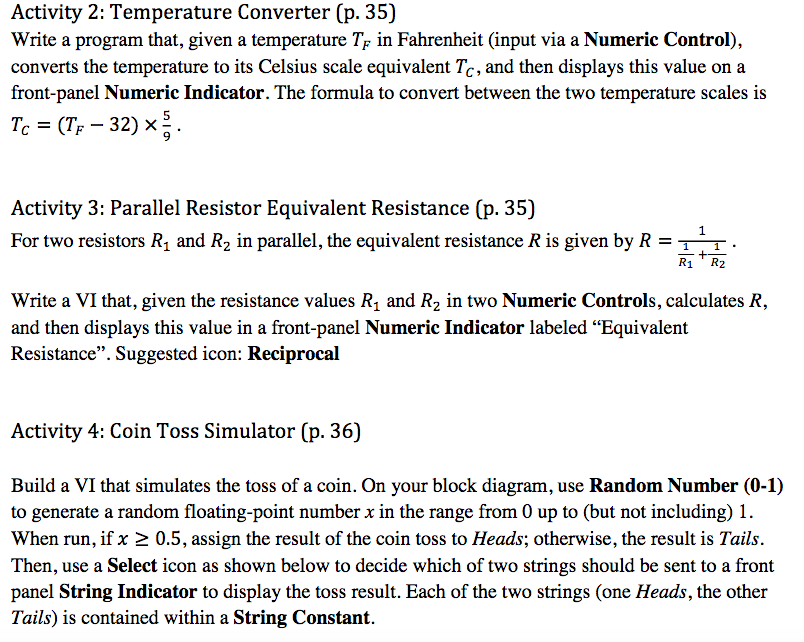
Activity 2: Temperature Converter (p. 35) Write a program that, given a temperature T in Fahrenheit (input via a Numeric Control), converts the temperature to its Celsius scale equivalent Tc, and then displays this value on a front-panel Numeric Indicator. The formula to convert between the two temperature scales is Tc=(Tr-32) . 5 Activity 3: Parallel Resistor Equivalent Resistance (p. 35) For two resistors R1 and R2 in parallel, the equivalent resistance R is given by R- R1 R2 Write a VI that, given the resistance values R and R2 in two Numeric Controls, calculates R, and then displays this value in a front-panel Numeric Indicator labeled "Equivalent Resistance". Suggested icon: Reciprocal Activity 4: Coin Toss Simulator (p. 36) Build a VI that simulates the toss of a coin. On your block diagram, use Random Number (0-1) to generate a random floating-point number x in the range from 0 up to (but not including)1 When run, if x 2 0.5, assign the result of the coin toss to Heads; otherwise, the result is Tails. Then, use a Select icon as shown below to decide which of two strings should be sent to a front panel String Indicator to display the toss result. Each of the two strings (one Heads, the other Tails) is contained within a String Constant. Activity 2: Temperature Converter (p. 35) Write a program that, given a temperature T in Fahrenheit (input via a Numeric Control), converts the temperature to its Celsius scale equivalent Tc, and then displays this value on a front-panel Numeric Indicator. The formula to convert between the two temperature scales is Tc=(Tr-32) . 5 Activity 3: Parallel Resistor Equivalent Resistance (p. 35) For two resistors R1 and R2 in parallel, the equivalent resistance R is given by R- R1 R2 Write a VI that, given the resistance values R and R2 in two Numeric Controls, calculates R, and then displays this value in a front-panel Numeric Indicator labeled "Equivalent Resistance". Suggested icon: Reciprocal Activity 4: Coin Toss Simulator (p. 36) Build a VI that simulates the toss of a coin. On your block diagram, use Random Number (0-1) to generate a random floating-point number x in the range from 0 up to (but not including)1 When run, if x 2 0.5, assign the result of the coin toss to Heads; otherwise, the result is Tails. Then, use a Select icon as shown below to decide which of two strings should be sent to a front panel String Indicator to display the toss result. Each of the two strings (one Heads, the other Tails) is contained within a String Constant
Step by Step Solution
There are 3 Steps involved in it

Get step-by-step solutions from verified subject matter experts
 Study Help