







Question: The RAPTOR program looks like the following: The loadData() subchart is used to load an array with the numbers from the file lab4_numbers.txt and getMedian()
The RAPTOR program looks like the following:
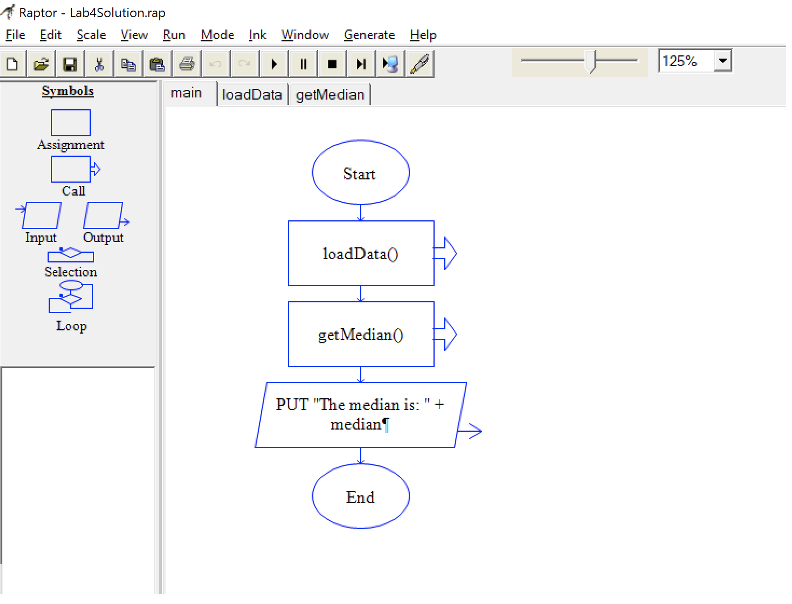
The loadData() subchart is used to load an array with the numbers from the file lab4_numbers.txt and getMedian() subchart is used to calculate the median for the numbers loaded in the numbers[] array. Your task is to write the necessary code for the two subcharts loadData() and getMedian() in a way so that it works exactly same as the video file. Now the question is how do we calculate median? You can do a google search or follow my example here.
Case-1: (Total Number of items in the array is an odd number)
Say, we have the following n=5 numbers in the numbers[] array:
40, 56, 78, 89, 100
In this scenario, the median is the middle item which in this case is: 78
To get the index of the middle item, you can use the ceiling function like ceiling(n/2)
medianIndex = ceiling(n/2) = ceiling (5/2) = 3
So, median = numbers[medianIndex]
Case-2: (Total Number of items in the array is an even number)
Say, we have the following n=6 numbers in the numbers[] array:
40, 56, 78, 89, 100, 120
As we have even numbers of item in the array so we need to choose the middle two numbers and find their average to calculate the median. In this case, 78 and 89 are two middle numbers. So, median is: (78+89)/2 = 83.5
So, median = (numbers[n/2] + numbers[n/2+1])/2
Case-1 Test:
Here is a test output if the array is loaded with: 40, 56, 78, 89, 100
OUTPUT:
Median: 78
Case-2 Test:
Here is a test output if the array is loaded with: 40, 56, 78, 89, 100, 120
OUTPUT:
Median: 83.50
lab4_numbers.txt:
40 56 78 89 100
Raptor - Lab4Solution.rap File Edit Scale View Run Mode Ink Window Generate Help 125% Symbols main loadData getMedian Assignment Start Call Input Output loadData Selection Loop get Median PUT "The median is: ". " + median End
Step by Step Solution
There are 3 Steps involved in it

Get step-by-step solutions from verified subject matter experts
 Study Help