







Question: The router (R_DHCP) has been partial configured by junior engineer, not finished yet. The two servers have been configured with ip address. However, all the
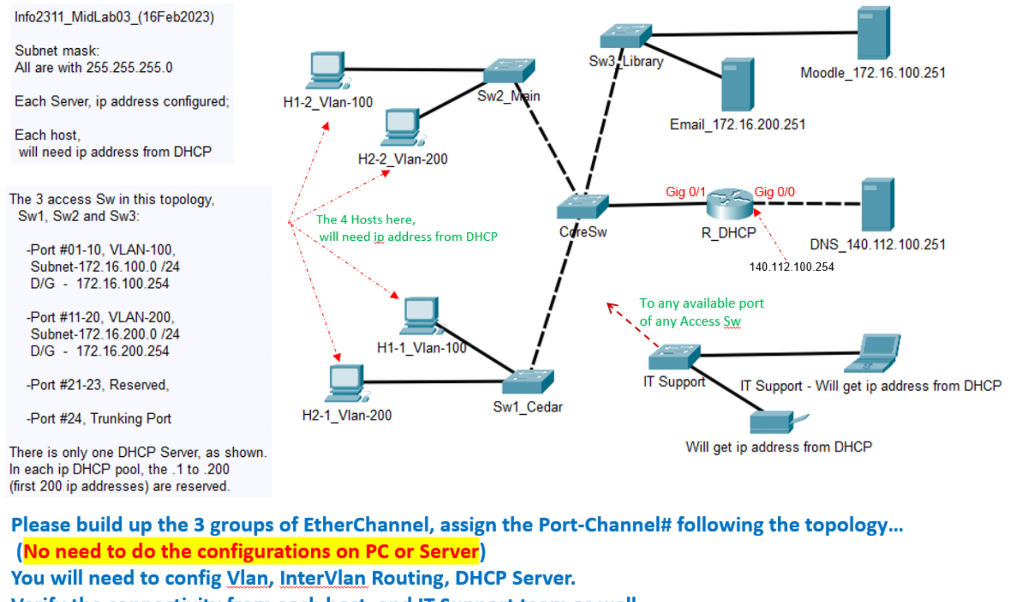
The router (R_DHCP) has been partial configured by junior engineer, not finished yet.
The two servers have been configured with ip address. However, all the hosts and IT Support in this topology will need to get IP address from DHCP Server.
Inf02311_MidLab03_(16Feb2023) Subnet mask: All are with 255.255.255.0 Each Server, ip address configured; Each host, will need ip address from DHCP The 3 access Sw in this topology, Sw1, Sw2 and Sw3: -Port \#01-10, VLAN-100, Subnet-172.16.100.0 /24 D/G - 172.16.100.254 -Port \#11-20, VLAN-200, Subnet-172.16.200.0 /24 D/G - 172.16.200.254 -Port \#21-23, Reserved, -Port \#24, Trunking Port There is only one DHCP Server, as shov In each ip DHCP pool, the 1 to 200 (first 200ip addresses) are reserved. Please build up the 3 groups of EtherChannel, assign the Port-Channel\# following the topology... (No need to do the configurations on PC or Server) You will need to config Vlan, InterVlan Routing, DHCP Server. Inf02311_MidLab03_(16Feb2023) Subnet mask: All are with 255.255.255.0 Each Server, ip address configured; Each host, will need ip address from DHCP The 3 access Sw in this topology, Sw1, Sw2 and Sw3: -Port \#01-10, VLAN-100, Subnet-172.16.100.0 /24 D/G - 172.16.100.254 -Port \#11-20, VLAN-200, Subnet-172.16.200.0 /24 D/G - 172.16.200.254 -Port \#21-23, Reserved, -Port \#24, Trunking Port There is only one DHCP Server, as shov In each ip DHCP pool, the 1 to 200 (first 200ip addresses) are reserved. Please build up the 3 groups of EtherChannel, assign the Port-Channel\# following the topology... (No need to do the configurations on PC or Server) You will need to config Vlan, InterVlan Routing, DHCP Server
Step by Step Solution
There are 3 Steps involved in it

Get step-by-step solutions from verified subject matter experts
 Study Help