







Question: The Shape interface provides public getColor and setColor methods. The colors are defined in a public enum, in the Shape class, whose values include TRANSPARENT,
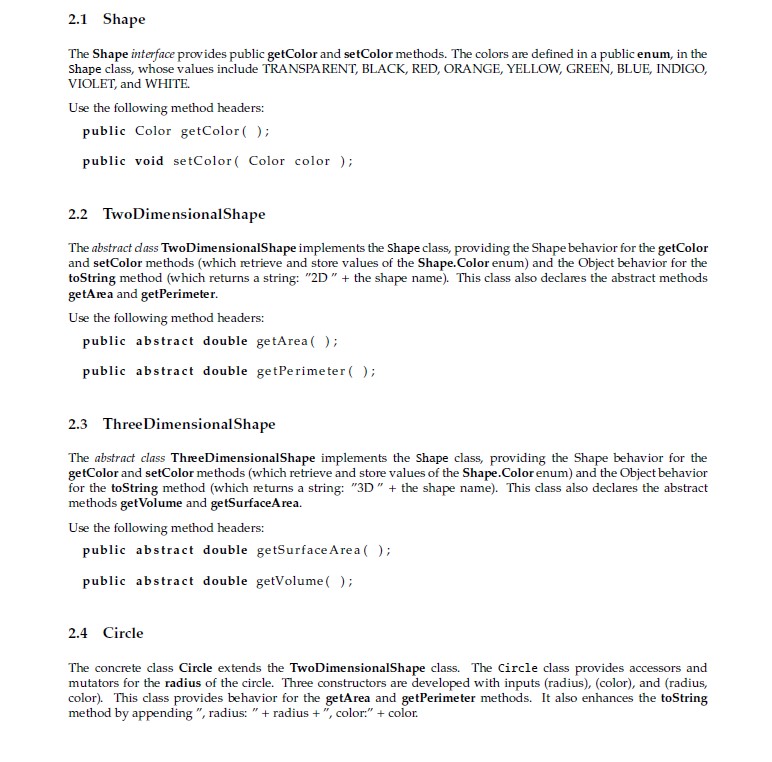
The Shape interface provides public getColor and setColor methods. The colors are defined in a public enum, in the
Shape class, whose values include TRANSPARENT, BLACK, RED, ORANGE, YELLOW, GREEN, BLUE, INDIGO,VIOLET, and WHITE.
Use the following method headers:
public Color getColor ( ) ;
public void setColor ( Color color ) ;
2.2 TwoDimensionalShape
The abstract class TwoDimensionalShape implements the Shape class, providing the Shape behavior for the getColor and setColor methods (which retrieve and store values of the Shape.Color enum) and the Object behavior for the toString method (which returns a string: "2D " + the shape name). This class also declares the abstract methods getArea and getPerimeter.
Use the following method headers:
public abs t r a c t double getArea ( ) ;
public abs t r a c t double getPerimeter ( ) ;
2.3 ThreeDimensionalShape
The abstract class ThreeDimensionalShape implements the Shape class, providing the Shape behavior for the getColor and setColor methods (which retrieve and store values of the Shape.Color enum) and the Object behavior for the toString method (which returns a string: "3D " + the shape name). This class also declares the abstract methods getVolume and getSurfaceArea.
Use the following method headers:
public abstract double getSur faceArea ( ) ;
public abstract double getVolume ( ) ;
2.4 Circle
The concrete class Circle extends the TwoDimensionalShape class. The Circle class provides accessors and mutators for the radius of the circle. Three constructors are developed with inputs (radius), (color), and (radius, color). This class provides behavior for the getArea and getPerimeter methods. It also enhances the toString method by appending ", radius: " + radius + ", color:" + color.
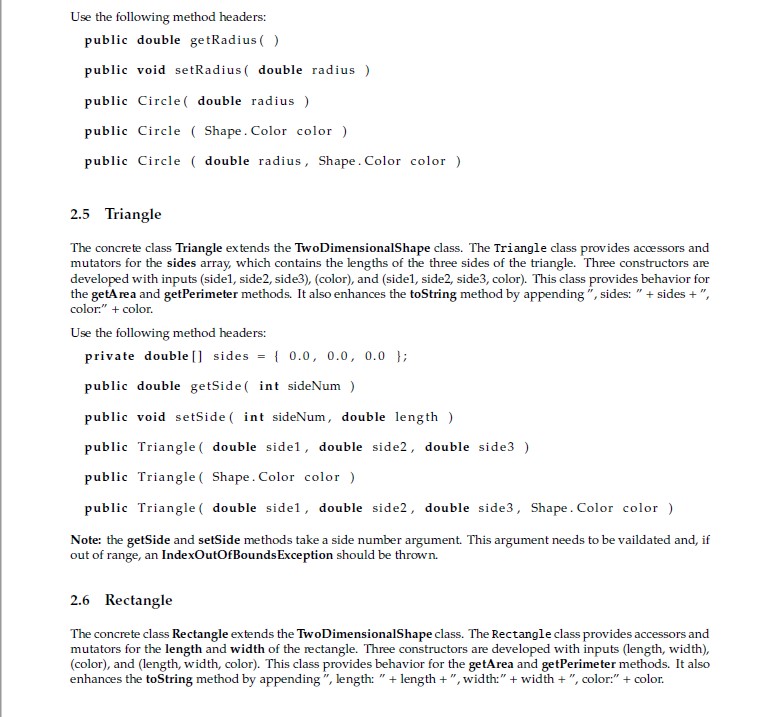
Use the following method headers:
public double getRadius ( )
public void setRadius ( double radius )
public Circle ( double radius )
public Circle ( Shape . Color color )
public Circle ( double radius , Shape.Color color )
2.5 Triangle
The concrete class Triangle extends the TwoDimensionalShape class. The Triangle class provides accessors and mutators for the sides array, which contains the lengths of the three sides of the triangle. Three constructors are developed with inputs (side1, side2, side3), (color), and (side1, side2, side3, color). This class provides behavior for the getArea and getPerimeter methods. It also enhances the toString method by appending ", sides: " + sides + ",color:" + color.
Use the following method headers:
private double [ ] s ide s = { 0.0 , 0.0 , 0.0 } ;
public double getSide ( int sideNum )
public void s e t S ide ( int sideNum, double length )
public Triangle ( double side1 , double side2 , double s ide3 )
public Triangle ( Shape . Color color )
public Triangle ( double side1 , double side2 , double side3 , Shape . Color color )
Note: the getSide and setSide methods take a side number argument. This argument needs to be vaildated and, if out of range, an IndexOutOfBoundsException should be thrown.
2.6 Rectangle
The concrete class Rectangle extends the TwoDimensionalShape class. The Rectangle class provides accessors and mutators for the length and width of the rectangle. Three constructors are developed with inputs (length, width), (color), and (length, width, color). This class provides behavior for the getArea and getPerimeter methods. It also enhances the toString method by appending ", length: " + length + ", width:" + width + ", color:" + color.
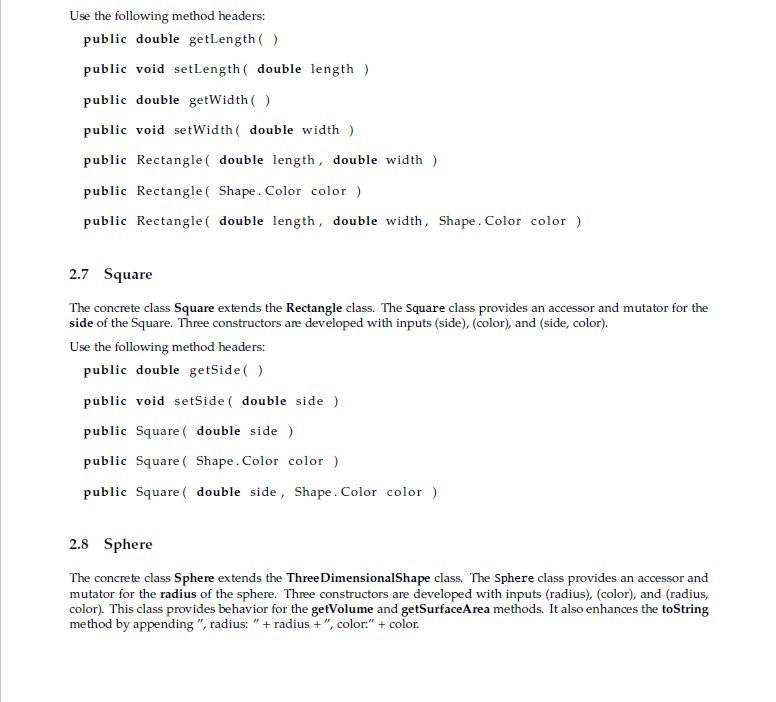
Use the following method headers:
public double getLength ( )
public void setLength ( double length )
public double getWidth ( )
public void setWidth ( double width )
public Rectangle ( double length , double width )
public Rectangle ( Shape.Color color )
public Rectangle ( double length , double width , Shape.Color color )
2.7 Square
The concrete class Square extends the Rectangle class. The Square class provides an accessor and mutator for the side of the Square. Three constructors are developed with inputs (side), (color), and (side, color).
Use the following method headers:
public double getSide ( )
public void setSide ( double side )
public Square ( double side )
public Square ( Shape . Color color )
public Square ( double side, Shape.Color color )
2.8 Sphere
The concrete class Sphere extends the ThreeDimensionalShape class. The Sphere class provides an accessor and mutator for the radius of the sphere. Three constructors are developed with inputs (radius), (color), and (radius, color). This class provides behavior for the getVolume and getSurfaceArea methods. It also enhances the toString method by appending ", radius: " + radius + ", color:" + color.
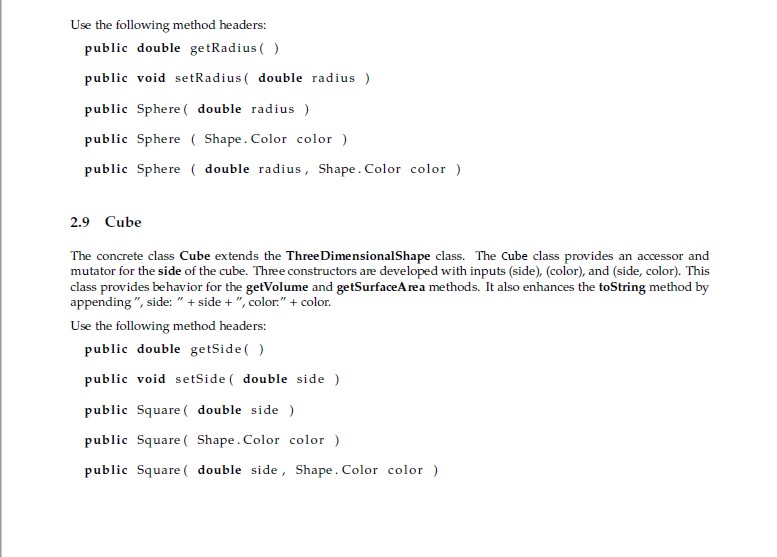
Use the following method headers:
public double getRadius ( )
public void setRadius ( double radius )
public Sphere ( double radius )
public Sphere ( Shape.Color color )
public Sphere ( double radius , Shape.Color color )
2.9 Cube
The concrete class Cube extends the ThreeDimensionalShape class. The Cube class provides an accessor and mutator for the side of the cube. Three constructors are developed with inputs (side), (color), and (side, color). This class provides behavior for the getVolume and getSurfaceArea methods. It also enhances the toString method by appending ", side: " + side + ", color:" + color.
Use the following method headers:
public double getSide ( )
public void setSide ( double side )
public Square ( double side )
public Square ( Shape . Color color )
public Square ( double side, Shape . Color color )
3 Testing
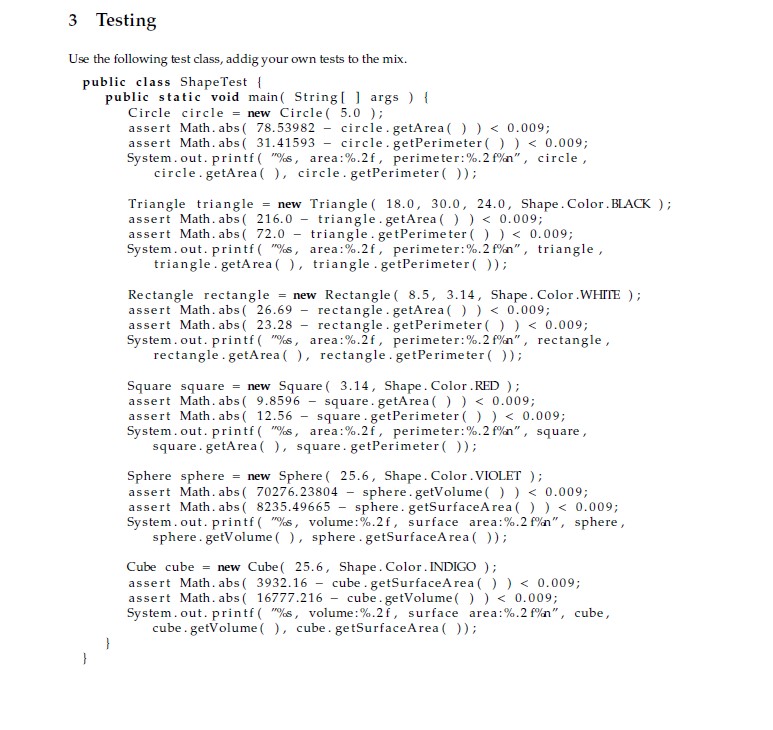
Use the following test class, adding your own tests to the mix.
public class ShapeTest {
public static void main (String [ ] args ) {
Circle circle = new Circle ( 5.0 ) ;
assert Math.abs ( 78.53982 ? circle.getArea ( ) )
assert Math.abs ( 31.41593 ? circle.getPerimeter ( ) )
System.out.printf ( "%s,area :%.2f, perimeter :%.2 f%n" , circle,
circle. getArea ( ) , c i r c l e . getPerimeter ( ) ) ;
Triangle triangle = new Triangle ( 18.0, 30.0, 24.0 , Shape . Color .BLACK ) ;
assert Math.abs ( 216.0 ? triangle.getArea ( ) )
assert Math.abs ( 72.0 ? triangle.getPerimeter ( ) )
System.out.p r i n t f ( "%s ,area :%.2 f, perimeter :%.2 f%n",triangle,
triangle.getArea ( ) ,triangle.getPerimeter ( ) ) ;
Rectanglerectangle = new Rectangle ( 8.5 , 3.1 4 , Shape.Color.WHITE ) ;
assert Math.abs ( 26.69 ? r e c t angle.getArea ( ) )
a s s e r t Math.abs ( 23.28 ? r e c t angl e . getPer imeter ( ) )
System.out.printf ( "%s , area :%.2 f , perimeter :%.2 f%n" , rectangle ,
rectangle. getArea ( ) , rectangle . getPerimeter ( ) ) ;
Square square = new Square ( 3 . 1 4 , Shape . Color .RED ) ;
assert Math.abs ( 9.8596 ? square . getArea ( ) )
assert Math.abs ( 12.56 ? square . getPerimeter ( ) )
System.out.printf ( "%s, area :%.2 f, per imeter :%.2 f%n", square ,
square.getArea ( ) , square . getPerimeter ( ) ) ;
Sphere sphere = new Sphere ( 2 5 . 6 , Shape . Color .VIOLET ) ;
assert Math.abs ( 70276.23804 ? sphere.getVolume ( ) )
assert Math.abs ( 8235.49665 ? sphere.getSurfaceArea ( ) )
System.out.printf ( "%s, volume :%.2 f , surface area :%.2 f%n" , sphere ,
sphere.getVolume ( ) , sphere.getSurfaceArea ( ) ) ;
Cube cube = new Cube ( 2 5 . 6 , Shape . Color . INDIGO ) ;
assert Math . abs ( 3932.16 ? cube . getSur faceArea ( ) )
assert Math . abs ( 16777.216 ? cube . getVolume ( ) )
System.out.printf ( "%s , volume :%.2 f , surface area :%.2 f%n" , cube ,
cube.getVolume ( ) , cube.getSurfaceArea ( ) ) ;
}
}
2.1 Shape The Shape interface provides public getColor and setColor methods. The colors are defined in a public enum, in the Shape class, whose values include TRANSPARENT, BLACK, RED, ORANGE, YELLOW, GREEN, BLUE, INDIGO, VIOLET, and WHITE. Use the following method headers: public Color getColor( ); public void setColor( Color color); 2.2 TwoDimensionalShape The abstract dass Two DimensionalShape implements the shape class, providing the Shape behavior for the getColor and setColor methods (which retrieve and store values of the Shape.Color enum) and the Object behavior for the toString method (which returns a string: "2D" + the shape name). This class also declares the abstract methods getArea and getPerimeter. Use the following method headers: public abstract double getArea( ); public abstract double getPerimeter ( ); 2.3 Three Dimensional Shape The abstract class Three Dimensional Shape implements the Shape class, providing the Shape behavior for the getColor and setColor methods (which retrieve and store values of the Shape.Color enum) and the Object behavior for the toString method (which returns a string: "3D" + the shape name). This class also declares the abstract methods getVolume and getSurfaceArea. Use the following method headers: public abstract double getSurface Area(); public abstract double getVolume(); 2.4 Circle The concrete class Circle extends the TwoDimensionalShape class. The Circle class provides accessors and mutators for the radius of the circle. Three constructors are developed with inputs (radius), (color), and (radius, color). This class provides behavior for the getArea and getPerimeter methods. It also enhances the toString method by appending", radius: " + radius +", color:" + color.
Step by Step Solution
3.34 Rating (157 Votes )
There are 3 Steps involved in it
Given the Shape interface as per the requirement with mentioned methods and enum Color Shapejava Shape interface public interface Shape public Color g... View full answer

Get step-by-step solutions from verified subject matter experts
 Study Help