







Question: The Third one is my draft but I dont know what should I do after this the program is matlab Please give me how to
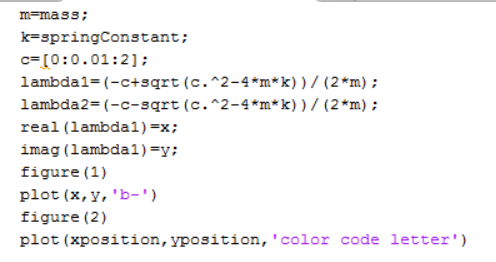
The Third one is my draft but I dont know what should I do after this
the program is matlab Please give me how to make script for this problem
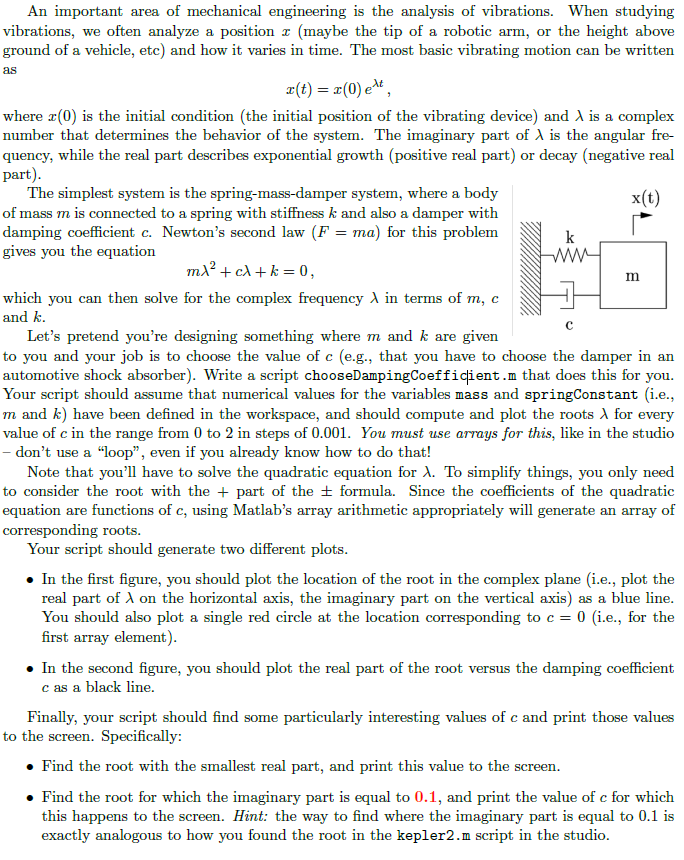
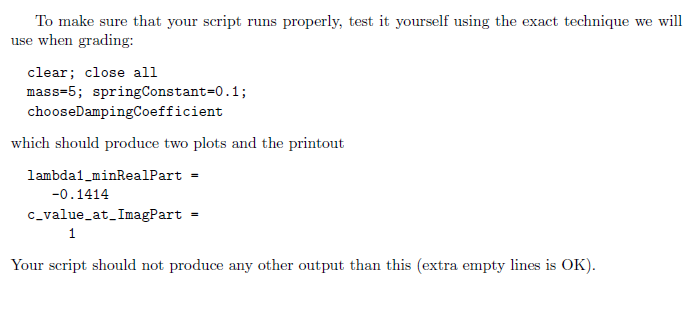
An important area of mechanical engineering is the analysis of vibrations. When studyinjg vibrations, we often analyze a position x (maybe the tip of a robotic arm, or the height above ground of a vehicle, etc) and how it varies in time. The most basic vibrating motion can be written as where x(O) is the initial condition (the initial position of the vibrating device) and is a complex number that determines the behavior of the system. The imaginary part of A is the angular fre- quency, while the real part describes exponential growth (positive real part) or decay (negative real part The simplest system is the spring-mass-damper system, where a body of mass m is connected to a spring with stiffness k and also a damper with damping coefficient c. Newton's second law (F ma) for this problem gives you the x(t) equation In which you can then solve for the complex frequency X in terms of m, c and k Let's pretend you're designing something where m and k are given to you and your job is to choose the value of c (e.g., that you have to choose the damper in an automotive shock absorber). Write a script chooseDampingCoefficient.m that does this for you. Your script should assume that numerical values for the variables mass and springConstant (i.e., m and k) have been defined in the workspace, and should compute and plot the roots for every value of c in the range from 0 to 2 in steps of 0.001. You must use arrays for this, like in the studio don't use a "loop", even if you already know how to do that! Note that you'll have to solve the quadratic equation for . To simplify things, you only need to consider the root with the + part of the formula. Since the coefficients of the quadratic equation are functions of c, using Matlab's array arithmetic appropriately will generate an array of corresponding roots Your script should generate two different plots . In the first figure, you should plot the location of the root in the complex plane (i.e., plot the real part of on the horizontal axis, the imaginary part on the vertical axis) as a blue line You should also plot a single red circle at the location corresponding to c 0 (i.e., for the first array element) In the second figure, you should plot the real part of the root versus the damping coefficient c as a black line. Finally, your script should find some particularly interesting values of c and print those values to the screen. Specifically: Find the root with the smallest real part, and print this value to the screen. o Find the root for which the imaginary part is equal to 0.1, and print the value of c for which this happens to the screen. Hint: the way to find where the imaginary part is equal to 0.1 is exactly analogous to how you found the root in the kepler2.m script in the studio An important area of mechanical engineering is the analysis of vibrations. When studyinjg vibrations, we often analyze a position x (maybe the tip of a robotic arm, or the height above ground of a vehicle, etc) and how it varies in time. The most basic vibrating motion can be written as where x(O) is the initial condition (the initial position of the vibrating device) and is a complex number that determines the behavior of the system. The imaginary part of A is the angular fre- quency, while the real part describes exponential growth (positive real part) or decay (negative real part The simplest system is the spring-mass-damper system, where a body of mass m is connected to a spring with stiffness k and also a damper with damping coefficient c. Newton's second law (F ma) for this problem gives you the x(t) equation In which you can then solve for the complex frequency X in terms of m, c and k Let's pretend you're designing something where m and k are given to you and your job is to choose the value of c (e.g., that you have to choose the damper in an automotive shock absorber). Write a script chooseDampingCoefficient.m that does this for you. Your script should assume that numerical values for the variables mass and springConstant (i.e., m and k) have been defined in the workspace, and should compute and plot the roots for every value of c in the range from 0 to 2 in steps of 0.001. You must use arrays for this, like in the studio don't use a "loop", even if you already know how to do that! Note that you'll have to solve the quadratic equation for . To simplify things, you only need to consider the root with the + part of the formula. Since the coefficients of the quadratic equation are functions of c, using Matlab's array arithmetic appropriately will generate an array of corresponding roots Your script should generate two different plots . In the first figure, you should plot the location of the root in the complex plane (i.e., plot the real part of on the horizontal axis, the imaginary part on the vertical axis) as a blue line You should also plot a single red circle at the location corresponding to c 0 (i.e., for the first array element) In the second figure, you should plot the real part of the root versus the damping coefficient c as a black line. Finally, your script should find some particularly interesting values of c and print those values to the screen. Specifically: Find the root with the smallest real part, and print this value to the screen. o Find the root for which the imaginary part is equal to 0.1, and print the value of c for which this happens to the screen. Hint: the way to find where the imaginary part is equal to 0.1 is exactly analogous to how you found the root in the kepler2.m script in the studio
Step by Step Solution
There are 3 Steps involved in it

Get step-by-step solutions from verified subject matter experts
 Study Help