







Question: The Youtube video above explains how to create data validation rules in Excel. Retrieve the spreadsheet attached to this assignment and use the Data Validation
The Youtube video above explains how to create data validation rules in Excel.
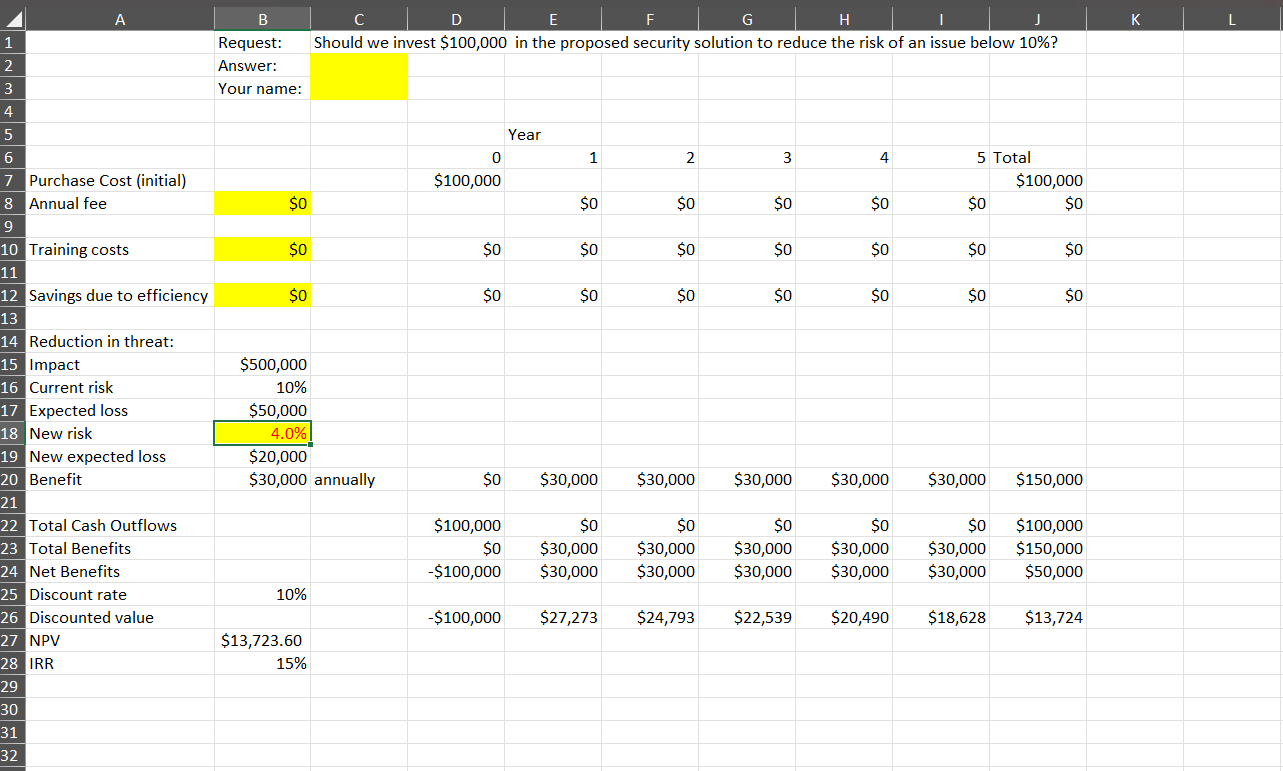
Retrieve the spreadsheet attached to this assignment and use the Data Validation control in Excel to accomplish the following controls:
Annual fee cannot exceed of purchase cost.
Training costs cannot exceed $ in year and $ thereafter.
Annual savings due to efficiency cannot exceed $ but must be zero in year
Cell Chighlighted in yellow to the right of the word Answer must force entry of either YES or NOno other values can be accepted.
Your name must appear in cell C and the cell must ensure that any name entered cannot exceed characters total.
Cell Bannual fee must NOT permit any alphabetic text.
The reduction in risk due to the security investment cell B must range between and inclusive.
Lock the spreadsheet so that data can only be entered in these cells all highlighted in yellow in the spreadsheet:
a C
b C
c B
d B
e B
f B
g D
Step by Step Solution
There are 3 Steps involved in it
1 Expert Approved Answer
Step: 1 Unlock

Question Has Been Solved by an Expert!
Get step-by-step solutions from verified subject matter experts
Step: 2 Unlock
Step: 3 Unlock
 Study Help