







Question: There are two classes in this project. Here's the code: import javax.swing.*; import java.awt.*; import java.awt.event.*; public class JBookQuote extends JFrame { FlowLayout flow =
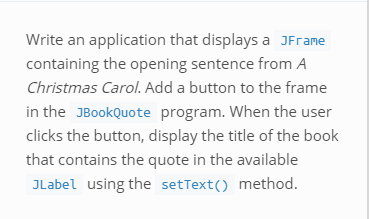
There are two classes in this project.
Here's the code:
import javax.swing.*; import java.awt.*; import java.awt.event.*; public class JBookQuote extends JFrame { FlowLayout flow = new FlowLayout(); JLabel msg1 = new JLabel("To begin with,"); JLabel msg2 = new JLabel("Marley was dead."); JButton button = new JButton("Click for source"); JLabel msg3 = new JLabel(); String title = "** A Christmas Carol **"; public JBookQuote() { // Write your code here }
@Override public void actionPerformed(ActionEvent e) { if (e.getSource().equals(button)) { } }
public static void main(String[] args) { JBookQuote aFrame = new JBookQuote(); aFrame.setSize(300, 150); aFrame.setVisible(true); } }
And this is the code for the other class:
import javax.swing.*; import java.awt.*; import java.awt.event.*; public class JBookQuote2 extends JFrame implements ActionListener { FlowLayout flow = new FlowLayout(); JLabel msg1 = new JLabel("To begin with,"); JLabel msg2 = new JLabel("Marley was dead."); JButton button = new JButton("Click for source"); JLabel msg3 = new JLabel("** A Christmas Carol **"); public JBookQuote2() { // Write your code here } @Override public void actionPerformed(ActionEvent e) { // Write your code here } public static void main(String[] args) { JBookQuote2 aFrame = new JBookQuote2(); aFrame.setSize(260, 150); aFrame.setVisible(true); } }
Write an application that displays a JFrane containing the opening sentence from A Christmas Carol. Add a button to the frame in the JBookQuote program. When the user clicks the button, display the title of the book that contains the quote in the available Label using the setText) method
Step by Step Solution
There are 3 Steps involved in it

Get step-by-step solutions from verified subject matter experts
 Study Help