







Question: ! ! ! THERE SHOULDN'T BE ANY EXTERNAL LIBRARIES ! ! ! ! This is an Embedded Systems lecture lab. Here is the explanation: 2
THERE SHOULDN'T BE ANY EXTERNAL LIBRARIES
This is an Embedded Systems lecture lab. Here is the explanation: Program the microcontroller by using C programming on Arduino IDE. Provide the connection between your computer and Arduino board. When your program runs, it should do the following task. Asegment display will be ON at beginning. You will enter any positive integer by using Serial Port Screen of Arduino IDE. Whatever you enter, it should be displayed on segment display. If you enter a onedigit number, it should be shown as usual. If for example, you entered a digits number, then and should be displayed on segment display with sec delay. B If you want to clear the segment display, you should enter the character b When cleared, segment display should be OFF. C Note that once you run the code, you should be able to try it infinitely without needing upload the program again or reset it
Lab
DISPLAYING UART DATA ON SEGMENT DISPLAY
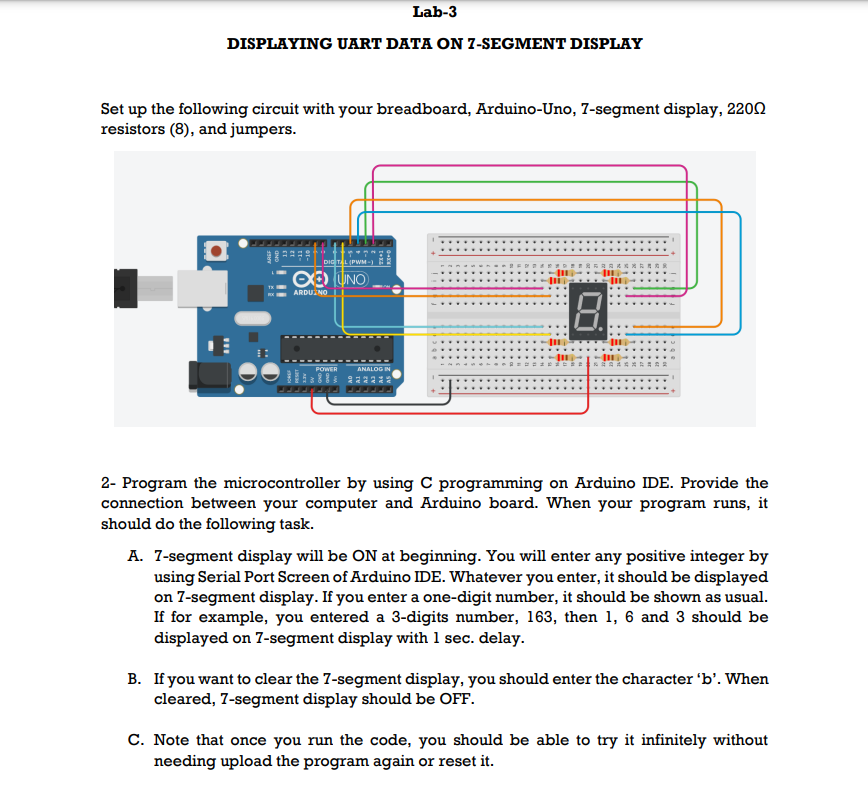
Set up the following circuit with your breadboard, ArduinoUno, segment display, Omega resistors and jumpers.
Program the microcontroller by using C programming on Arduino IDE. Provide the connection between your computer and Arduino board. When your program runs, it should do the following task.
Asegment display will be ON at beginning. You will enter any positive integer by using Serial Port Screen of Arduino IDE. Whatever you enter, it should be displayed on segment display. If you enter a onedigit number, it should be shown as usual. If for example, you entered a digits number, then and should be displayed on segment display with sec delay.
B If you want to clear the segment display, you should enter the character b When cleared, segment display should be OFF.
C Note that once you run the code, you should be able to try it infinitely without needing upload the program again or reset it PLEASE NOTE THAT THERE SHOULD NOT BE ANY EXTERNAL LIBRARIES IN THE CODE
Step by Step Solution
There are 3 Steps involved in it
1 Expert Approved Answer
Step: 1 Unlock

Question Has Been Solved by an Expert!
Get step-by-step solutions from verified subject matter experts
Step: 2 Unlock
Step: 3 Unlock
 Study Help