



Question: These are queries that use the full Red Cat Database as shown in Figure 3.1. To do these queries you cannot use the SimplifiedSales database.
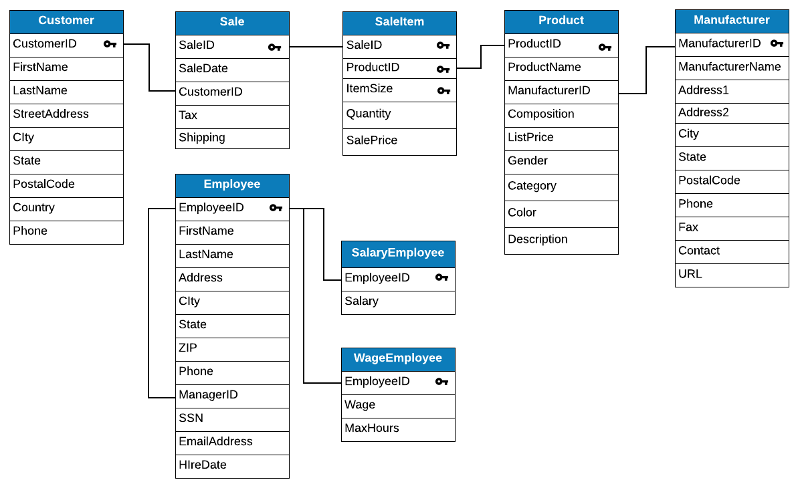
These are queries that use the full Red Cat Database as shown in Figure 3.1. To do these queries you cannot use the SimplifiedSales database. You must use the full Red Cat tables of Customer, Sale, SaleItem, Product, Manufacturer, and Employee tables.
For each information request below, formulate a single SQL query to produce the required information. In each case, you should display only the columns requested. Be sure that your queries do not produce duplicate records unless otherwise directed.
1. List Employees (first and last names) and their salaries of employees who have a salary higher than their managers. Use a correlated subquery in the WHERE clause.
2. Show employee information for the most recently hired employee in each city. (Most recent is Maximum hiredate). Use a correlated subquery in the WHERE clause. Sequence the data by city.
3. Give a list of Manufacturer names and IDs for manufacturers which only provide products valued over $30, i.e. whose cheapest product's list price is over $30. (Hint: Use a correlated subquery in WHERE clause)
4. Give a list of customers (IDs and Names) whose purchases during the month of January 2014 were always the same color. (Hint: Use a single correlated subquery with joins, and count distinct colors of purchased products in the WHERE clause.)
5. Give a list of customers (IDs and names) who have purchased multiple items, but all of which were the same color. Multiple items means more than one sale items. Use what you learned in a previous problem about counting colors. Use subqueries in the WHERE clause.
6. For each manufacturer (ManufacturerID) show the maximum list price of its products. Show only those manufacturers whose products have an average list price below the average list price of products from manufacturers in their state, and put the result in order by state. Use a correlated subquery in the HAVING clause. Show ManufacturerID, State, and MaxListPrice.
7. For each ManufacturerID and manufacturer name show the maximum list price of its products. Do this using a correlated subquery in the SELECT clause. Name the new column "MaxListPrice".
8. For each sale with non-zero tax, list the saleID and saledate, tax, and shipping, as well as the total of the sale. This sale total includes the quantity * saleprice of all the sale items on the sale plus the tax and shipping. Do this with a correlated subquery in the SELECT clause. Show data for February 2015. Name the new column "TotalSale".
Customer Sale Saleltem Product CustomerlD SaleID SaleID 0, ProductID FirstName SaleDate 0 CustomeriD Manufacturer ManufacturerID O ManufacturerName Address1 Address2 City 0 ProductID Item Size Quantity Sale Price Tax ProductName ManufacturerID Composition ListPrice Gender Category LastName StreetAddress City State Postal Code Country Shipping State PostalCode 0 Phone Color Employee Employeeld FirstName LastName Phone Fax Description Contact URL Address SalaryEmployee Employeeld Salary City State ZIP Phone ManagerID SSN WageEmployee Employeeld Wage MaxHours EmailAddress HlreDate Customer Sale Saleltem Product CustomerlD SaleID SaleID 0, ProductID FirstName SaleDate 0 CustomeriD Manufacturer ManufacturerID O ManufacturerName Address1 Address2 City 0 ProductID Item Size Quantity Sale Price Tax ProductName ManufacturerID Composition ListPrice Gender Category LastName StreetAddress City State Postal Code Country Shipping State PostalCode 0 Phone Color Employee Employeeld FirstName LastName Phone Fax Description Contact URL Address SalaryEmployee Employeeld Salary City State ZIP Phone ManagerID SSN WageEmployee Employeeld Wage MaxHours EmailAddress HlreDateStep by Step Solution
There are 3 Steps involved in it

Get step-by-step solutions from verified subject matter experts