







Question: these are the code what i've done so far,just wondering what should i add to make that form like the requirement shown orders - 1293
these are the code what i've done so far,just wondering what should i add to make that form like the requirement shown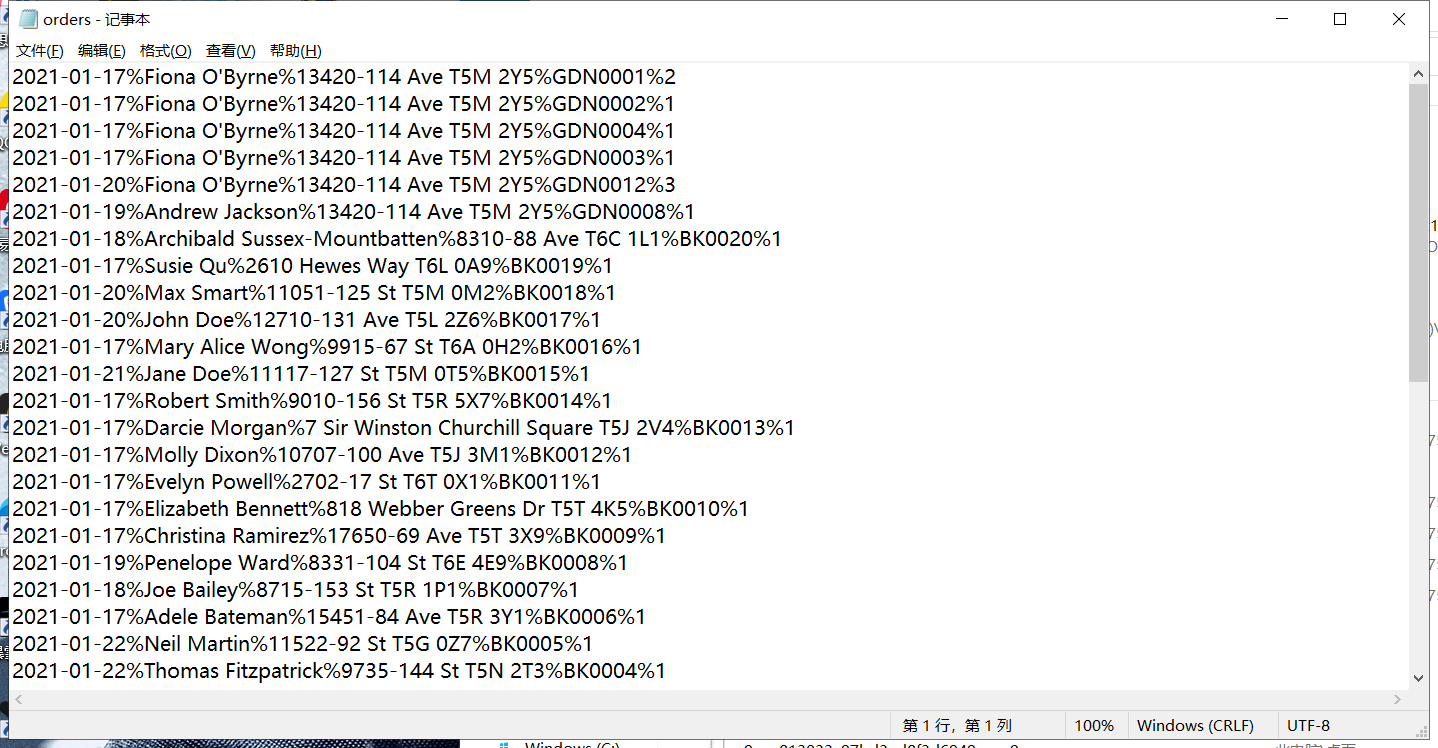
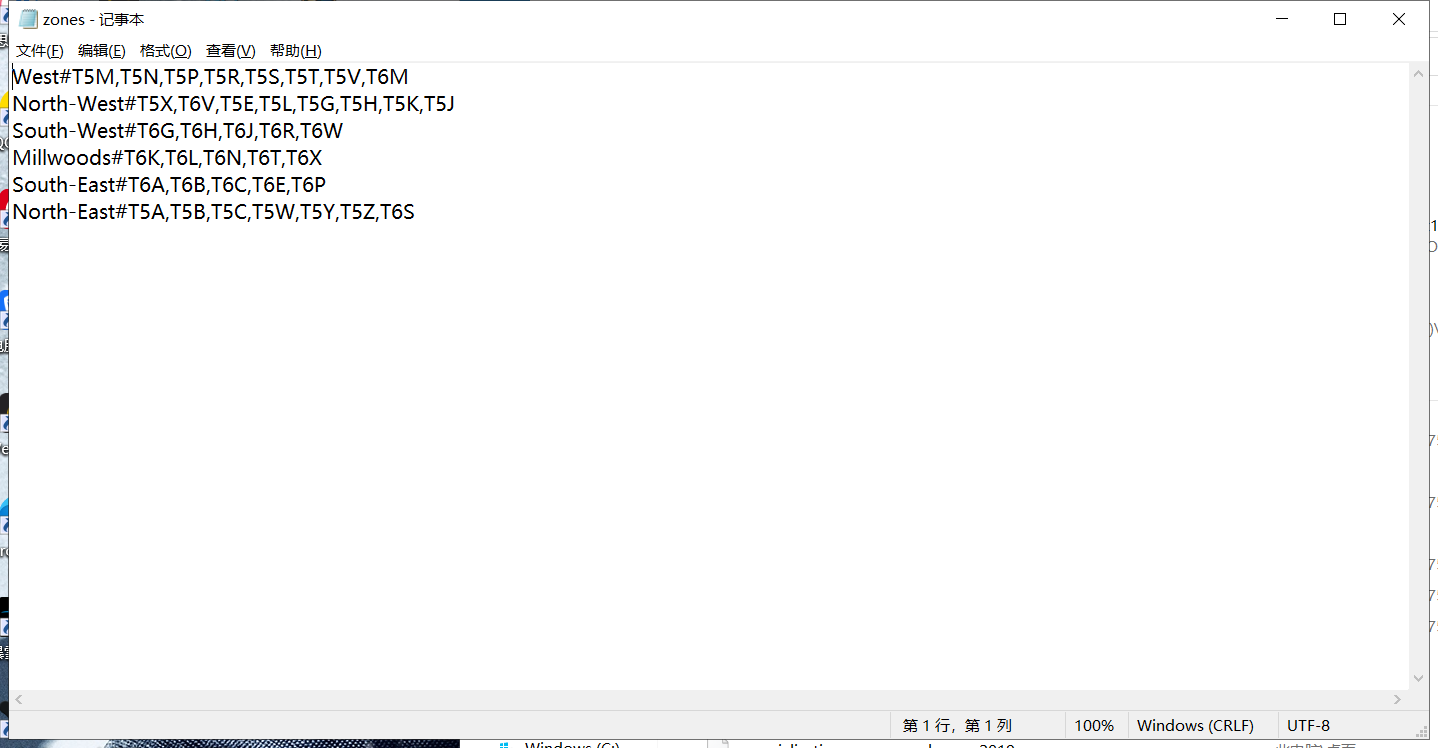
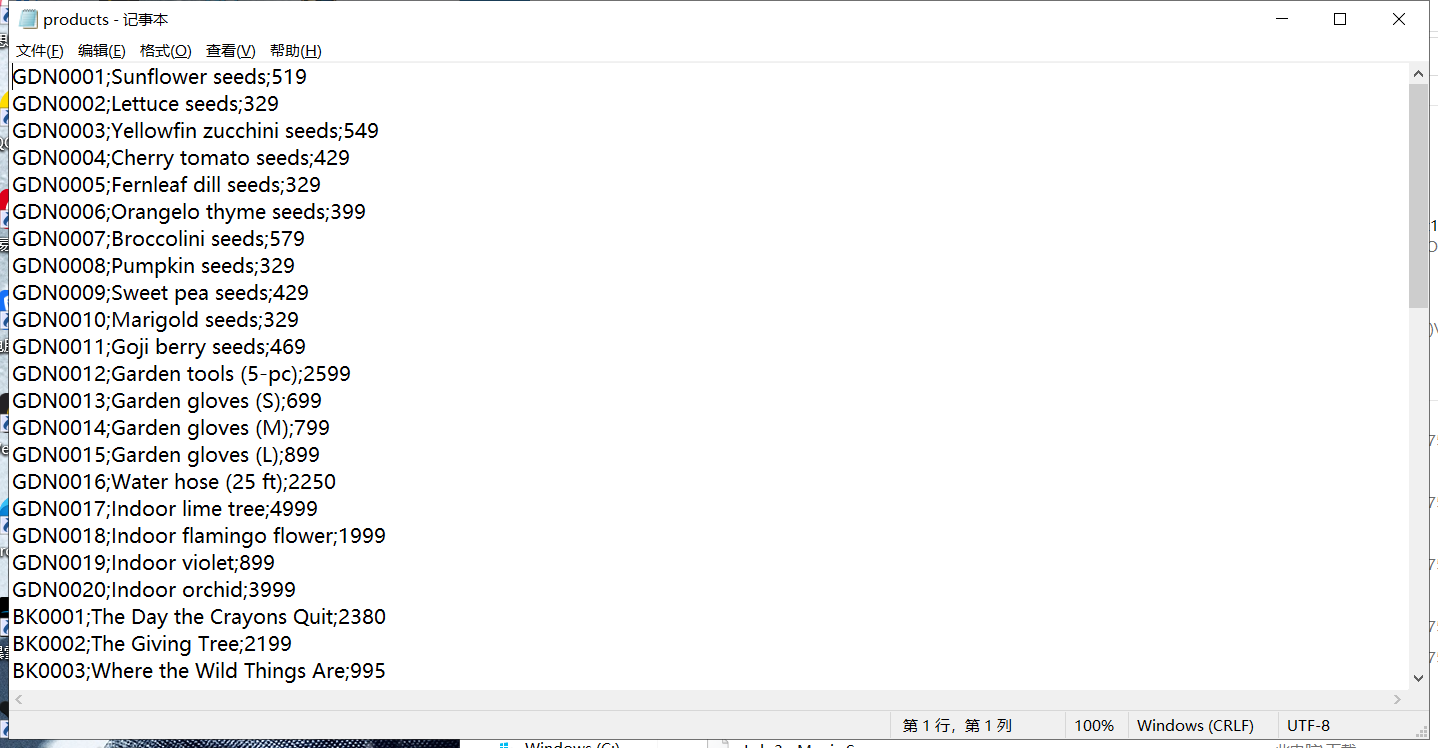
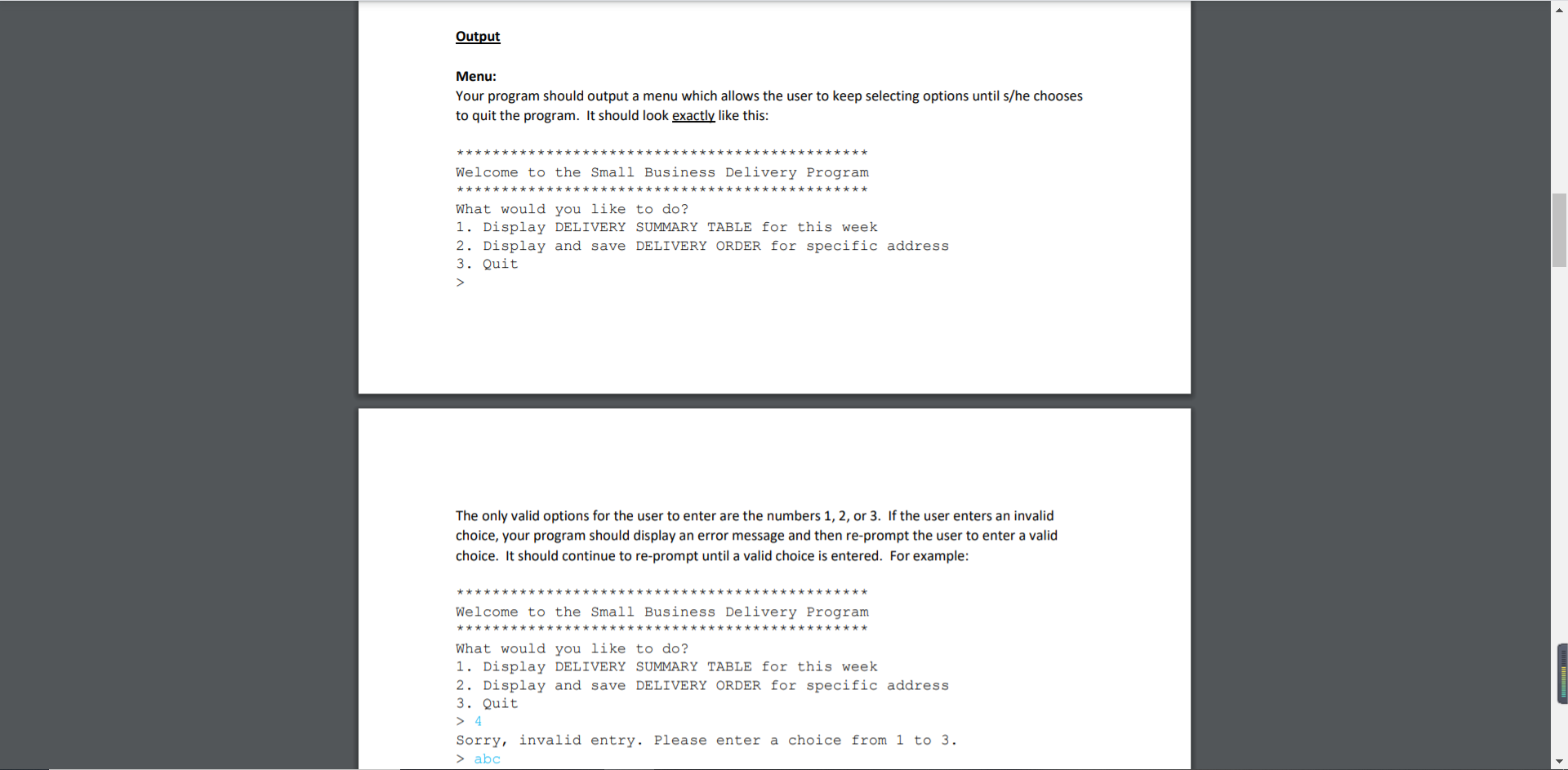
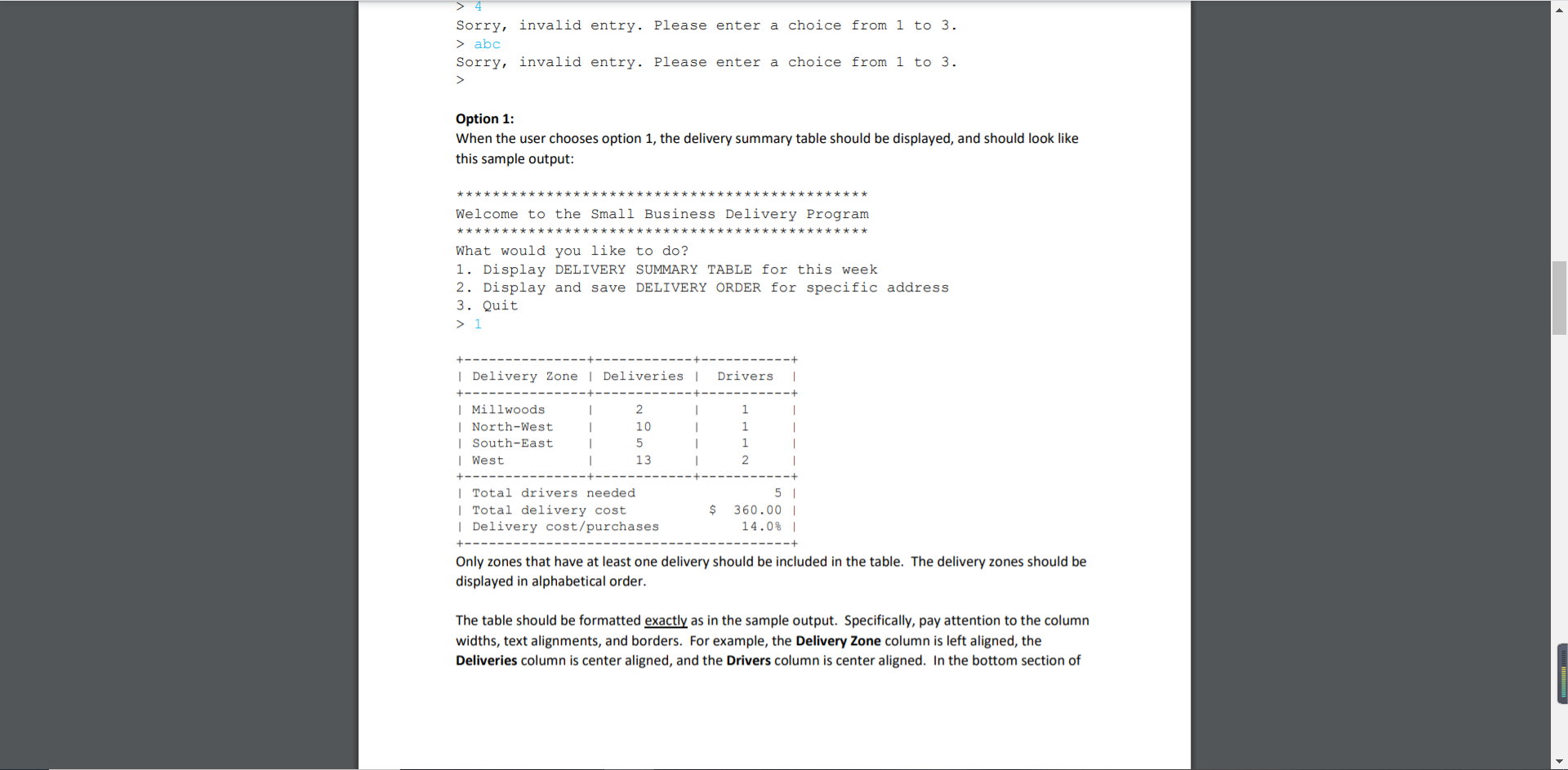
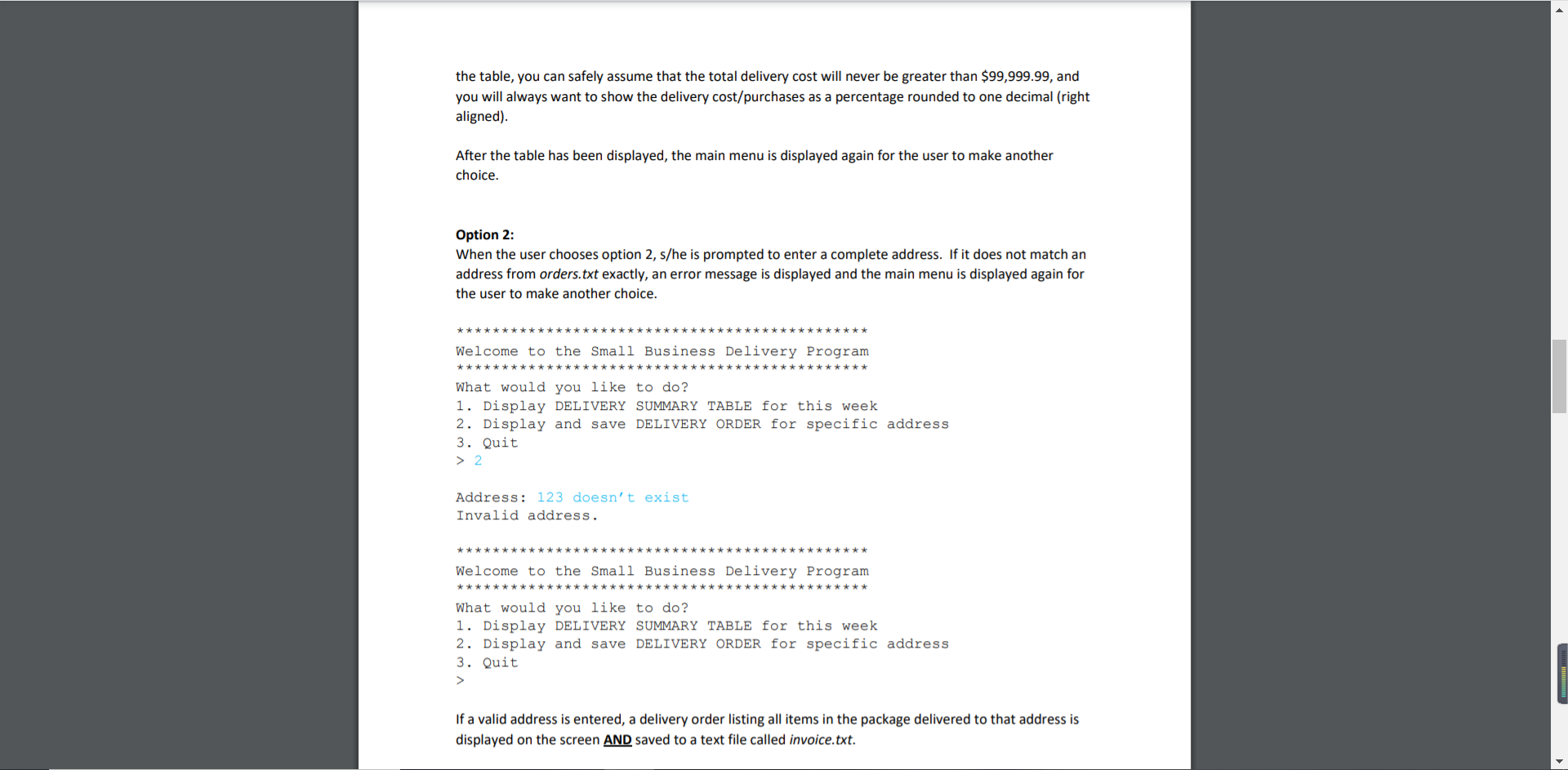
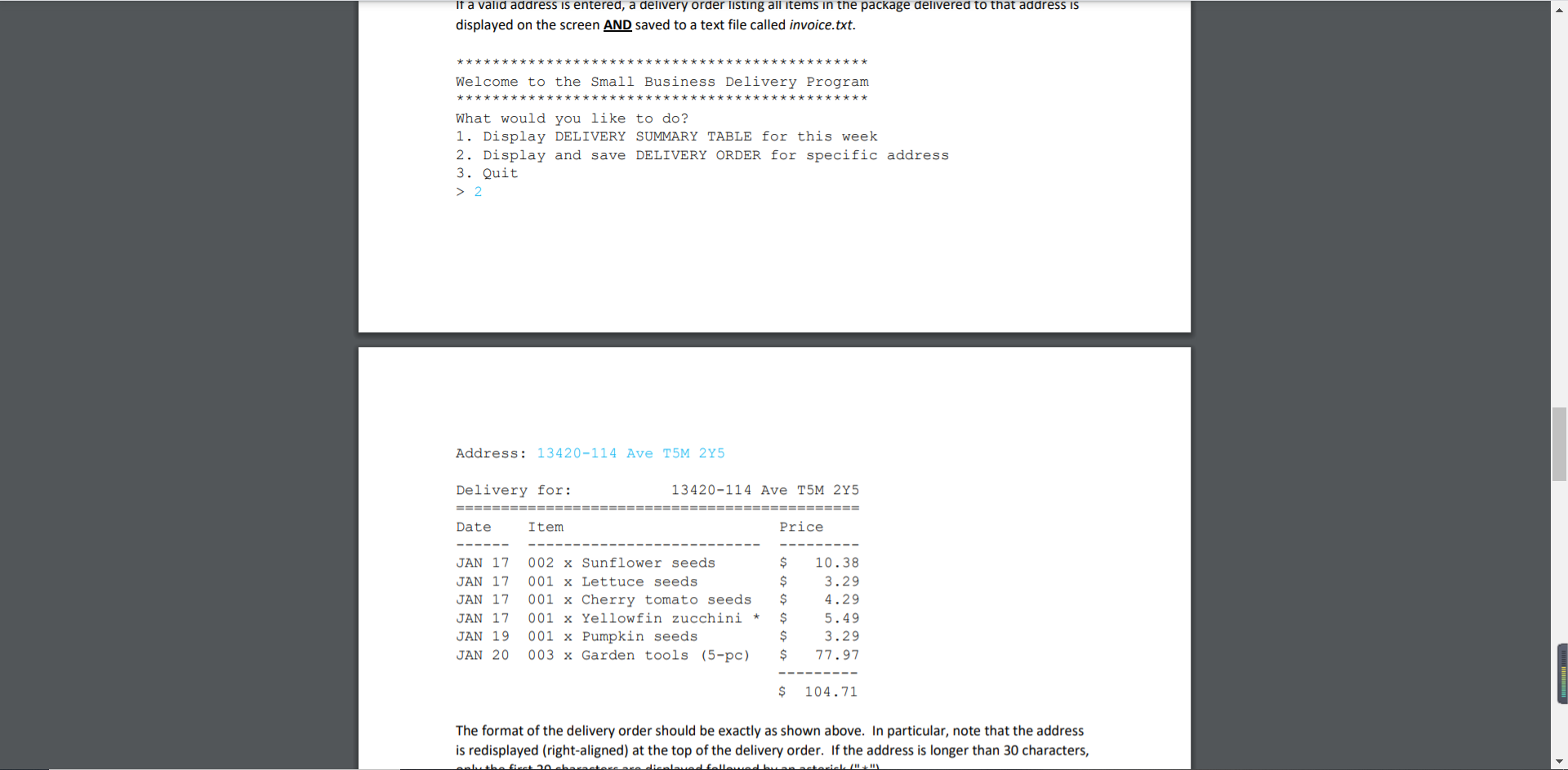
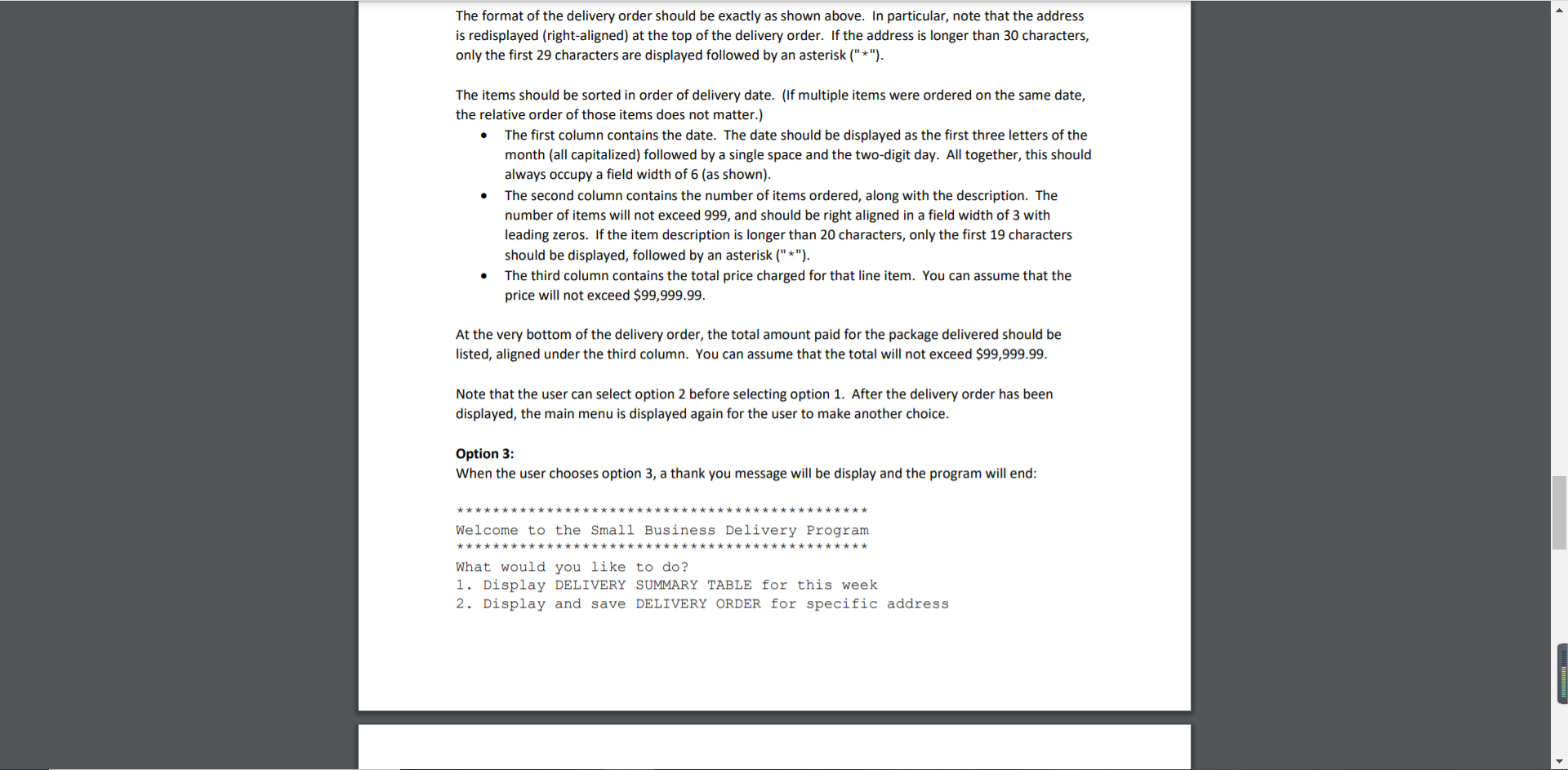
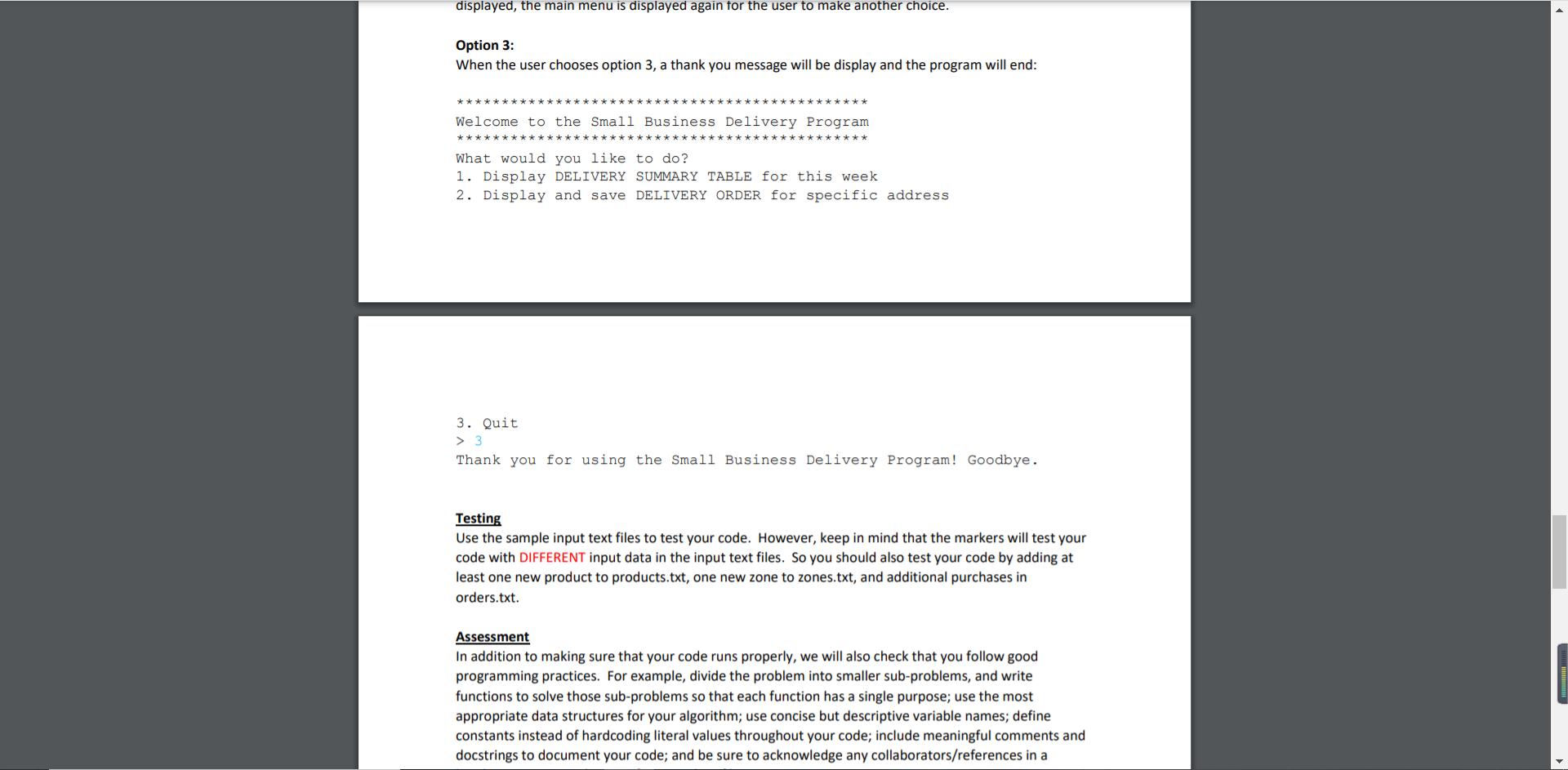
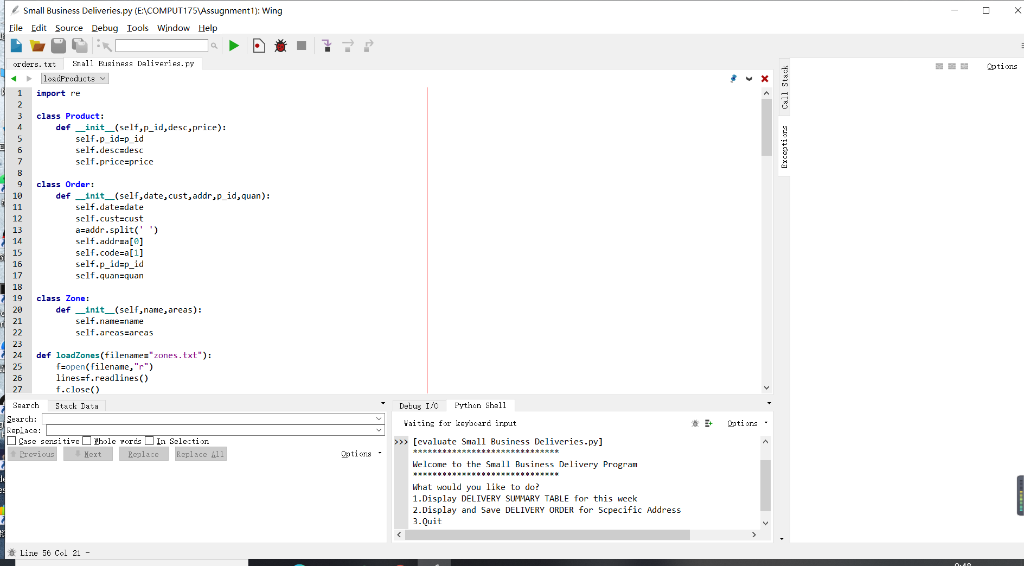
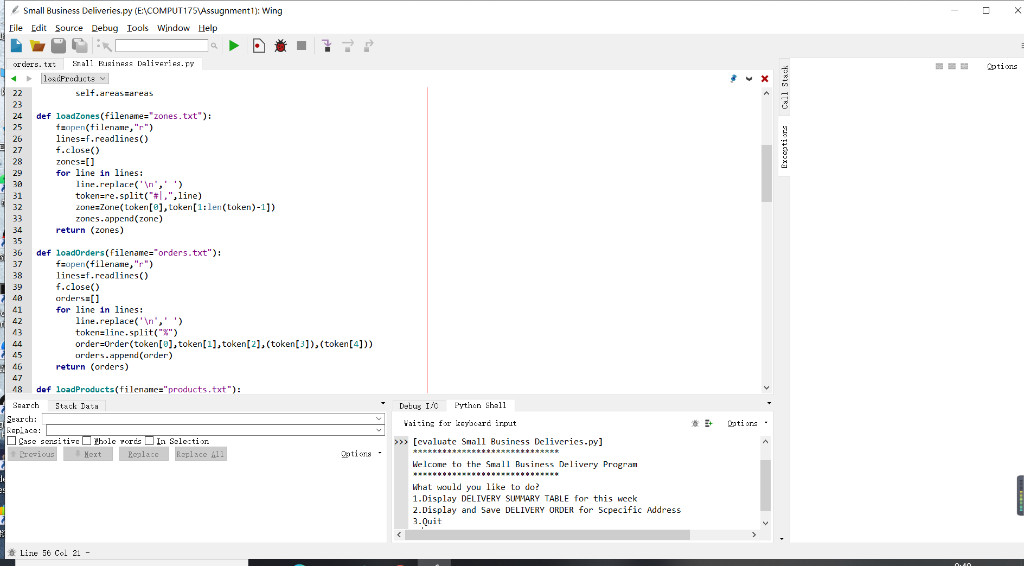
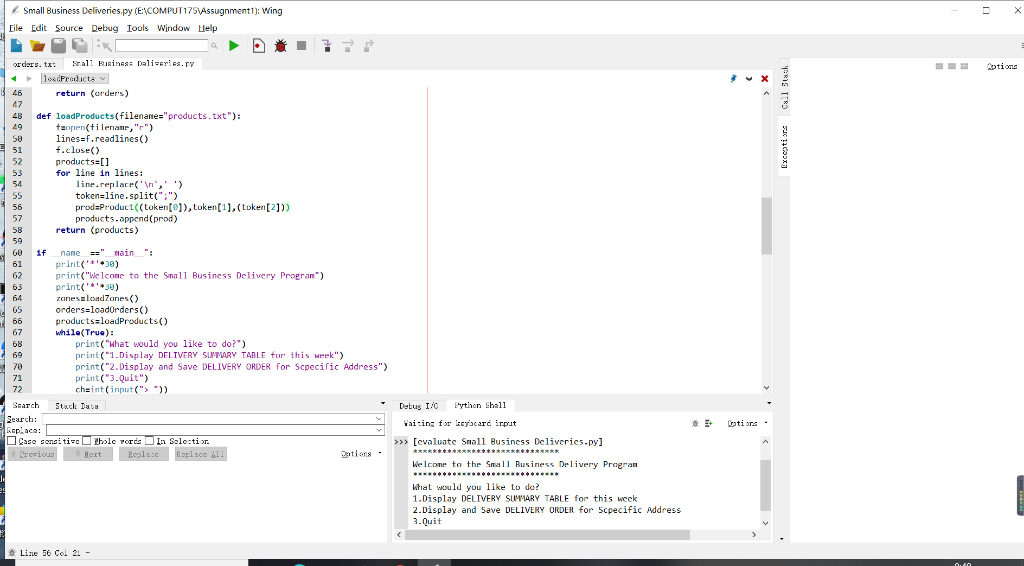
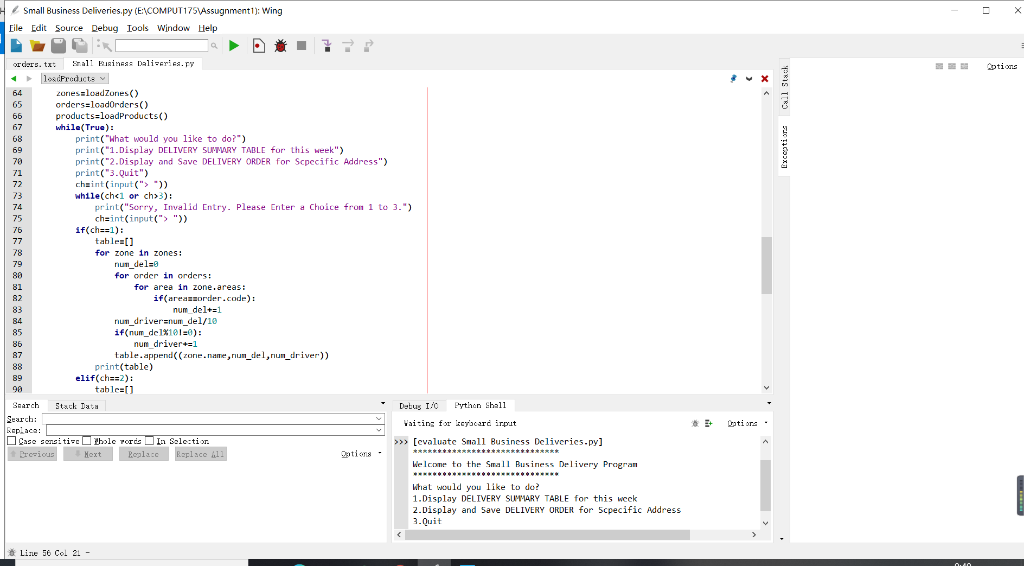
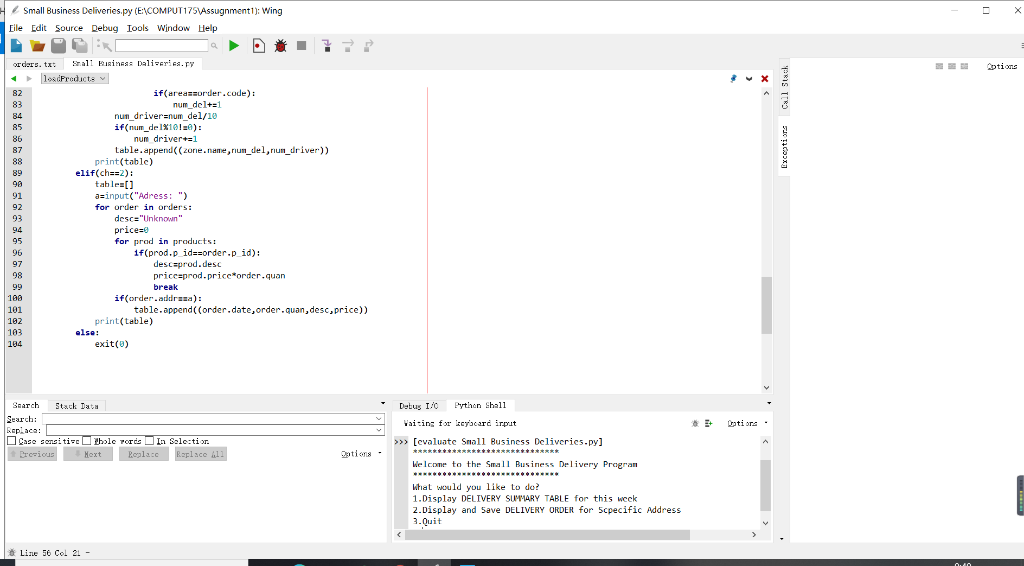
orders - 1293 (E) (E) (Q) V (H) 2021-01-17%Fiona O'Byrne%13420-114 Ave T5M 2Y5%GDN0001%2 2021-01-17%Fiona O'Byrne%13420-114 Ave T5M 2Y5%GDN0002%1 2021-01-17%Fiona O'Byrne%13420-114 Ave T5M 2Y5%GDN0004%1 2021-01-17%Fiona O'Byrne%13420-114 Ave T5M 2Y5%GDN0003%1 2021-01-20%Fiona O'Byrne%13420-114 Ave T5M 2Y5%GDN0012%3 2021-01-19%Andrew Jackson%13420-114 Ave T5M 2Y5%GDN0008%1 2021-01-18%Archibald Sussex-Mountbatten%8310-88 Ave T6C 1L1%BK0020%1 2021-01-17%Susie Qu%2610 Hewes Way T6L OA9%BK0019%1 2021-01-20%Max Smart%11051-125 St T5M OM2%BK0018%1 2021-01-20%John Doe%12710-131 Ave T5L 276%BK0017%1 JE 2021-01-17%Mary Alice Wong%9915-67 St T6A OH2%BK0016%1 2021-01-21%Jane Doe%11117-127 St T5M OT5%BK0015%1 2021-01-17%Robert Smith%9010-156 St T5R 5X7%BK0014%1 2021-01-17%Darcie Morgan%7 Sir Winston Churchill Square T5J 2V4%BK0013%1 2021-01-17%Molly Dixon%10707-100 Ave T5J 3M1%BK0012%1 2021-01-17%Evelyn Powell%2702-17 St TOT OX1%BK0011%1 2021-01-17%Elizabeth Bennett%818 Webber Greens Dr T5T 4K5%BK0010%1 2021-01-17%Christina Ramirez%17650-69 Ave T5T 3X9%BK0009%1 2021-01-19%Penelope Ward%8331-104 St T6E 4E9%BK0008%1 2021-01-18%Joe Bailey%8715-153 St T5R 1P1%BK0007%1 2021-01-17%Adele Bateman%15451-84 Ave T5R 3Y1%BK0006%1 2021-01-22%Neil Martin%11522-92 St T5G OZ7%BK0005%1 2021-01-22%Thomas Fitzpatrick%9735-144 St T5N 2T3%BK0004%1 115, 151 100% Windows (CRLF) UTF-8 1 Alindo I | Zones - (E) (E) (Q) V) (H) West#T5M,T5N,T5P,T5R,T5S,T5T,T5V,TOM North-West#T5X,T6V,T5E,T5L,T5G,T5H,T5K,T5J South-West#T6G,T6H,TOJ,TOR,T6W Millwoods#T6K,T6L,TON,T6T,T6X South-East#T6A,T6B,T6C,T6E,T6P North-East#T5A,T5B,T5C,T5W,T5Y,T5Z,T6S 115, 171 100% Windows (CRLF) UTF-8 Andon ( products - (E) (E) (0) V (H) GDN0001;Sunflower seeds;519 GDN0002;Lettuce seeds;329 GDN0003;Yellowfin zucchini seeds;549 GDN0004;Cherry tomato seeds;429 GDN0005;Fernleaf dill seeds;329 GDN0006; Orangelo thyme seeds;399 GDN0007;Broccolini seeds;579 GDN0008;Pumpkin seeds;329 GDN0009;Sweet pea seeds;429 GDN0010;Marigold seeds;329 GDN0011;Goji berry seeds;469 GDN0012;Garden tools (5-pc);2599 GDN0013;Garden gloves (S);699 GDN0014;Garden gloves (M);799 GDN0015;Garden gloves (L):899 GDN0016;Water hose (25 ft),2250 GDN0017;Indoor lime tree;4999 GDN0018;Indoor flamingo flower;1999 GDN0019;Indoor violet;899 GDN0020;Indoor orchid;3999 BK0001;The Day the Crayons Quit;2380 BK0002;The Giving Tree;2199 BK0003;Where the Wild Things Are;995 115, 151 100% Windows (CRLF) UTF-8 Aidon Output Menu: Your program should output a menu which allows the user to keep selecting options until s/he chooses to quit the program. It should look exactly like this: Welcome to the Small Business Delivery Program What would you like to do? 1. Display DELIVERY SUMMARY TABLE for this week 2. Display and save DELIVERY ORDER for specific address 3. Quit > The only valid options for the user to enter are the numbers 1, 2, or 3. If the user enters an invalid choice, your program should display an error message and then re-prompt the user to enter a valid choice. It should continue to re-prompt until a valid choice is entered. For example: ***** Welcome to the Small Business Delivery Program What would you like to do? 1. Display DELIVERY SUMMARY TABLE for this week 2. Display and save DELIVERY ORDER for specific address 3. Quit > 4 Sorry, invalid entry. Please enter a choice from 1 to 3. > abc Sorry, invalid entry. Please enter a choice from 1 to 3. > abc Sorry, invalid entry. Please enter a choice from 1 to 3. > Option 1: When the user chooses option 1, the delivery summary table should be displayed, and should look like this sample output: Welcome to the Small Business Delivery Program What would you like to do? 1. Display DELIVERY SUMMARY TABLE for this week 2. Display and save DELIVERY ORDER for specific address 3. Quit > 1 | Delivery Zone | Deliveries | Drivers | Millwoods | North-West | South-East | West 2 10 5 13 1 1 1 2 | | Total drivers needed | Total delivery cost | Delivery cost/purchases $ 5 360.00 14.0% Only zones that have at least one delivery should be included in the table. The delivery zones should be displayed in alphabetical order. The table should be formatted exactly as in the sample output. Specifically, pay attention to the column widths, text alignments, and borders. For example, the Delivery Zone column is left aligned, the Deliveries column is center aligned, and the Drivers column is center aligned. In the bottom section of the table, you can safely assume that the total delivery cost will never be greater than $99,999.99, and you will always want to show the delivery cost/purchases as a percentage rounded to one decimal (right aligned). After the table has been displayed, the main menu is displayed again for the user to make another choice. Option 2: When the user chooses option 2, s/he is prompted to enter a complete address. If it does not match an address from orders.txt exactly, an error message is displayed and the main menu is displayed again for the user to make another choice. Welcome to the Small Business Delivery Program ********* ******** What would you like to do? 1. Display DELIVERY SUMMARY TABLE for this week 2. Display and save DELIVERY ORDER for specific address 3. Quit > 2 Address: 123 doesn't exist Invalid address. Welcome to the Small Business Delivery Program *********** ********** What would you like to do? 1. Display DELIVERY SUMMARY TABLE for this week 2. Display and save DELIVERY ORDER for specific address 3. Quit > If a valid address is entered, a delivery order listing all items in the package delivered to that address is displayed on the screen AND saved to a text file called invoice.txt. If a valid address is entered, a delivery order listing all items in the package delivered to that address is displayed on the screen AND saved to a text file called invoice.txt. Welcome to the Small Business Delivery Program What would you like to do? 1. Display DELIVERY SUMMARY TABLE for this week 2. Display and save DELIVERY ORDER for specific address 3. Quit > 2 Address: 13420-114 Ave T5M 245 Delivery for: 13420-114 Ave T5M 275 ================ EEEEEEEEEEEEEEEEEEEEE Date Item Price JAN 17 JAN 17 JAN 17 JAN 17 JAN 19 JAN 20 002 x Sunflower seeds 001 x Lettuce seeds 001 x Cherry tomato seeds 001 x Yellowfin zucchini * 001 x Pumpkin seeds 003 x Garden tools (5-pc) $ $ $ $ $ $ 10.38 3.29 4.29 5.49 3.29 77.97 $ 104.71 The format of the delivery order should be exactly as shown above. In particular, note that the address is redisplayed (right-aligned) at the top of the delivery order. If the address is longer than 30 characters, dalamad followed by The format of the delivery order should be exactly as shown above. In particular, note that the address is redisplayed (right-aligned) at the top of the delivery order. If the address is longer than 30 characters, only the first 29 characters are displayed followed by an asterisk ("*"). The items should be sorted in order of delivery date. (If multiple items were ordered on the same date, the relative order of those items does not matter.) The first column contains the date. The date should be displayed as the first three letters of the month (all capitalized) followed by a single space and the two-digit day. All together, this should always occupy a field width of 6 (as shown). The second column contains the number of items ordered, along with the description. The number of items will not exceed 999, and should be right aligned in a field width of 3 with leading zeros. If the item description is longer than 20 characters, only the first 19 characters should be displayed, followed by an asterisk ("*"). The third column contains the total price charged for that line item. You can assume that the price will not exceed $99,999.99. At the very bottom of the delivery order, the total amount paid for the package delivered should be listed, aligned under the third column. You can assume that the total will not exceed $99,999.99. Note that the user can select option 2 before selecting option 1. After the delivery order has been displayed, the main menu is displayed again for the user to make another choice. Option 3: When the user chooses option 3, a thank you message will be display and the program will end: Welcome to the Small Business Delivery Program What would you like to do? 1. Display DELIVERY SUMMARY TABLE for this week 2. Display and save DELIVERY ORDER for specific address displayed, the main menu is displayed again for the user to make another choice. Option 3: When the user chooses option 3, a thank you message will be display and the program will end: Welcome to the Small Business Delivery Program What would you like to do? 1. Display DELIVERY SUMMARY TABLE for this week 2. Display and save DELIVERY ORDER for specific address 3. Quit > 3 Thank you for using the Small Business Delivery Program! Goodbye. Testing Use the sample input text files to test your code. However, keep in mind that the markers will test your code with DIFFERENT input data in the input text files. So you should also test your code by adding at least one new product to products.txt, one new zone to zones.txt, and additional purchases in orders.txt. Assessment In addition to making sure that your code runs properly, we will also check that you follow good programming practices. For example, divide the problem into smaller sub-problems, and write functions to solve those sub-problems so that each function has a single purpose; use the most appropriate data structures for your algorithm; use concise but descriptive variable names; define constants instead of hardcoding literal values throughout your code; include meaningful comments and docstrings to document your code; and be sure to acknowledge any collaborators/references in a Small Business Deliveries.py (E\COMPUT175 Assugnment1); Wing Eile Edit Source Debug Tools Window Help ptions Exceptisr Call Stack orders.txt Salt Bins Daliseries.TY los creducte 1 import pe 2 3 class Product: 4 der _init_(selt,p_id, desc,price): 5 self.p id=p id 6 self.descadese 7 self.pricceprice 8 9 class Order: 10 def __init__(self,date,cust, addr,p id, quan): 11 self.date date 12 self.cust=cust 13 a=addr.split(' ') 14 selt.addrea[] 15 self.code=0[1] 16 self.p_id=p_id 17 self.quanquan 18 19 class Zone: 20 def _init__(self,name, areas): 21 self.nane name 22 srit.arcassareas 23 24 def loadZones(filenames zones.txt"): 25 f=open(filenane, ".") 26 linesaf.readlines() 27 f.close() Search Stack Data Search: Geplaca: Case consiti- cble porcs In Selection Previous Next Replace Replace 411 Debug I/O Python shall Vaiting for cy'acard irpat Latine - dations >>> [evaluate Small Business Deliverics.py] ****************************** Welcome to the Small Business Delivery Program 14 What would you like to do? 1.Display DELIVERY SUMMARY TABLE for this week 2.Display and Save DELIVERY ORDER for 5cpecific Address 3. Quit Line 56 Col 21 - Small Business Deliveries.py (E\COMPUT175 Assugnmenti): Wing Eile Edit Source Debug Tools Window Help ptions Exceptie Call Stack orders.txt Shall wiring Dallvarle.ry loadFreducte 22 self.areas areas 23 24 def loadZones(filename="zones.txt"): 25 tsopen(tilenamp, ".") 26 lines=f.readlines() 27 f.close() 28 zones=[] 29 for line in lines: 30 line.replace(' ','') 31 token=re.split("#l.", line) 32 zone=Zone(token[@], token(1:len(token)-1]) 33 zones.append( zone) 34 return (zones) 35 36 def loadOrders(filename="orders.txt"): 37 fopen(filename, ".") 38 linesaf.readlines) 39 f.close() ordersei 41 for line in lines: 42 line.replace(' ','') 43 tokenaline.split("") 44 order=Order(token[0], token[1], token[2]. (token[3]), (token[4])) 45 orders.append(order) 46 return (orders) 47 48 def loadProducts(filename="products.txt"): Search Stack Data Search: Lepiaca: Case sensiti- cble porcs In Selection Precious Next Replace Raplace 411 dations Debug I/O Python shall Vaiting for cy'acard irpat Latine - >>> [evaluate Small Business Deliverics.py] ****************************** Welcome to the Small Business Delivery Program 14 What would you like to do? 1. Display DELIVERY SUMMARY TABLE for this week 2.Display and Save DELIVERY ORDER for 5cpecific Address 3.Quit Line 56 Col 21 - 00 ptions X Exceptisrs Call Stack Small Business Deliveries.py (E\COMPUT175 Assugnment1); Wing Eile Edit Source Debug Tools Window Help . orders.txt Shall wiring Dallvarle.ry losdreducte 46 return (order's) 47 48 def loadProducts(filename="products.txt") 49 taopen(tilename, "r") 50 lines=f.readlines() 51 f.close() 52 products=[] 53 for line in lines: 54 line.replace(' ','') 55 token=line.split(":") 56 prodProduct (token[@]), token(1),(token [2])) 57 products.append(prod) 58 return (products) 59 60 1f name="main": 61 print('*.30) 62 print("Welcome to the Small Business Delivery Program) 63 print(''+30) 64 zones loadZones) 65 orderseloadOrders() 66 products=loadProducts() 67 while(True): 68 print("What would you like to do?") 69 print("1.Display DELIVERY SUMMARY TABLE for this week") 70 print("2.Display and Save DELIVERY ORDER for Scpecific Address") 71 print("3. Quit") 72 cheint(input("")) Search Stack Data Search: Geplaca: Case sensiti- cble porcs In Selection Precious Next Replace Raplace 411 dations Debug I/O Python shall Latine - Vaiting for Ecocard irpat >>> [evaluate Small Business Deliverics.py] ****************************** Welcome to the Small Business Delivery Program 14 What would you like to do? 1.Display DELIVERY SUMMARY TABLE for this week 2.Display and Save DELIVERY ORDER for 5cpecific Address 3. Quit Line 56 Col 21 - 00 Small Business Deliveries.py (E\COMPUT17VAssugnmenti): Wing Eile Edit Source Debug Tools Window Help ptions Exceptisre Call Stack orders.txt Small Wiring Dalvarle.ry leadProducts 64 zories=load Zunes) 65 orderseloadOrders() 66 products-loadProducts() 67 while(True): 68 print("What would you like to do?) 69 print("1. Display DELIVERY SUMRY TABLE for this week") 70 print("2.Display and Save DELIVERY ORDER for Specific Address") 71 print("3. Quit") 72 chaint (input(">>> 73 while(chci or ch>3): 74 print("Sorry, Invalid Entry. Please Enter a choice from 1 to 3.") 75 cheint(input("")) 76 if(chal): 77 table=[] 78 for zone in zones: 79 num dela 80 for order in orders: 81 for area in zone.areas: 82 if(areas order.code): 83 num delta1 84 nur_driver=num_del/10 85 if(num_de1%101=0): 86 num driver = 1 87 table.append((zone.name,rium_del,rium_driver)) print(table) 89 elif(chas2) 98 table=[] Search Stack Data Debug I/O Python shall Search: Vaiting for cy'acard irpat Laplaca: Case sensiti- cblc Pords In Salestir >>> [evaluate Small Business Deliverics.py] Previous Hext Blace Blace 611 dations ****************************** Welcome to the Small Rusiness Delivery Program What would you like to do? 1.Display DELIVERY SUMMARY TABLE for this week 2.Display and Save DELIVERY ORDER for 5cpecific Address 3.Quit Line 56 Col 21 - 00 Small Business Deliveries.py (E\COMPUT175 Assugnment1); Wing Eile Edit Source Debug Tools Window Help ptions Exceptisre Call Stack orders.txt Shall wiring Dallvarle.ry loadFroducte 82 if(area=sorder.code): 83 num_deltal 84 nun_driver=num_del/10 85 if(num_de1%1013): 86 num drivertal 87 table.append((zone.name, rium_del,run_driver)) 88 print(table) 89 elif(ch==2): 98 tables[] 91 a=input("Adress: ") 92 for order in orders: 93 desc="Unknown" 94 price 95 for prad in products: 96 1f(prod.p_id=sorder.p id): 97 desc=prod.desc 98 price=prod.price order.quan 99 break 100 if(order addresa): 101 table.append((order.date,order.quan,desc, price)) 182 print(table) 1A3 else: 184 exit() Debug I/O Python shall Erotira . Search Stack Data Search: Replace: Case sensiti- cole Torde In Salestir Previous Next Replace Replace 411 Vaiting for cy'acard irpat >>> [evaluate Small Business Deliverics.py] ****************************** Welcome to the Small Business Delivery Program dations What would you like to do? 1. Display DELIVERY SUMMARY TABLE for this week 2.Display and Save DELIVERY ORDER for 5cpecific Address 3.Quit Line 56 Col 21 - 00 orders - 1293 (E) (E) (Q) V (H) 2021-01-17%Fiona O'Byrne%13420-114 Ave T5M 2Y5%GDN0001%2 2021-01-17%Fiona O'Byrne%13420-114 Ave T5M 2Y5%GDN0002%1 2021-01-17%Fiona O'Byrne%13420-114 Ave T5M 2Y5%GDN0004%1 2021-01-17%Fiona O'Byrne%13420-114 Ave T5M 2Y5%GDN0003%1 2021-01-20%Fiona O'Byrne%13420-114 Ave T5M 2Y5%GDN0012%3 2021-01-19%Andrew Jackson%13420-114 Ave T5M 2Y5%GDN0008%1 2021-01-18%Archibald Sussex-Mountbatten%8310-88 Ave T6C 1L1%BK0020%1 2021-01-17%Susie Qu%2610 Hewes Way T6L OA9%BK0019%1 2021-01-20%Max Smart%11051-125 St T5M OM2%BK0018%1 2021-01-20%John Doe%12710-131 Ave T5L 276%BK0017%1 JE 2021-01-17%Mary Alice Wong%9915-67 St T6A OH2%BK0016%1 2021-01-21%Jane Doe%11117-127 St T5M OT5%BK0015%1 2021-01-17%Robert Smith%9010-156 St T5R 5X7%BK0014%1 2021-01-17%Darcie Morgan%7 Sir Winston Churchill Square T5J 2V4%BK0013%1 2021-01-17%Molly Dixon%10707-100 Ave T5J 3M1%BK0012%1 2021-01-17%Evelyn Powell%2702-17 St TOT OX1%BK0011%1 2021-01-17%Elizabeth Bennett%818 Webber Greens Dr T5T 4K5%BK0010%1 2021-01-17%Christina Ramirez%17650-69 Ave T5T 3X9%BK0009%1 2021-01-19%Penelope Ward%8331-104 St T6E 4E9%BK0008%1 2021-01-18%Joe Bailey%8715-153 St T5R 1P1%BK0007%1 2021-01-17%Adele Bateman%15451-84 Ave T5R 3Y1%BK0006%1 2021-01-22%Neil Martin%11522-92 St T5G OZ7%BK0005%1 2021-01-22%Thomas Fitzpatrick%9735-144 St T5N 2T3%BK0004%1 115, 151 100% Windows (CRLF) UTF-8 1 Alindo I | Zones - (E) (E) (Q) V) (H) West#T5M,T5N,T5P,T5R,T5S,T5T,T5V,TOM North-West#T5X,T6V,T5E,T5L,T5G,T5H,T5K,T5J South-West#T6G,T6H,TOJ,TOR,T6W Millwoods#T6K,T6L,TON,T6T,T6X South-East#T6A,T6B,T6C,T6E,T6P North-East#T5A,T5B,T5C,T5W,T5Y,T5Z,T6S 115, 171 100% Windows (CRLF) UTF-8 Andon ( products - (E) (E) (0) V (H) GDN0001;Sunflower seeds;519 GDN0002;Lettuce seeds;329 GDN0003;Yellowfin zucchini seeds;549 GDN0004;Cherry tomato seeds;429 GDN0005;Fernleaf dill seeds;329 GDN0006; Orangelo thyme seeds;399 GDN0007;Broccolini seeds;579 GDN0008;Pumpkin seeds;329 GDN0009;Sweet pea seeds;429 GDN0010;Marigold seeds;329 GDN0011;Goji berry seeds;469 GDN0012;Garden tools (5-pc);2599 GDN0013;Garden gloves (S);699 GDN0014;Garden gloves (M);799 GDN0015;Garden gloves (L):899 GDN0016;Water hose (25 ft),2250 GDN0017;Indoor lime tree;4999 GDN0018;Indoor flamingo flower;1999 GDN0019;Indoor violet;899 GDN0020;Indoor orchid;3999 BK0001;The Day the Crayons Quit;2380 BK0002;The Giving Tree;2199 BK0003;Where the Wild Things Are;995 115, 151 100% Windows (CRLF) UTF-8 Aidon Output Menu: Your program should output a menu which allows the user to keep selecting options until s/he chooses to quit the program. It should look exactly like this: Welcome to the Small Business Delivery Program What would you like to do? 1. Display DELIVERY SUMMARY TABLE for this week 2. Display and save DELIVERY ORDER for specific address 3. Quit > The only valid options for the user to enter are the numbers 1, 2, or 3. If the user enters an invalid choice, your program should display an error message and then re-prompt the user to enter a valid choice. It should continue to re-prompt until a valid choice is entered. For example: ***** Welcome to the Small Business Delivery Program What would you like to do? 1. Display DELIVERY SUMMARY TABLE for this week 2. Display and save DELIVERY ORDER for specific address 3. Quit > 4 Sorry, invalid entry. Please enter a choice from 1 to 3. > abc Sorry, invalid entry. Please enter a choice from 1 to 3. > abc Sorry, invalid entry. Please enter a choice from 1 to 3. > Option 1: When the user chooses option 1, the delivery summary table should be displayed, and should look like this sample output: Welcome to the Small Business Delivery Program What would you like to do? 1. Display DELIVERY SUMMARY TABLE for this week 2. Display and save DELIVERY ORDER for specific address 3. Quit > 1 | Delivery Zone | Deliveries | Drivers | Millwoods | North-West | South-East | West 2 10 5 13 1 1 1 2 | | Total drivers needed | Total delivery cost | Delivery cost/purchases $ 5 360.00 14.0% Only zones that have at least one delivery should be included in the table. The delivery zones should be displayed in alphabetical order. The table should be formatted exactly as in the sample output. Specifically, pay attention to the column widths, text alignments, and borders. For example, the Delivery Zone column is left aligned, the Deliveries column is center aligned, and the Drivers column is center aligned. In the bottom section of the table, you can safely assume that the total delivery cost will never be greater than $99,999.99, and you will always want to show the delivery cost/purchases as a percentage rounded to one decimal (right aligned). After the table has been displayed, the main menu is displayed again for the user to make another choice. Option 2: When the user chooses option 2, s/he is prompted to enter a complete address. If it does not match an address from orders.txt exactly, an error message is displayed and the main menu is displayed again for the user to make another choice. Welcome to the Small Business Delivery Program ********* ******** What would you like to do? 1. Display DELIVERY SUMMARY TABLE for this week 2. Display and save DELIVERY ORDER for specific address 3. Quit > 2 Address: 123 doesn't exist Invalid address. Welcome to the Small Business Delivery Program *********** ********** What would you like to do? 1. Display DELIVERY SUMMARY TABLE for this week 2. Display and save DELIVERY ORDER for specific address 3. Quit > If a valid address is entered, a delivery order listing all items in the package delivered to that address is displayed on the screen AND saved to a text file called invoice.txt. If a valid address is entered, a delivery order listing all items in the package delivered to that address is displayed on the screen AND saved to a text file called invoice.txt. Welcome to the Small Business Delivery Program What would you like to do? 1. Display DELIVERY SUMMARY TABLE for this week 2. Display and save DELIVERY ORDER for specific address 3. Quit > 2 Address: 13420-114 Ave T5M 245 Delivery for: 13420-114 Ave T5M 275 ================ EEEEEEEEEEEEEEEEEEEEE Date Item Price JAN 17 JAN 17 JAN 17 JAN 17 JAN 19 JAN 20 002 x Sunflower seeds 001 x Lettuce seeds 001 x Cherry tomato seeds 001 x Yellowfin zucchini * 001 x Pumpkin seeds 003 x Garden tools (5-pc) $ $ $ $ $ $ 10.38 3.29 4.29 5.49 3.29 77.97 $ 104.71 The format of the delivery order should be exactly as shown above. In particular, note that the address is redisplayed (right-aligned) at the top of the delivery order. If the address is longer than 30 characters, dalamad followed by The format of the delivery order should be exactly as shown above. In particular, note that the address is redisplayed (right-aligned) at the top of the delivery order. If the address is longer than 30 characters, only the first 29 characters are displayed followed by an asterisk ("*"). The items should be sorted in order of delivery date. (If multiple items were ordered on the same date, the relative order of those items does not matter.) The first column contains the date. The date should be displayed as the first three letters of the month (all capitalized) followed by a single space and the two-digit day. All together, this should always occupy a field width of 6 (as shown). The second column contains the number of items ordered, along with the description. The number of items will not exceed 999, and should be right aligned in a field width of 3 with leading zeros. If the item description is longer than 20 characters, only the first 19 characters should be displayed, followed by an asterisk ("*"). The third column contains the total price charged for that line item. You can assume that the price will not exceed $99,999.99. At the very bottom of the delivery order, the total amount paid for the package delivered should be listed, aligned under the third column. You can assume that the total will not exceed $99,999.99. Note that the user can select option 2 before selecting option 1. After the delivery order has been displayed, the main menu is displayed again for the user to make another choice. Option 3: When the user chooses option 3, a thank you message will be display and the program will end: Welcome to the Small Business Delivery Program What would you like to do? 1. Display DELIVERY SUMMARY TABLE for this week 2. Display and save DELIVERY ORDER for specific address displayed, the main menu is displayed again for the user to make another choice. Option 3: When the user chooses option 3, a thank you message will be display and the program will end: Welcome to the Small Business Delivery Program What would you like to do? 1. Display DELIVERY SUMMARY TABLE for this week 2. Display and save DELIVERY ORDER for specific address 3. Quit > 3 Thank you for using the Small Business Delivery Program! Goodbye. Testing Use the sample input text files to test your code. However, keep in mind that the markers will test your code with DIFFERENT input data in the input text files. So you should also test your code by adding at least one new product to products.txt, one new zone to zones.txt, and additional purchases in orders.txt. Assessment In addition to making sure that your code runs properly, we will also check that you follow good programming practices. For example, divide the problem into smaller sub-problems, and write functions to solve those sub-problems so that each function has a single purpose; use the most appropriate data structures for your algorithm; use concise but descriptive variable names; define constants instead of hardcoding literal values throughout your code; include meaningful comments and docstrings to document your code; and be sure to acknowledge any collaborators/references in a Small Business Deliveries.py (E\COMPUT175 Assugnment1); Wing Eile Edit Source Debug Tools Window Help ptions Exceptisr Call Stack orders.txt Salt Bins Daliseries.TY los creducte 1 import pe 2 3 class Product: 4 der _init_(selt,p_id, desc,price): 5 self.p id=p id 6 self.descadese 7 self.pricceprice 8 9 class Order: 10 def __init__(self,date,cust, addr,p id, quan): 11 self.date date 12 self.cust=cust 13 a=addr.split(' ') 14 selt.addrea[] 15 self.code=0[1] 16 self.p_id=p_id 17 self.quanquan 18 19 class Zone: 20 def _init__(self,name, areas): 21 self.nane name 22 srit.arcassareas 23 24 def loadZones(filenames zones.txt"): 25 f=open(filenane, ".") 26 linesaf.readlines() 27 f.close() Search Stack Data Search: Geplaca: Case consiti- cble porcs In Selection Previous Next Replace Replace 411 Debug I/O Python shall Vaiting for cy'acard irpat Latine - dations >>> [evaluate Small Business Deliverics.py] ****************************** Welcome to the Small Business Delivery Program 14 What would you like to do? 1.Display DELIVERY SUMMARY TABLE for this week 2.Display and Save DELIVERY ORDER for 5cpecific Address 3. Quit Line 56 Col 21 - Small Business Deliveries.py (E\COMPUT175 Assugnmenti): Wing Eile Edit Source Debug Tools Window Help ptions Exceptie Call Stack orders.txt Shall wiring Dallvarle.ry loadFreducte 22 self.areas areas 23 24 def loadZones(filename="zones.txt"): 25 tsopen(tilenamp, ".") 26 lines=f.readlines() 27 f.close() 28 zones=[] 29 for line in lines: 30 line.replace(' ','') 31 token=re.split("#l.", line) 32 zone=Zone(token[@], token(1:len(token)-1]) 33 zones.append( zone) 34 return (zones) 35 36 def loadOrders(filename="orders.txt"): 37 fopen(filename, ".") 38 linesaf.readlines) 39 f.close() ordersei 41 for line in lines: 42 line.replace(' ','') 43 tokenaline.split("") 44 order=Order(token[0], token[1], token[2]. (token[3]), (token[4])) 45 orders.append(order) 46 return (orders) 47 48 def loadProducts(filename="products.txt"): Search Stack Data Search: Lepiaca: Case sensiti- cble porcs In Selection Precious Next Replace Raplace 411 dations Debug I/O Python shall Vaiting for cy'acard irpat Latine - >>> [evaluate Small Business Deliverics.py] ****************************** Welcome to the Small Business Delivery Program 14 What would you like to do? 1. Display DELIVERY SUMMARY TABLE for this week 2.Display and Save DELIVERY ORDER for 5cpecific Address 3.Quit Line 56 Col 21 - 00 ptions X Exceptisrs Call Stack Small Business Deliveries.py (E\COMPUT175 Assugnment1); Wing Eile Edit Source Debug Tools Window Help . orders.txt Shall wiring Dallvarle.ry losdreducte 46 return (order's) 47 48 def loadProducts(filename="products.txt") 49 taopen(tilename, "r") 50 lines=f.readlines() 51 f.close() 52 products=[] 53 for line in lines: 54 line.replace(' ','') 55 token=line.split(":") 56 prodProduct (token[@]), token(1),(token [2])) 57 products.append(prod) 58 return (products) 59 60 1f name="main": 61 print('*.30) 62 print("Welcome to the Small Business Delivery Program) 63 print(''+30) 64 zones loadZones) 65 orderseloadOrders() 66 products=loadProducts() 67 while(True): 68 print("What would you like to do?") 69 print("1.Display DELIVERY SUMMARY TABLE for this week") 70 print("2.Display and Save DELIVERY ORDER for Scpecific Address") 71 print("3. Quit") 72 cheint(input("")) Search Stack Data Search: Geplaca: Case sensiti- cble porcs In Selection Precious Next Replace Raplace 411 dations Debug I/O Python shall Latine - Vaiting for Ecocard irpat >>> [evaluate Small Business Deliverics.py] ****************************** Welcome to the Small Business Delivery Program 14 What would you like to do? 1.Display DELIVERY SUMMARY TABLE for this week 2.Display and Save DELIVERY ORDER for 5cpecific Address 3. Quit Line 56 Col 21 - 00 Small Business Deliveries.py (E\COMPUT17VAssugnmenti): Wing Eile Edit Source Debug Tools Window Help ptions Exceptisre Call Stack orders.txt Small Wiring Dalvarle.ry leadProducts 64 zories=load Zunes) 65 orderseloadOrders() 66 products-loadProducts() 67 while(True): 68 print("What would you like to do?) 69 print("1. Display DELIVERY SUMRY TABLE for this week") 70 print("2.Display and Save DELIVERY ORDER for Specific Address") 71 print("3. Quit") 72 chaint (input(">>> 73 while(chci or ch>3): 74 print("Sorry, Invalid Entry. Please Enter a choice from 1 to 3.") 75 cheint(input("")) 76 if(chal): 77 table=[] 78 for zone in zones: 79 num dela 80 for order in orders: 81 for area in zone.areas: 82 if(areas order.code): 83 num delta1 84 nur_driver=num_del/10 85 if(num_de1%101=0): 86 num driver = 1 87 table.append((zone.name,rium_del,rium_driver)) print(table) 89 elif(chas2) 98 table=[] Search Stack Data Debug I/O Python shall Search: Vaiting for cy'acard irpat Laplaca: Case sensiti- cblc Pords In Salestir >>> [evaluate Small Business Deliverics.py] Previous Hext Blace Blace 611 dations ****************************** Welcome to the Small Rusiness Delivery Program What would you like to do? 1.Display DELIVERY SUMMARY TABLE for this week 2.Display and Save DELIVERY ORDER for 5cpecific Address 3.Quit Line 56 Col 21 - 00 Small Business Deliveries.py (E\COMPUT175 Assugnment1); Wing Eile Edit Source Debug Tools Window Help ptions Exceptisre Call Stack orders.txt Shall wiring Dallvarle.ry loadFroducte 82 if(area=sorder.code): 83 num_deltal 84 nun_driver=num_del/10 85 if(num_de1%1013): 86 num drivertal 87 table.append((zone.name, rium_del,run_driver)) 88 print(table) 89 elif(ch==2): 98 tables[] 91 a=input("Adress: ") 92 for order in orders: 93 desc="Unknown" 94 price 95 for prad in products: 96 1f(prod.p_id=sorder.p id): 97 desc=prod.desc 98 price=prod.price order.quan 99 break 100 if(order addresa): 101 table.append((order.date,order.quan,desc, price)) 182 print(table) 1A3 else: 184 exit() Debug I/O Python shall Erotira . Search Stack Data Search: Replace: Case sensiti- cole Torde In Salestir Previous Next Replace Replace 411 Vaiting for cy'acard irpat >>> [evaluate Small Business Deliverics.py] ****************************** Welcome to the Small Business Delivery Program dations What would you like to do? 1. Display DELIVERY SUMMARY TABLE for this week 2.Display and Save DELIVERY ORDER for 5cpecific Address 3.Quit Line 56 Col 21 - 00
Step by Step Solution
There are 3 Steps involved in it

Get step-by-step solutions from verified subject matter experts
 Study Help