







Question: This almost worked, but I got a few errors. Code below. Question and errors in photos. def main ( ) : # Step 1 :
This almost worked, but I got a few errors. Code below. Question and errors in photos.
def main:
# Step : Read input file name from user
inputfile inputEnter the input file name:
# Step : Read input file and process data
with openinputfile, r as file:
lines file.readlines
# Step : Parse input data into dictionary
tvshows
for i in range lenlines:
seasons intlinesistrip
showtitle linesi strip
if seasons in tvshows:
tvshowsseasonsappendshowtitle
else:
tvshowsseasonsshowtitle
# Step : Sort dictionary by keys descending order
sortedbykeys dictsortedtvshows.items reverseTrue
# Step : Output sorted by keys to outputkeys.txt
with openoutputkeys.txtw as keysfile:
for key, shows in sortedbykeys.items:
showslist ; joinshows
keysfile.writefkey: showslist
# Step : Sort dictionary by values reverse alphabetical order
sortedbyvalues dictsortedtvshows.items keylambda item: item reverseTrue
# Step : Output sorted by values to outputtitles.txt
with openoutputtitles.txtw as titlesfile:
for key, shows in sortedbyvalues.items:
for show in sortedshows reverseTrue:
titlesfile.writefshow
if namemain:
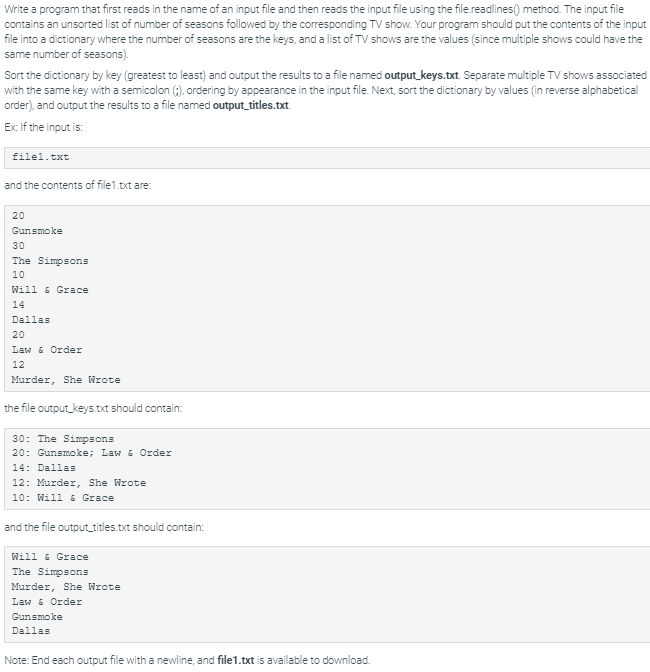
main Write a program that first reads in the name of an input file and then reads the input file using the file readlines method. The input file
contains an unsorted list of number of seasons followed by the corresponding TV show. Your program should put the contents of the input
file into a dictionary where the number of seasons are the keys, and a list of shows are the values since multiple shows could have the
same number of seasons
Sort the dictionary by key greatest to least and output the results to a file named outputkeys.txt Separate multiple TV shows associated
with the same key with a semicolon ordering by appearance in the input file. Next, sort the dictionary by values in reverse alphabetical
order and output the results to a file named outputtitles.txt
Ex: If the input is:
filetxt
and the contents of filetxt are:
the file outputkeys.txt should contain:
and the file outputtitles.txt should contain:
Will & Grace
The Simpsons
Murder, She Wrote
Law & Order
Gunsmoke
Dallas
Note: End each output file with a newline, and filetxt is available to download. Output differs. See highlights below. Special character legend
Input
Your file content Enter the input file name:
Output differs. See highlights below.
Special character legend
Input filetxt
Step by Step Solution
There are 3 Steps involved in it
1 Expert Approved Answer
Step: 1 Unlock

Question Has Been Solved by an Expert!
Get step-by-step solutions from verified subject matter experts
Step: 2 Unlock
Step: 3 Unlock
 Study Help