







Question: This application functions as a simple password protected file server for plain text documents that requires Snort to help protect this information. The network is
This application functions as a simple password protected file server for plain text documents that requires Snort to help protect this information.
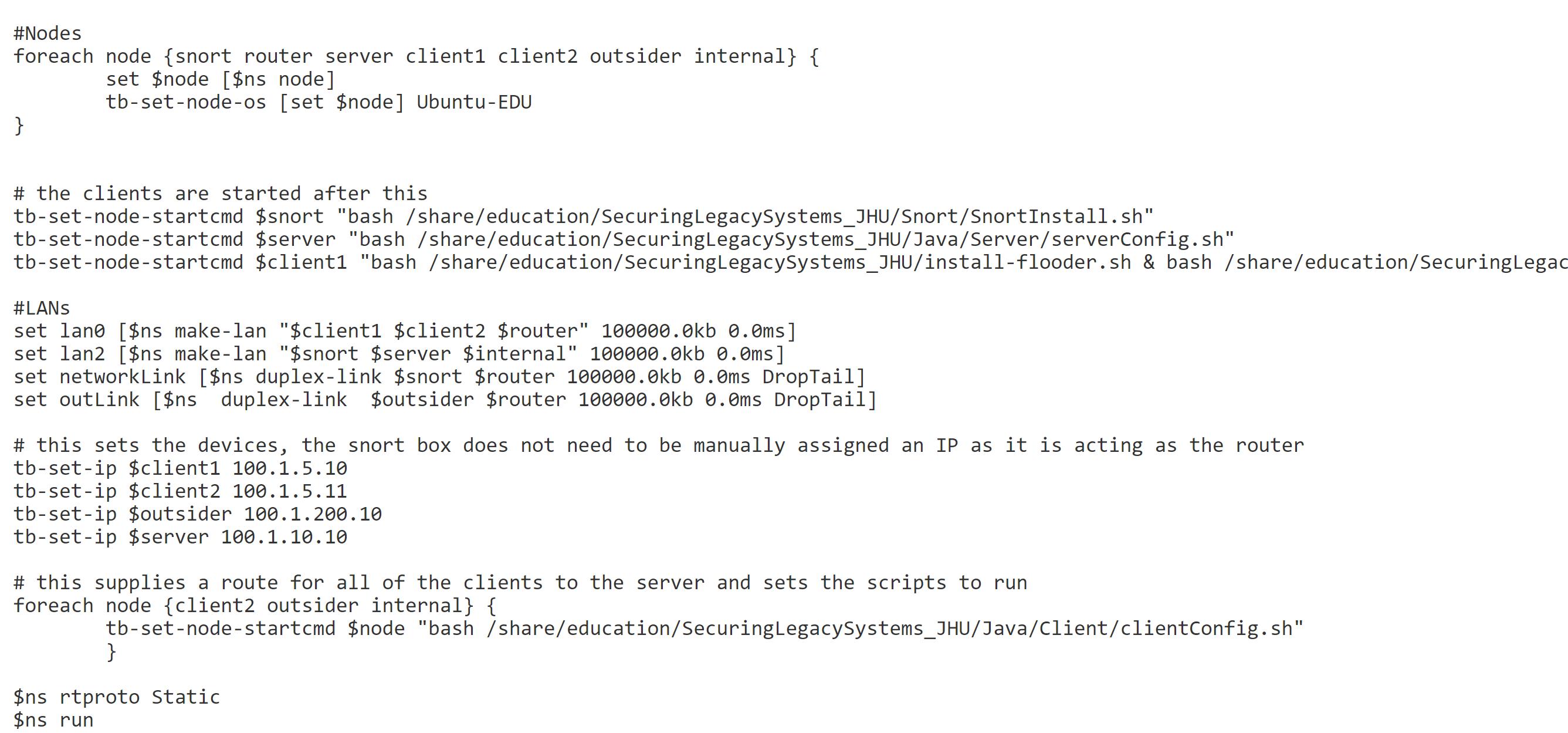
The network is broken into three parts. The first is environment which contains the server along with a single client machine. This network is protected by the Snort router, which is set not to permit any traffic through at the start. The second network contains a single outsider machine. The third contains two client computers. All these networks are connected to each other using a single router.
The NS file and network visualization are as follows:
![$node [$ns node] tb-set-node-os [set $node] Ubuntu-EDU } # the clients are](https://dsd5zvtm8ll6.cloudfront.net/si.experts.images/questions/2024/02/65caf6ebb86bb_29965caf6eb954ab.jpg)
1. How does this application work? And evaluate this application.
2. What does "-Q" option do in Snort? And "--daq nfq" ?
3. What happens to the traffic to client1 when Snort is not running? Is this good?
4. How to recover one of the files sent by the server to a client? How to determine which client this file was sent to?
5. Is this a secure way for the client to send the file to the server? Why?
6. How to do a rule to prevent classified data from being sent to the outsider computer, but not to any other computers?
7. What are other files or extensions that should be filtered?
#Nodes foreach node {snort router server client1 client2 outsider internal} { set $node [$ns node] tb-set-node-os [set $node] Ubuntu-EDU } # the clients are started after this tb-set-node-startcmd $snort "bash /share/education/SecuringLegacySystems_JHU/Snort/SnortInstall.sh" tb-set-node-startcmd $server "bash /share/education/SecuringLegacySystems_JHU/Java/Server/serverConfig.sh" tb-set-node-startcmd $client1 "bash /share/education/SecuringLegacy Systems_JHU/install-flooder.sh & bash /share/education/SecuringLegac #LANS set lane [$ns make-lan "$client1 $client2 $router" 100000.0kb 0.0ms] set lan2 [$ns make-lan "$snort $server $internal" 100000.0kb 0.0ms] set networkLink [$ns duplex-link $snort $router 100000.0kb 0.0ms DropTail] set outLink [$ns duplex-link $outsider $router 100000.0kb 0.0ms DropTail] # this sets the devices, the snort box does not need to be manually assigned an IP as it is acting as the router tb-set-ip $client1 100.1.5.10 tb-set-ip $client2 100.1.5.11 tb-set-ip $outsider 100.1.200.10 tb-set-ip $server 100.1.10.10 # this supplies a route for all of the clients to the server and sets the scripts to run foreach node {client2 outsider internal} { tb-set-node-startcmd $node "bash/share/education/SecuringLegacySystems_JHU/Java/Client/clientConfig.sh" } $ns rtproto Static $ns run
Step by Step Solution
There are 3 Steps involved in it

Get step-by-step solutions from verified subject matter experts
 Study Help