







Question: This assignment contains twenty exercises, each worth five points, for a total of one hundred points possible. For each exercise, create a SQL query that
This assignment contains twenty exercises, each worth five points, for a total of one hundred points possible. For each exercise, create a SQL query that runs with the database provided with this assignment in Blackboard. Create a document with Microsoft Word or with a word processor that can create PDF files. Place your name, date, course name, section number, and assignment number at the top. For each exercise, print out the exercise number, the requirements, the SQL statement, and the results. The results are provided in this document for you to compare with what you have so that you know your query is properly formed. The Entity-Relationship diagram for the database is shown in the figure below. A member typically enters the store, picks videos off the shelf, and brings them up to the counter. The employee creates a rental invoice that has the rental number, rental date, and a list of videos being rented. For each video, the rental fee, daily late fee, and return date is stated. The return date for each of the videos in the rental is left empty when the member rents them. Then, when they are returned, the return date is entered in to the appropriate record. For each exercise, enter the exercise number, state the exercise requirements, and paste in the SQL statement and results. PLEASE MAKE THE QUERIES COMPATIBLE with SQLITE AND TYPED NOT WRITTEN. THANK YOU SO MUCH!
Exercises 1. Display the movie title, year, and genre for all movies. Sort the results by title, year, and genre in that order.
2. Display the movie title, year, and genre for all movies sorted by genre in ascending order, then sorted by year in descending order within genre.
3. Display the movie title, year, and cost for all movies that contain the word hope anywhere in the title. Sort the results by title. Hint: Use the LIKE keyword and %hope% for the search term since % means anything in SQLite.
4. Display the movie title, year, and genre for all action movies. Hint: SQLite is casesensitive, so be sure to use Action and not action.
5. Display the title and cost of all movies whose price is greater than $40.
6. Display the movie title, cost, and genre for action and comedy movies whose price is less than $50. Sort the results by genre. Hint: Use the IN operator and a set for the two genre names. Dont forget they are case-sensitive.
7. Display, for each movie, a description that includes the movie title, year, and genre. Put the year in parentheses and the genre in uppercase letters. Hint: Use the || operator to concatenate two things together, i.e. '( ' || movie_year || ') ' and use the UPPER function to convert a field into upper case, i.e. UPPER(genre_name).
8. Display the average cost of the movies in each genre. Display the genre name and the average cost, sorting the results in alphabetical order by genre. Hint: Use the AVG() function, placing the field within the parenthesis.
9. Display the title, genre, description, and rental fee of all movies with a price code. Hint: JOINing tables together eliminates records with NULL foreign keys.
10. Display, for each genre, the average rental fee for the movies in that genre. Show the genre name followed by the average. Sort the results by genre name.
11. For each movie, display the title, year, and the number of rentals it takes to pay for the movie, which is determined by dividing the movie by its rental fee. Hint: To divide two fields, use the / operator, i.e. field1/field2.
12. Display the title and year of all movies that have a price code. Hint: Use price_id IS NOT NULL to filter out movies with no price code.
13. Display the title, year, and cost for all movies that cost between $45 and $50.
14. Display the title, year, price description, and rental fee for movies in the family, comedy, or drama genres. Hint: Use the IN operator followed by the set of genres so that the query selects only those movies whose genre belongs in the set.
15. Display the title and year of all movies that do not have videos on the shelf. Hint: Use a subquery that selects all the movie numbers in the video and movie tables joined with a NATURAL JOIN. Then, in the outer query, filter the results WHERE the movie number is NOT IN the set of values that result in the subquery.
16. Display the first name, last name, and balance of members who have rented videos. Sort the records by name. Hint: Use DISTINCT to eliminate duplicates.
17. Display the minimum, maximum, and average balance of members who have rented videos. Hint: Use the MIN, MAX, and AVG functions.
18. Display the rental date, video number, movie title, due date, and return date for all videos that were returned after the due date. Sort the results by movie title.
19. Display the rental number, rental date, video number, movie title, daily late fee, days late, and the fee for each video returned late. Hint: To determine the number of days late, use CAST((julianday(return_date) - julianday(due_date)) AS INTEGER) AS days_late. To calculate the late fee, use (julianday(return_date) - julianday(due_date)) * daily_late_fee AS late_fee.
20. Display the membership number, last name, and revenue earned from each member. Revenue is defined as the SUM of all of the rental_fee values (do not include late fees) for each movie the member has rented. Sort the results by member number.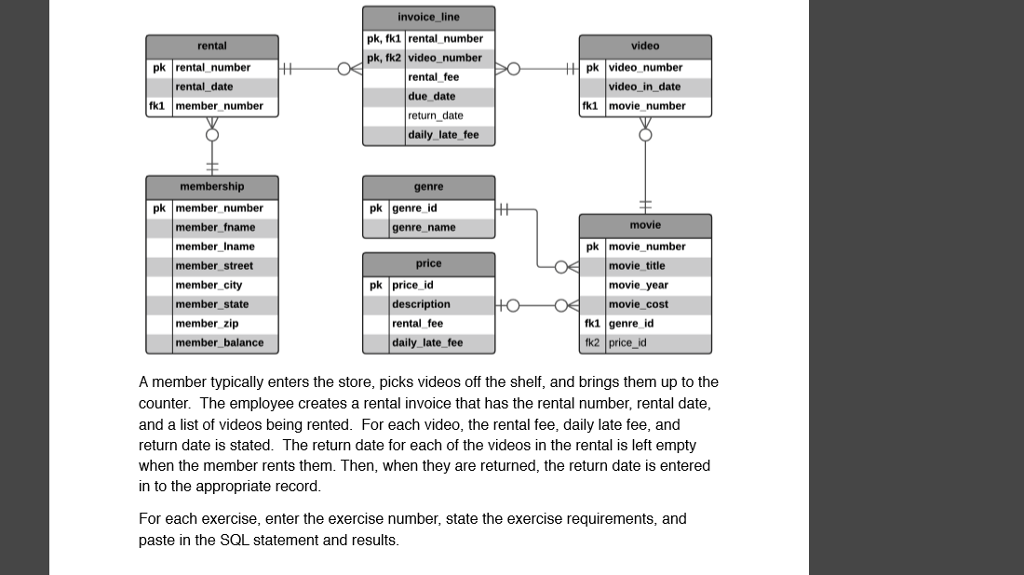
invoice_line pk, fk1 rental number pk, fk2 video number rental video pk rental number rental_ date fkl member number rental fee due date return date daily late fee pk video number video in_date fki movie number membership pk member number genre pk genre id movie member fname member Iname member street member city member state member zip member balance genre name pk movie number movie title movie year movie cost price pk price id fki genre id fk2 price_id rental fee daily_late fee A member typically enters the store, picks videos off the shelf, and brings them up to the counter. The employee creates a rental invoice that has the rental number, rental date, and a list of videos being rented. For each video, the rental fee, daily late fee, and return date is stated. The return date for each of the videos in the rental is left empty when the member rents them. Then, when they are returned, the return date is entered in to the appropriate record For each exercise, enter the exercise number, state the exercise requirements, and paste in the SQL statement and results
Step by Step Solution
There are 3 Steps involved in it

Get step-by-step solutions from verified subject matter experts
 Study Help