Question: This assignment is about creating flow charts. There are 3 problems PROBLEM 1 PROBLEM 2 (3 pictures included) PROBLEM 3 Instructions: Use the flowcharting conventions
This assignment is about creating flow charts. There are 3 problems
PROBLEM 1
PROBLEM 2 (3 pictures included)
PROBLEM 3
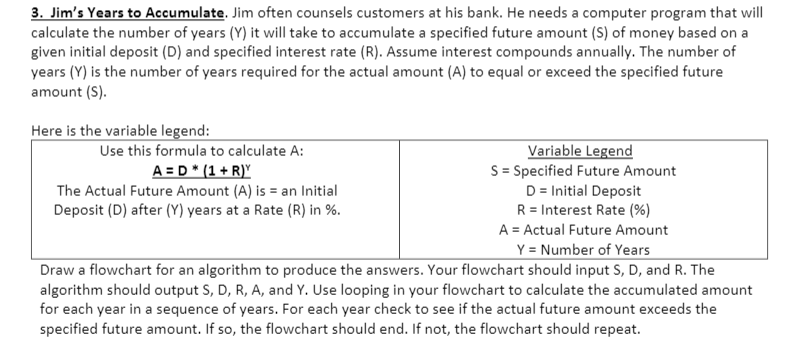
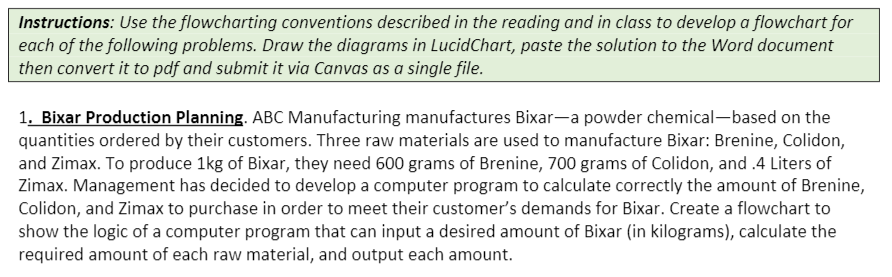
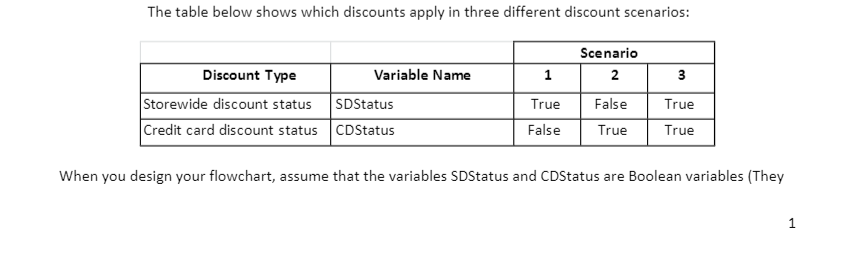
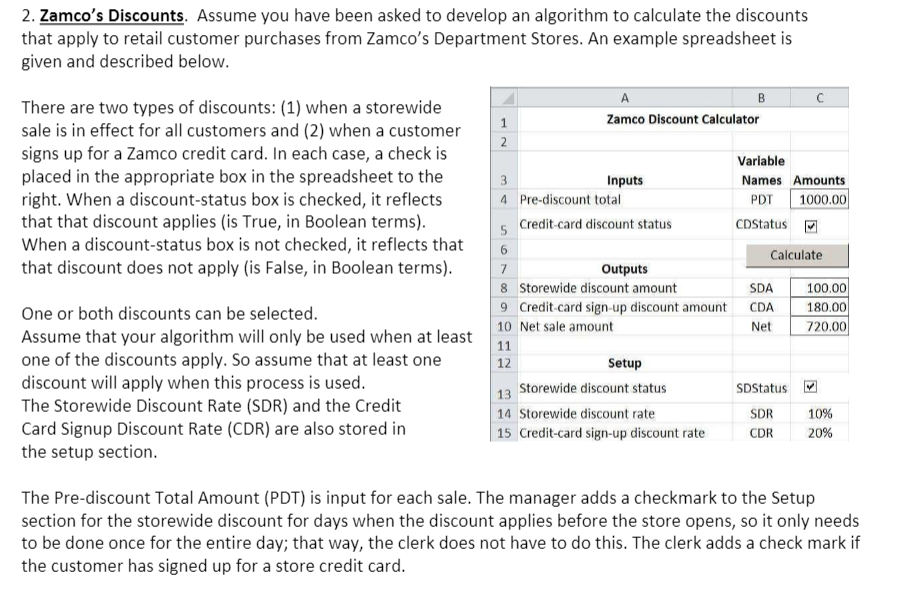
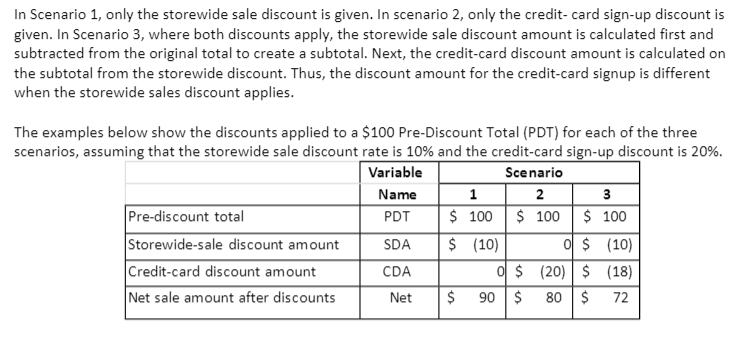
Instructions: Use the flowcharting conventions described in the reading and in class to develop a flowchart for each of the following problems. Draw the diagrams in LucidChart, paste the solution to the Word document then convert it to pdf and submit it via Canvas as a single file. 1. Bixar Production Planning. ABC Manufacturing manufactures Bixar-a powder chemical-based on the quantities ordered by their customers. Three raw materials are used to manufacture Bixar: Brenine, Colidon, and Zimax. To produce 1kg of Bixar, they need 600 grams of Brenine, 700 grams of Colidon, and.4 Liters of Zimax. Management has decided to develop a computer program to calculate correctly the amount of Brenine, Colidon, and Zimax to purchase in order to meet their customer's demands for Bixar. Create a flowchart to show the logic of a computer program that can input a desired amount of Bixar (in kilograms), calculate the required amount of each raw material, and output each amount. The table below shows which discounts apply in three different discount scenarios: 1 3 Discount Type Variable Name Storewide discount status SDStatus Credit card discount status CDStatus Scenario 12 False True True True False True When you design your flowchart, assume that the variables SDStatus and CDStatus are Boolean variables (They 1 2. Zamco's Discounts. Assume you have been asked to develop an algorithm to calculate the discounts that apply to retail customer purchases from Zamco's Department Stores. An example spreadsheet is given and described below. There are two types of discounts: (1) when a storewide sale is in effect for all customers and (2) when a customer signs up for a Zamco credit card. In each case, a check is placed in the appropriate box in the spreadsheet to the right. When a discount-status box is checked, it reflects that that discount applies (is True, in Boolean terms). When a discount-status box is not checked, it reflects that that discount does not apply (is False, in Boolean terms). B c 1 Zamco Discount Calculator 2 Variable 3 Inputs Names Amounts 4 Pre-discount total PDT 1000.00 5 credit card discount status CDStatus 6 Calculate 7 Outputs 8 Storewide discount amount SDA 100.00 9 Credit card sign-up discount amount CDA 180.00 10 Net sale amount 720.00 11 12 Setup 13 Storewide discount status SDStatus 14 Storewide discount rate SDR 15 Credit card sign-up discount rate CDR 20% Net One or both discounts can be selected. Assume that your algorithm will only be used when at least one of the discounts apply. So assume that at least one discount will apply when this process is used. The Storewide Discount Rate (SDR) and the Credit Card Signup Discount Rate (CDR) are also stored in the setup section. 10% The Pre-discount Total Amount (PDT) is input for each sale. The manager adds a checkmark to the Setup section for the storewide discount for days when the discount applies before the store opens, so it only needs to be done once for the entire day; that way, the clerk does not have to do this. The clerk adds a check mark if the customer has signed up for a store credit card. In Scenario 1, only the storewide sale discount is given. In scenario 2, only the credit card sign-up discount is given. In Scenario 3, where both discounts apply, the storewide sale discount amount is calculated first and subtracted from the original total to create a subtotal. Next, the credit-card discount amount is calculated on the subtotal from the storewide discount. Thus, the discount amount for the credit card signup is different when the storewide sales discount applies. The examples below show the discounts applied to a $100 Pre-Discount Total (PDT) for each of the three scenarios, assuming that the storewide sale discount rate is 10% and the credit card sign-up discount is 20%. Variable Scenario Name 12 3 Pre-discount total PDT $ 100 $ 100 $ 100 Storewide-sale discount amount SDA $ (10) o $ (10) Credit card discount amount CDA o $ (20) $ (18) Net sale amount after discounts Net $ 90 $ 80$ 72 3. Jim's Years to Accumulate. Jim often counsels customers at his bank. He needs a computer program that will calculate the number of years (Y) it will take to accumulate a specified future amount (S) of money based on a given initial deposit (D) and specified interest rate (R). Assume interest compounds annually. The number of years (Y) is the number of years required for the actual amount (A) to equal or exceed the specified future amount (s). Here is the variable legend: Use this formula to calculate A: Variable Legend A=D * (1 + R)Y S = Specified Future Amount The Actual Future Amount (A) is = an Initial D = Initial Deposit Deposit (D) after (V) years at a Rate (R) in %. R = Interest Rate (%) A = Actual Future Amount Y = Number of Years Draw a flowchart for an algorithm to produce the answers. Your flowchart should input S, D, and R. The algorithm should output S, D, R, A, and Y. Use looping in your flowchart to calculate the accumulated amount for each year in a sequence of years. For each year check to see if the actual future amount exceeds the specified future amount. If so, the flowchart should end. If not, the flowchart should repeat









 Study Help