







Question: This assignment is designed to give you a first experience in Assembler programming. You will be using Visual Studio 2 0 1 9 and Microsoft
This assignment is designed to give you a first experience in Assembler programming.
You will be using Visual Studio and Microsoft Assembler MASM
Clear the display.
D isplay the string CSSpring Summer Fall Semester XXXX on row column of the display. Replace Spring Summer Fall with the appropriate one, and XXXX with the correct year.
Display the string "Assembler # on row column
Display your name on row column of the display.
Begin displaying the guessing game on row column Display steps on individual rows as shown in the sample run section.
Generate a random number between and see Irvine notes below
Prompt the user to guess a number between and
Based on your randomly generated number, and tell the user whether the real number is higher, lower, or correct. is too high or is too low
Continue to allow the user to guess until they get the correct number. Once they have the correct value, ask them if they would like to play again. If yes, clear the display and start over. If no exit the program.
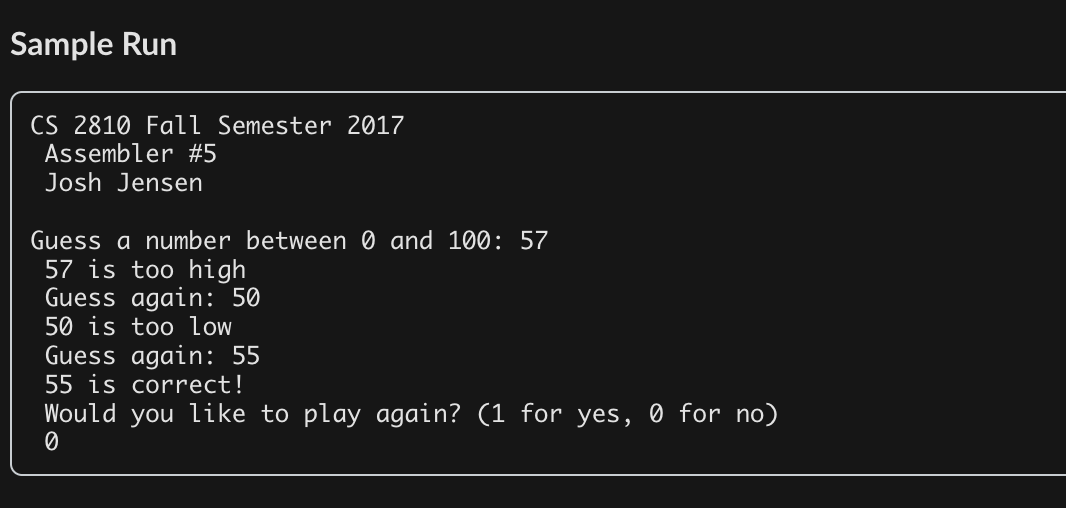
Sample Program Run
Sample Run
CS Fall Semester
Assembler #
Josh Jensen
Guess a number between and :
is too high
Guess again:
is too low
Guess again:
is correct!
Would you like to play again? for yes, for no
New to this assignment, you will need to write a carriage return to the console this is what happens when you press enter
Store the following as a string and write it out to the console as normal anywhere you want to move the cursor down a single row.
vCarriageReturn byte
The Irvine library contains a number of Procs and Macros that simplify IO in MASM.
Sample Run
Step by Step Solution
There are 3 Steps involved in it
1 Expert Approved Answer
Step: 1 Unlock

Question Has Been Solved by an Expert!
Get step-by-step solutions from verified subject matter experts
Step: 2 Unlock
Step: 3 Unlock
 Study Help