







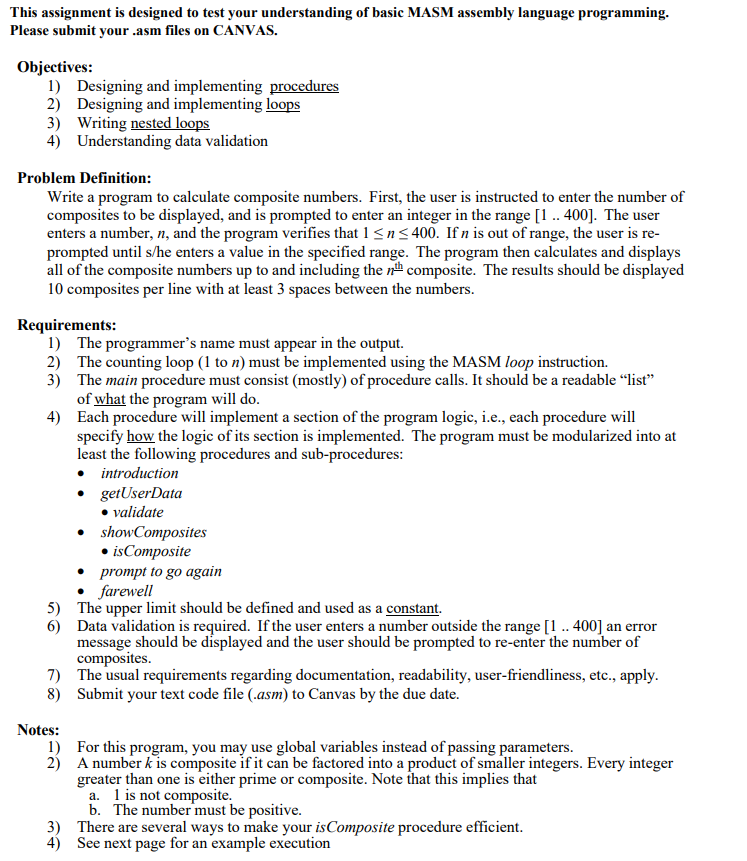
Question: This assignment is designed to test your understanding of basic MASM assembly language programming. Please submit your . asm files on CANVAS. Objectives: Designing and
This assignment is designed to test your understanding of basic MASM assembly language programming.
Please submit your asm files on CANVAS.
Objectives:
Designing and implementing procedures
Designing and implementing loops
Writing nested loops
Understanding data validation
Problem Definition:
Write a program to calculate composite numbers. First, the user is instructed to enter the number of
composites to be displayed, and is prompted to enter an integer in the range The user
enters a number, and the program verifies that If is out of range, the user is re
prompted until she enters a value in the specified range. The program then calculates and displays
all of the composite numbers up to and including the composite. The results should be displayed
composites per line with at least spaces between the numbers.
Requirements:
The programmer's name must appear in the output.
The counting loop to must be implemented using the MASM loop instruction.
The main procedure must consist mostly of procedure calls. It should be a readable "list"
of what the program will do
Each procedure will implement a section of the program logic, ie each procedure will
specify how the logic of its section is implemented. The program must be modularized into at
least the following procedures and subprocedures:
introduction
getUserData
validate
showComposites
isComposite
prompt to go again
farewell
The upper limit should be defined and used as a constant.
Data validation is required. If the user enters a number outside the range an error
message should be displayed and the user should be prompted to reenter the number of
composites.
The usual requirements regarding documentation, readability, userfriendliness, etc., apply.
Submit your text code file asm to Canvas by the due date.
Notes:
For this program, you may use global variables instead of passing parameters.
A number is composite if it can be factored into a product of smaller integers. Every integer
greater than one is either prime or composite. Note that this implies that
a is not composite.
b The number must be positive.
There are several ways to make your isComposite procedure efficient.
Here is the code I have so far:
INCLUDE Irvineinc
; Constants
lowerBound equ
upperBound equ
data
intro BYTE "Composites by
introPrompt BYTE "Enter the number of composite numbers you would like to see.",
introPrompt BYTE "I will accept orders for up to composites.",
goodbyeMsg BYTE "Results certified by Goodbye",
compositePrompt BYTE "Enter the number of composites to display :
againPrompt BYTE "Would you like to go again YES NO:
rangeError BYTE "Out of range. Try again",
compositeOut BYTE "Composite numbers:
compositeInp DWORD
factorCounter DWORD
code
main PROC
call introduction
call getUserData
call showComposites
call again
call farewell
main ENDP
introduction PROC
; Introduction
mov edx, OFFSET intro
call WriteString
call Crlf
call Crlf
mov edx, OFFSET introPrompt
call WriteString
call Crlf
mov edx, OFFSET introPrompt
call WriteString
call Crlf
introduction ENDP
getUserData PROC
; Get number of composites
mov edx, OFFSET compositePrompt
call WriteString
call ReadInt
mov compositeInp, eax
call validate
getUserData ENDP
validate PROC
; Validate input range
mov eax, compositeInp
cmp eax, lowerBound
jl rangeErr
cmp eax, upperBound
jg rangeErr
; If input is in range, proceed to show composites
call showComposites
ret
rangeErr:
; Display range error message and prompt again
mov edx, OFFSET rangeError
call WriteString
call Crlf
call getUserData
ret
validate ENDP
showComposites PROC
; Find composites from to n
; put ecx into the loop counter
mov eax,
mov ecx, compositeInp
; Display "Composite numbers:
mov edx, OFFSET compositeOut
call WriteString
outerLoop:
mov eax, esi ; Load current number into eax
mov ebx,
mov edx, ; Clear edx for division
mov factorCounter, ; Reset factor counter to
i
Step by Step Solution
There are 3 Steps involved in it
1 Expert Approved Answer
Step: 1 Unlock

Question Has Been Solved by an Expert!
Get step-by-step solutions from verified subject matter experts
Step: 2 Unlock
Step: 3 Unlock
 Study Help