







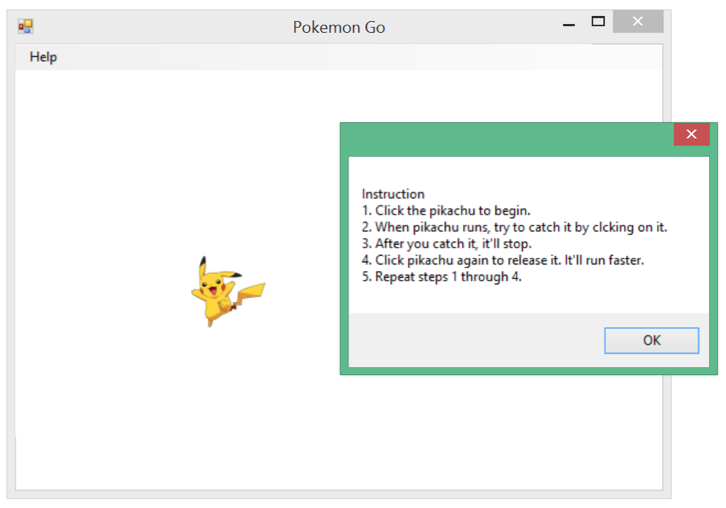
Question: This assignment requires you to develop a game called Pokemon Go in Microsoft Visual Studio 2017 . The figure below shows how it should work.
This assignment requires you to develop a game called Pokemon Go in Microsoft Visual Studio 2017. The figure below shows how it should work. Along with this file, I uploaded an example executable Pikachu.exe You can download and play it. See how it works. Turn on your speaker. Pikachu will yell when you catch him.
Hint: You need to use timer to control the movement of Pikachu.
Grading criteria:
Pokemon should be able to move around randomly. You can choose your own favorite pokemon. (20 points)
Pokemon should bounce back when it hits the boundaries. (20 points)
If pokemon is stopped, you should be able to click on it and make it run. (20 points)
While pokemon is running, if you click on it, it should stop and yell. You can choose your own sound file. (20 points)
Everytime when pokemon is stopped and run again, its speed should increase a little bit. (10 points),
Add How to play instructions in the menu, similar to the above image. (10 points)
Pokemon Go Help Instruction 1. Click the pikachu to begin. 2. When pikachu runs, try to catch it by clcking on it 3. After you catch it, it'll stop. 4. Click pikachu again to release it. It'll run faster 5. Repeat steps 1 through 4 OK Pokemon Go Help Instruction 1. Click the pikachu to begin. 2. When pikachu runs, try to catch it by clcking on it 3. After you catch it, it'll stop. 4. Click pikachu again to release it. It'll run faster 5. Repeat steps 1 through 4 OK
Step by Step Solution
There are 3 Steps involved in it

Get step-by-step solutions from verified subject matter experts
 Study Help