







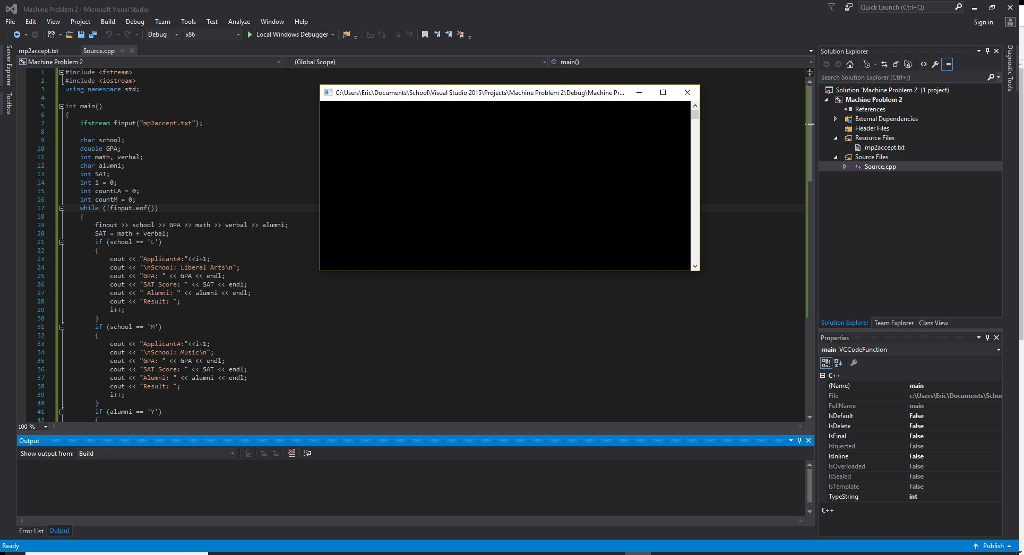
Question: This C++ program for a class doesnt show any debugging errors but whenevr I run it, all I get is a blank black screen with
This C++ program for a class doesnt show any debugging errors but whenevr I run it, all I get is a blank black screen with a bliking cursor. Any idea why the program isnt working properly?
************************************************************************************
#include
#include
using namespace std;
int main()
{
ifstream finput("mp2accept.txt");
char school;
double GPA;
int math, verbal;
char alumni;
int SAT;
int i = 0;
int countLA = 0;
int countM = 0;
while (!finput.eof())
{
finput >> school >> GPA >> math >> verbal >> alumni;
SAT = math + verbal;
if (school == 'L')
{
cout
cout
cout
cout
cout
cout
i++;
}
if (school == 'M')
{
cout
cout
cout
cout
cout
cout
i++;
}
if (alumni == 'Y')
{
if(SAT
{
cout
continue;
}
if (GPA
{
cout
continue;
}
}
else if (alumni == 'N')
{
if (SAT
{
cout
continue;
}
if (GPA
{
cout
continue;
}
}
if (school == 'L')
{
if (countLA
{
cout
countLA++;
continue;
}
else
{
cout
continue;
}
}
else if (school == 'M')
{
if (countM
{
cout
countM++;
continue;
}
else
{
cout
continue;
}
}
}
finput.close( );
return 0;
***********************************************************************************************************************
}
File Data:
L 4.0 600 650 N M 3.9 610 520 N L 3.8 590 600 N L 3.0 600 600 Y L 3.4 600 600 N L 3.0 500 490 Y L 2.9 500 500 Y M 3.5 500 490 Y M 3.9 490 600 Y L 3.5 700 500 N L 3.1 600 400 Y L 3.0 490 510 Y L 4.0 800 800 Y M 3.2 500 500 N
DMachine Pioblem 2-Microsclt Visual Studo uuckaunch1- Local Windows Debugger Salubon Ep orer e mairo search, Solution plorer :Ctrl+J include ciostroas -leader F les ouble ePA ins nats, verhsl: nti- f (achonl cout e school Liberal Arts'n cout Result: Shom ouput fromt Buid
Step by Step Solution
There are 3 Steps involved in it

Get step-by-step solutions from verified subject matter experts
 Study Help