







Question: THIS CALCULATOR HAS TO BE MADE USING JAVA LANGUAGE Java programming Develop a calculator in the eclipse development environment, considering the following requirements: a) The
THIS CALCULATOR HAS TO BE MADE USING JAVA LANGUAGE
Java programming Develop a calculator in the eclipse development environment, considering the following requirements:
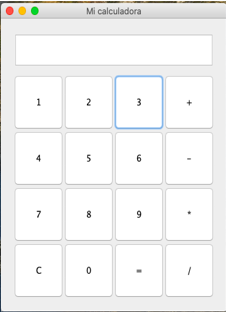
a) The operations you must perform are: addition, subtraction, multiplication and division. Likewise, the numbers will be entered through buttons and not directly from the keyboard.
b) The layout of the calculator interface should be similar to the one shown.
c) The buttons must have a fixed size of 80px high and 80px wide, for this design you must use the JButton class.
d) The text field should have a height of 50px and be aligned as shown in the image. To do this, use the JTextField class.
For functionality, consider the following instructions:
Concatenate more than one number in the input, except when entering the symbols +, -, *, /, C, or =.
Clear variables and input element when button with the C symbol is pressed.
When the button with the equals symbol (=) is pressed, the result of the operation should be displayed.
Mi calculadora 1 2 3 4 5 6 7 8 9 C 0
Step by Step Solution
There are 3 Steps involved in it

Get step-by-step solutions from verified subject matter experts
 Study Help