







Question: This code is for MATLAB. It requires the code and 3 plots for the data Example template code close all clear % simple numerical integration
This code is for MATLAB. It requires the code and 3 plots for the data
Example template code
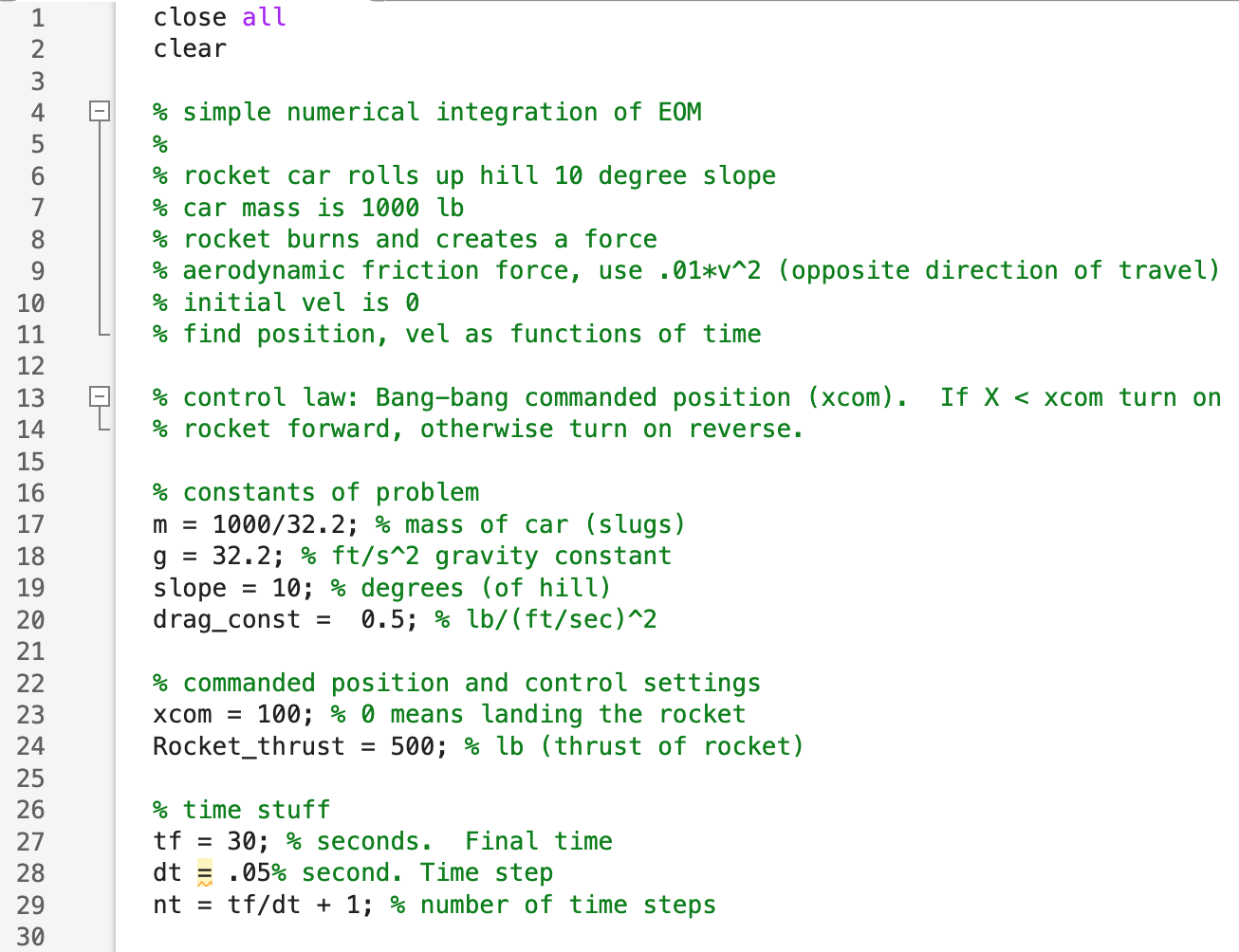
close all
clear
% simple numerical integration of EOM
%
% rocket car rolls up hill 10 degree slope
% car mass is 1000 lb
% rocket burns and creates a force
% aerodynamic friction force, use .01*v^2 (opposite direction of travel)
% initial vel is 0
% find position, vel as functions of time
% control law: Bang-bang commanded position (xcom). If X
% rocket forward, otherwise turn on reverse.
% constants of problem
m = 1000/32.2; % mass of car (slugs)
g = 32.2; % ft/s^2 gravity constant
slope = 10; % degrees (of hill)
drag_const = 0.5; % lb/(ft/sec)^2
% commanded position and control settings
xcom = 100; % 0 means landing the rocket
Rocket_thrust = 500; % lb (thrust of rocket)
% time stuff
tf = 30; % seconds. Final time
dt = .05% second. Time step
nt = tf/dt + 1; % number of time steps
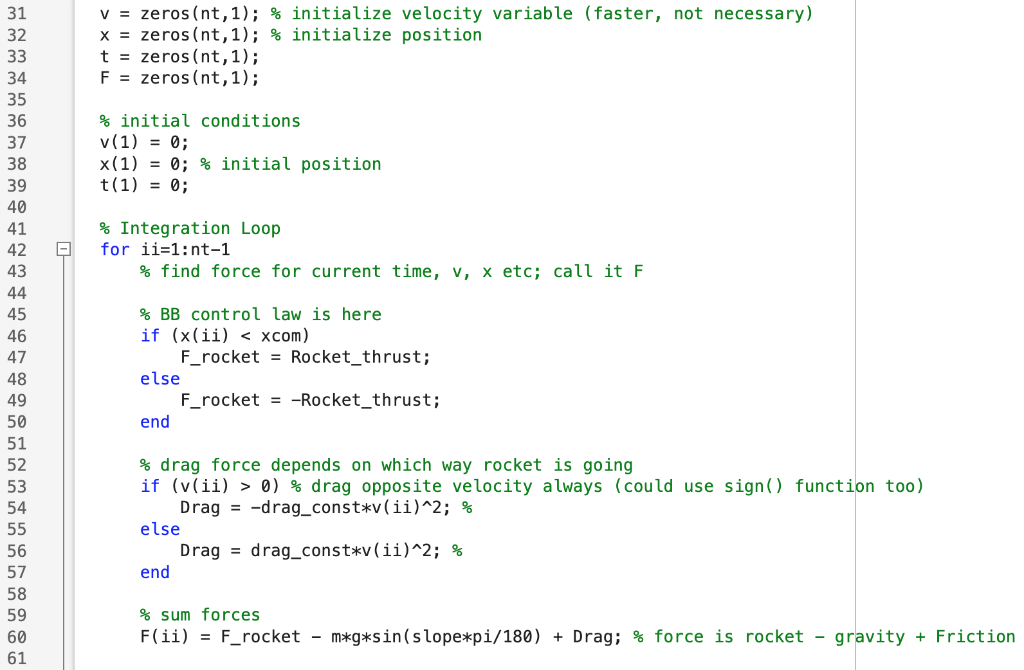
v = zeros(nt,1); % initialize velocity variable (faster, not necessary)
x = zeros(nt,1); % initialize position
t = zeros(nt,1);
F = zeros(nt,1);
% initial conditions
v(1) = 0;
x(1) = 0; % initial position
t(1) = 0;
% Integration Loop
for ii=1:nt-1
% find force for current time, v, x etc; call it F
% BB control law is here
if (x(ii)
F_rocket = Rocket_thrust;
else
F_rocket = -Rocket_thrust;
end
% drag force depends on which way rocket is going
if (v(ii) > 0) % drag opposite velocity always (could use sign() function too)
Drag = -drag_const*v(ii)^2; %
else
Drag = drag_const*v(ii)^2; %
end
% sum forces
F(ii) = F_rocket - m*g*sin(slope*pi/180) + Drag; % force is rocket - gravity + Friction
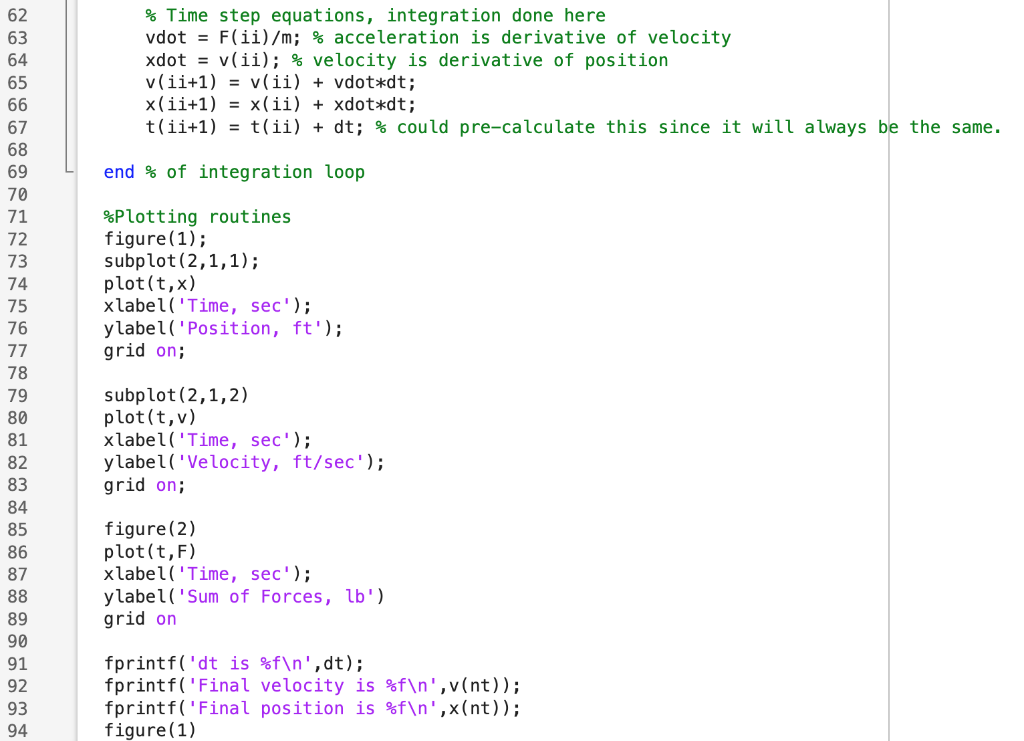
% Time step equations, integration done here
vdot = F(ii)/m; % acceleration is derivative of velocity
xdot = v(ii); % velocity is derivative of position
v(ii+1) = v(ii) + vdot*dt;
x(ii+1) = x(ii) + xdot*dt;
t(ii+1) = t(ii) + dt; % could pre-calculate this since it will always be the same.
end % of integration loop
%Plotting routines
figure(1);
subplot(2,1,1);
plot(t,x)
xlabel('Time, sec');
ylabel('Position, ft');
grid on;
subplot(2,1,2)
plot(t,v)
xlabel('Time, sec');
ylabel('Velocity, ft/sec');
grid on;
figure(2)
plot(t,F)
xlabel('Time, sec');
ylabel('Sum of Forces, lb')
grid on
fprintf('dt is %f ',dt);
fprintf('Final velocity is %f ',v(nt));
fprintf('Final position is %f ',x(nt));
figure(1)
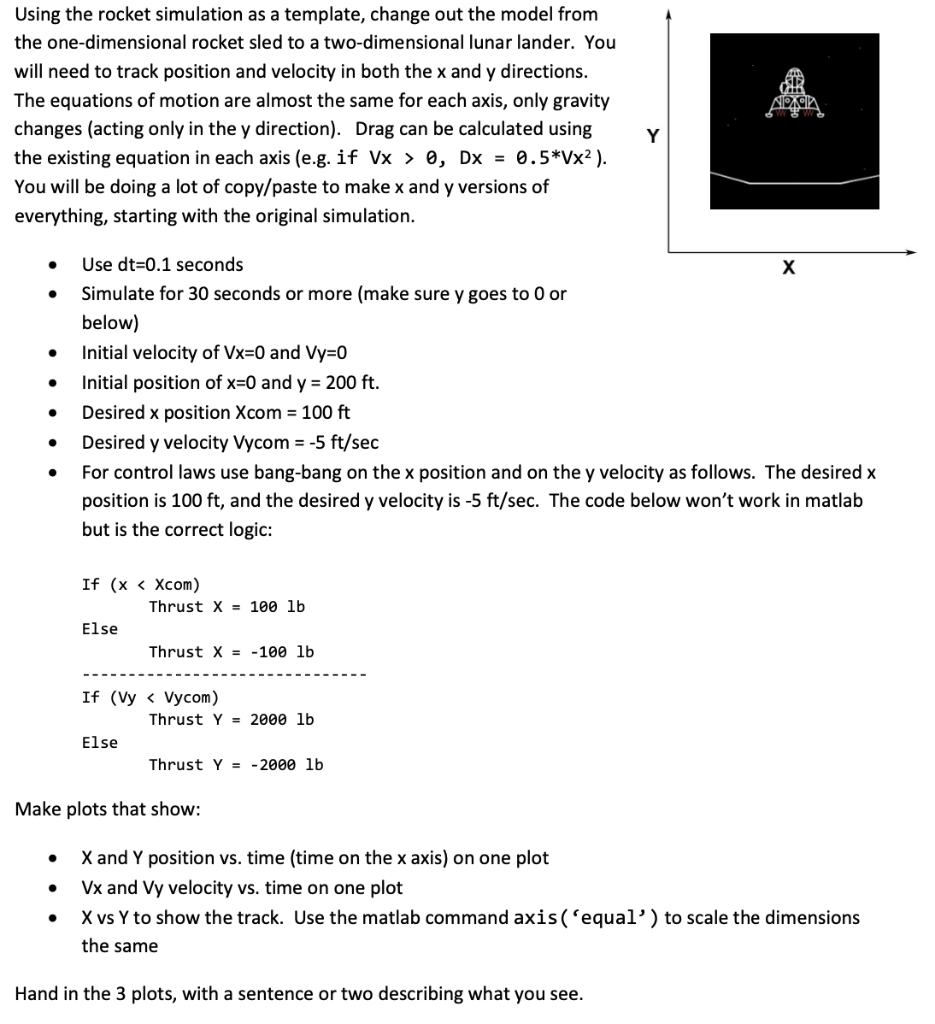
Using the rocket simulation as a template, change out the model from the one-dimensional rocket sled to a two-dimensional lunar lander. You will need to track position and velocity in both the x and y directions. The equations of motion are almost the same for each axis, only gravity changes (acting only in the y direction). Drag can be calculated using the existing equation in each axis (e.g. if Vx>0,Dx=0.5V2 ). You will be doing a lot of copy/paste to make x and y versions of everything, starting with the original simulation. - Use dt=0.1 seconds - Simulate for 30 seconds or more (make sure y goes to 0 or below) - Initial velocity of Vx=0 and Vy=0 - Initial position of x=0 and y=200ft. - Desired x position Xcom=100ft - Desired y velocity Vycom =5ft/sec - For control laws use bang-bang on the x position and on the y velocity as follows. The desired x position is 100ft, and the desired y velocity is 5ft/sec. The code below won't work in matlab but is the correct logic: Make plots that show: - X and Y position vs. time (time on the x axis) on one plot - Vx and Vy velocity vs. time on one plot - X vs Y to show the track. Use the matlab command axis ( 'equal') to scale the dimensions the same Hand in the 3 plots, with a sentence or two describing what you see. Using the rocket simulation as a template, change out the model from the one-dimensional rocket sled to a two-dimensional lunar lander. You will need to track position and velocity in both the x and y directions. The equations of motion are almost the same for each axis, only gravity changes (acting only in the y direction). Drag can be calculated using the existing equation in each axis (e.g. if Vx>0,Dx=0.5V2 ). You will be doing a lot of copy/paste to make x and y versions of everything, starting with the original simulation. - Use dt=0.1 seconds - Simulate for 30 seconds or more (make sure y goes to 0 or below) - Initial velocity of Vx=0 and Vy=0 - Initial position of x=0 and y=200ft. - Desired x position Xcom=100ft - Desired y velocity Vycom =5ft/sec - For control laws use bang-bang on the x position and on the y velocity as follows. The desired x position is 100ft, and the desired y velocity is 5ft/sec. The code below won't work in matlab but is the correct logic: Make plots that show: - X and Y position vs. time (time on the x axis) on one plot - Vx and Vy velocity vs. time on one plot - X vs Y to show the track. Use the matlab command axis ( 'equal') to scale the dimensions the same Hand in the 3 plots, with a sentence or two describing what you see
Step by Step Solution
There are 3 Steps involved in it

Get step-by-step solutions from verified subject matter experts
 Study Help