







Question: This computer project involves the calculation of various items associated with the Income and Retained Earning Statements. A spreadsheet is to be designed to accept
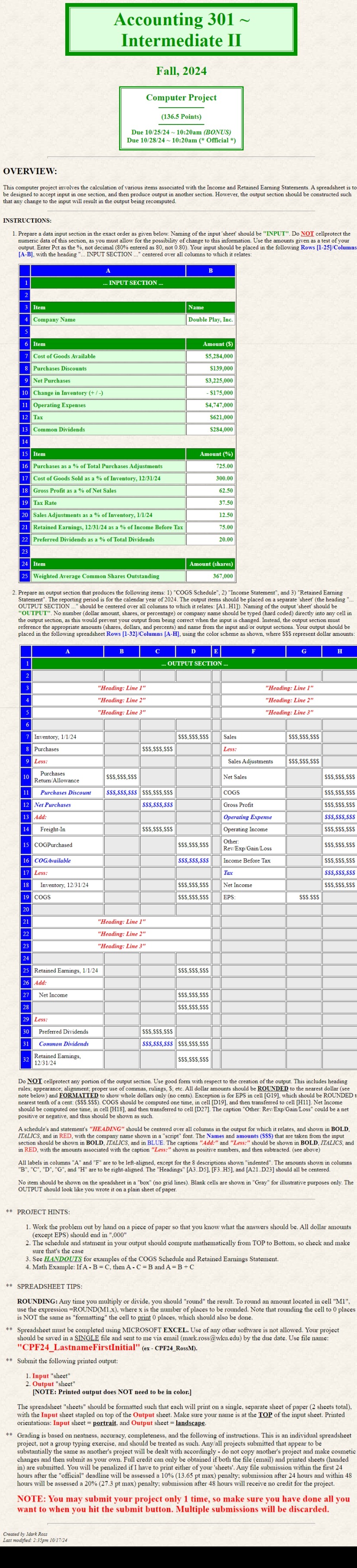
This computer project involves the calculation of various items associated with the Income and Retained Earning Statements. A spreadsheet is to be designed to accept input in one section, and then produce output in another section. However, the output section should be constructed such that any change to the input will result in the output being recomputed.
Please give the formulas and the number answers please.
INSTRUCTIONS:
Prepare a data input section in the exact order as given below. Naming of the input 'sheet' should be "INPUT". Do NOT cellprotect the numeric data of this section, as you must allow for the possibility of change to this information. Use the amounts given as a test of your output. Enter Pct as the not decimal entered as not Your input should be placed in the following Rows Columns AB with the heading INPUT SECTION centered over all columns to which it relates:
AB INPUT SECTION ItemNameCompany NameDouble Play, IncItemAmount $Cost of Goods Available$Purchases Discounts$Net Purchases$Change in Inventory $Operating Expenses$Tax$Common Dividends$ItemAmount Purchases as a of Total Purchases AdjustmentsCost of Goods Sold as a of Inventory, Gross Profit as a of Net SalesTax RateSales Adjustments as a of Inventory, Retained Earnings, as a of Income Before TaxPreferred Dividends as a of Total DividendsItemAmount sharesWeighted Average Common Shares Outstanding
Prepare an output section that produces the following items: "COGS Schedule", "Income Statement", and "Retained Earning Statement". The reporting period is for the calendar year of The output items should be placed on a separate 'sheet' the heading OUTPUT SECTION should be centered over all columns to which it relates: AH Naming of the output 'sheet' should be "OUTPUT". No number dollar amount, shares, or percentage or company name should be typed hard coded directly into any cell in the output section, as this would prevent your output from being correct when the input is changed. Instead, the output section must reference the appropriate amounts shares dollars, and percents and name from the input andor output sections. Your output should be placed in the following spreadsheet Rows Columns AH using the color scheme as shown, where $$$ represent dollar amounts:
ABCDEFGH OUTPUT SECTION "Heading: Line Heading: Line "Heading: Line Heading: Line "Heading: Line Heading: Line Inventory, $$$$$$$$$Sales$$$$$$$$$Purchases$$$$$$$$$Less:Less:Sales Adjustments$$$$$$$$$ Purchases ReturnAllowance$$$$$$$$$Net Sales$$$$$$$$$ Purchases Discount$$$$$$$$$$$$$$$$$$COGS$$$$$$$$$Net Purchases$$$$$$$$$Gross Profit$$$$$$$$$Add:Operating Expense$$$$$$$$$ FreightIn$$$$$$$$$Operating Income$$$$$$$$$COGPurchased$$$$$$$$$Other: RevExpGainLoss$$$$$$$$$COGAvailable$$$$$$$$$Income Before Tax$$$$$$$$$Less:Tax$$$$$$$$$ Inventory, $$$$$$$$$Net Income$$$$$$$$$COGS$$$$$$$$$EPS:$$$$$$"Heading: Line "Heading: Line "Heading: Line Retained Earnings, $$$$$$$$$Add:Net Income$$$$$$$$$$$$$$$$$$Less:Preferred Dividends$$$$$$$$$Common Dividends$$$$$$$$$$$$$$$$$$Retained Earnings, $$$$$$$$$
Do NOT cellprotect any portion of the output section. Use good form with respect to the creation of the output. This includes heading rules; appearance; alignment; proper use of commas, rulings, $; etc. All dollar amounts should be ROUNDED to the nearest dollar see note below and FORMATTED to show whole dollars only no cents Exception is for EPS in cell G which should be ROUNDED to nearest tenth of a cent: $$$$$$ COGS should be computed one time, in cell D and then transferred to cell H Net Income should be computed one time, in cell H and then transferred to cell D The caption "Other: RevExpGainLoss could be a net positive or negative, and thus should be shown as such.
Step by Step Solution
There are 3 Steps involved in it
1 Expert Approved Answer
Step: 1 Unlock

Question Has Been Solved by an Expert!
Get step-by-step solutions from verified subject matter experts
Step: 2 Unlock
Step: 3 Unlock
 Study Help