







Question: this from the page 206 here is the given code ################################## # Implementing a Dynamic Array import ctypes class DynamicArray(object): def __init__(self): self._n = 0

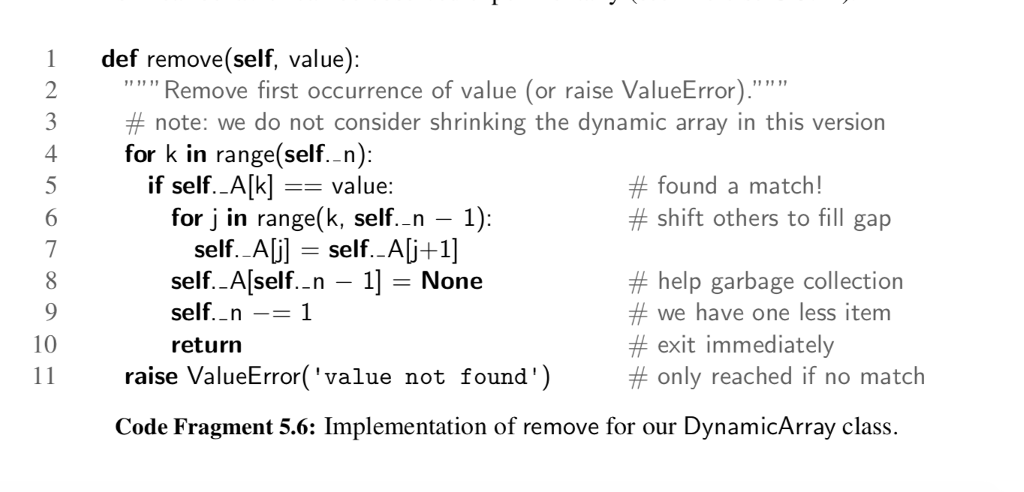 this from the page 206
here is the given code
################################## # Implementing a Dynamic Array
import ctypes
class DynamicArray(object): def __init__(self): self._n = 0 self._capacity = 1 self._A = (self._capacity * ctypes.py_object)()
def __len__(self): return self._n
def __setitem__(self, index, value): if not 0
def __getitem__(self, index): if not 0
# Grow the array dynamically def _resize(self, c): B = (c * ctypes.py_object)() for k in range(self._n): B[k] = self._A[k] self._A = B self._capacity = c
def append(self, obj): if self._n == self._capacity: # dynamic array is full self._resize(2 * self._capacity) self._A[self._n] = obj self._n += 1
# Remove the last element of the array def pop(self): if self._n > 1: self._A[self._n - 1] = None # setting the last element to None # will be interpreted as not having an element at all self._n -= 1
# Shrink the capacity of the array by half any time the number of elements in the # array is below 1/4 if self._n
def insert(self, k, obj): if self._n == self._capacity: # dynamic array is full self._resize(2 * self._capacity)
# we need to shift elements for j in range(self._n, k, -1): self._A[j] = self._A[j-1]
self._A[k] = obj self._n += 1
if __name__ == "__main__": L = DynamicArray() # TEST pop(k) HERE
Implement pop(k) in DynamicArray.py by extending the implementation of pop) to account for an input of index k. Consider only positive values for k. [HINT: pop(k) must shift elements to the left after removing index k, exactly like re- move(value). See remove(value) on papge 206 of the textbook)]
Step by Step Solution
There are 3 Steps involved in it

Get step-by-step solutions from verified subject matter experts
 Study Help