







Question: This game is called Geometric Shapes. This game involves working with circles and spheres. You will be calculating radius, circumference, area of a circle, area
This game is called Geometric Shapes. This game involves working with circles and spheres. You will be calculating radius, circumference, area of a circle, area of a sphere, and the volume of a sphere. The input will consist of one of those 5 values and the program will compute the other four values. This game is called from the menu of the games that you have been working on. When you choose this game, it will take you to another menu listing five choices. The menu will look like this:
Which circle or sphere calculation would you like to start with?
1) Radius
2) Circle Circumference
3) Circle Area
4) Sphere Area
5) Sphere Volume
When you choose one of the 5 choices the program will take you to a method associated with that choice.
0) Make this method name describe what the method does.
1) This method will then prompt you to enter a value for that particular shape.
2) This method will have a while loop that will guarantee the value entered is not less than or equal to zero.
3) The method will then compute the other four values.
4) The method will then call a method that prints the 5 values. This same method will be used by all the shapes to print the results.
When I grade this project, I will be looking at the style of the code to show that the indenting is appropriate. (Eclipse will do this for you.) I will be looking at user identifier names that document what the identifier is doing.
This is what I've done until now:
import java.util.Scanner; public class GeometricShapes /* Calculate circle and sphere Shapes.*/ { //*** These variables can be seen throughout the class. //*** They can be very useful when you need the same value //*** in several places. private static int globalValue1 = 10; //*** Eclipse makes them blue private static int globalValue2 = 20; private static int value; private static double value2; private static double value3; private static String choice; private static String spaces = " "; //*** this Scanner can be used throughout the class. private static Scanner scan = new Scanner(System.in); //*** This method controls two while loops. The outer loop allows the game to //*** be played repeatedly. The inner loop is the game. public static void geometricShapes() throws InterruptedException { intruduction(); int value; //*** This is a local variable and can only be seen //*** in this block of code. Eclipse makes them brown. int value2; int value3; String choice = "Yes"; while(choice.equalsIgnoreCase("Yes")) {
System.out.println(" Which circle or sphere calculatrtion would you like to start with?"); System.out.println(" 1) Radius"); System.out.println(" 2) Circle Circunference"); System.out.println(" 3) Circle Area"); System.out.println(" 4) Sphere Area"); System.out.println(" 5) Sphere Volume"); value = readChoiceNumber(); sleepDemonstration(); while(value > 5 ) { /*System.out.println(spaces + "Each game will have an inner loop where the game is played." );*/ System.out.println(spaces + " please enter a number between 1 nad 5." ); value = scan.nextInt(); scan.nextLine();//*** This removes the enter key when value is read. } choice = shouldIStayInLoop(); } }
private static void sleepDemonstration() throws InterruptedException { System.out.println(" Please enter the radius"); value2 = readChoiceNumber(); double circunference; circunference = (2 * Math.PI * value2); double circleArea; circleArea = (Math.PI * (value2*value2)); double sphereArea; sphereArea = (4 * Math.PI * (value2 * value2)); double sphereVolume; sphereVolume = ((4.0/3.0) * Math.PI * (value2 * value2 * value2)); System.out.println(" The radius of the circle is: " + value2); System.out.println(" The circumference of the circle is: " + circunference); System.out.println(" The are of the circle is: " + circleArea); System.out.println(" The area of the sphere is: " + sphereArea); System.out.println(" The volume of the sphere is: " + sphereVolume); }
private static void intruduction() throws InterruptedException { System.out.println(" There are five circle or sphere values that this program calcuates. The client " + " chooses one of the values and the program calculates the other four values."); } private static int returnsValue() throws InterruptedException { int localValue = 6; globalValue1 = globalValue1 + 10; System.out.println("" + " localValue is created in method returnsValue. "+ " it is manipulated and then returned. " ); localValue++; return localValue; } private static int readChoiceNumber() { Scanner scan = new Scanner(System.in); int choiceNumber; String indent = " "; choiceNumber = scan.nextInt(); while(choiceNumber 100) { System.out.println(indent + "the number must be 1 through 100 inclusive"); System.out.println(indent + " please enter a proper choice. "); choiceNumber = scan.nextInt(); } return choiceNumber; } private static String shouldIStayInLoop() { globalValue2 = globalValue2 + 100; String choice; System.out.println(spaces + " " + " Would you like to play this game again?"); System.out.println(spaces + " please enter (yeso) "); choice = scan.nextLine(); return choice; } }
The output should look like:
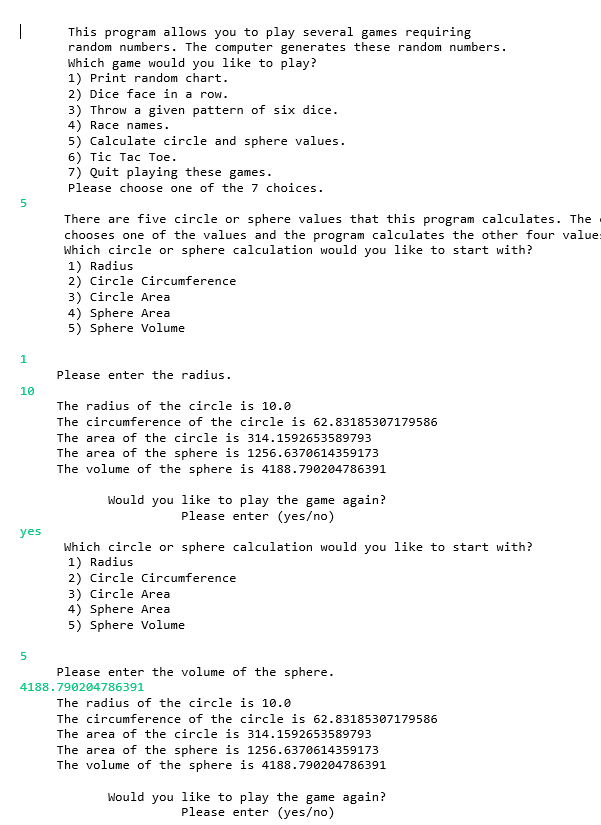
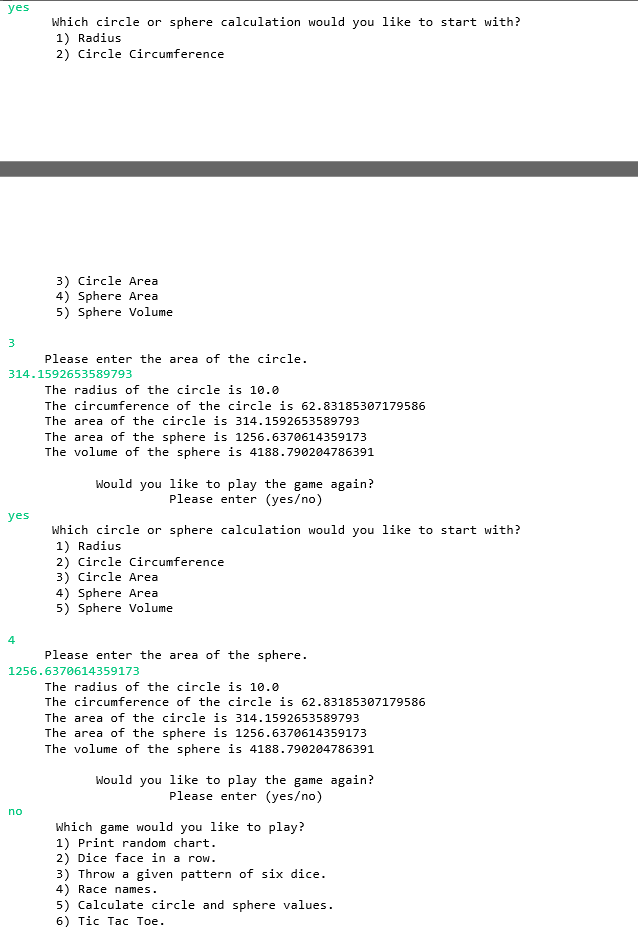
| This program allows you to play several games requiring random numbers. The computer generates these random numbers. Which game would you like to play? 1) Print random chart. 2) Dice face in a row. 3) Throw a given pattern of six dice. 4) Race names. 5) Calculate circle and sphere values. 6) Tic Tac Toe. 7) Quit playing these games. Please choose one of the 7 choices. 5 There are five circle or sphere values that this program calculates. The chooses one of the values and the program calculates the other four value Which circle or sphere calculation would you like to start with? 1) Radius 2) Circle Circumference 3) Circle Area 4) Sphere Area 5) Sphere Volume 1 Please enter the radius. 10 The radius of the circle is 10.0 The circumference of the circle is 62.83185307179586 The area of the circle is 314.1592653589793 The area of the sphere is 1256.6370614359173 The volume of the sphere is 4188.790204786391 yes Would you like to play the game again? Please enter (yeso) Which circle or sphere calculation would you like to start with? 1) Radius 2) Circle Circumference 3) Circle Area 4) Sphere Area 5) Sphere Volume 5 Please enter the volume of the sphere. 4188.790294786391 The radius of the circle is 10.0 The circumference of the circle is 62.83185307179586 The area of the circle is 314.1592653589793 The area of the sphere is 1256.6370614359173 The volume of the sphere is 4188.790204786391 Would you like to play the game again? Please enter (yeso) yes Which circle or sphere calculation would you like to start with? 1) Radius 2) Circle Circumference 3) Circle Area 4) Sphere Area 5) Sphere Volume 3 Please enter the area of the circle. 314.1592653589793 The radius of the circle is 10.0 The circumference of the circle is 62.83185307179586 The area of the circle is 314.1592653589793 The area of the sphere is 1256.6370614359173 The volume of the sphere is 4188.790204786391 yes Would you like to play the game again? Please enter (yeso) Which circle or sphere calculation would you like to start with? 1) Radius 2) Circle Circumference 3) Circle Area 4) Sphere Area 5) Sphere Volume 4 Please enter the area of the sphere. 1256.6370614359173 The radius of the circle is 10.0 The circumference of the circle is 62.83185307179586 The area of the circle is 314.1592653589793 The area of the sphere is 1256.6370614359173 The volume of the sphere is 4188.790204786391 Would you like to play the game again? Please enter (yeso) no Which game would you like to play? 1) Print random chart. 2) Dice face in a row. 3) Throw a given pattern of six dice. 4) Race names. 5) Calculate circle and sphere values. 6) Tic Tac Toe
Step by Step Solution
There are 3 Steps involved in it

Get step-by-step solutions from verified subject matter experts
 Study Help