







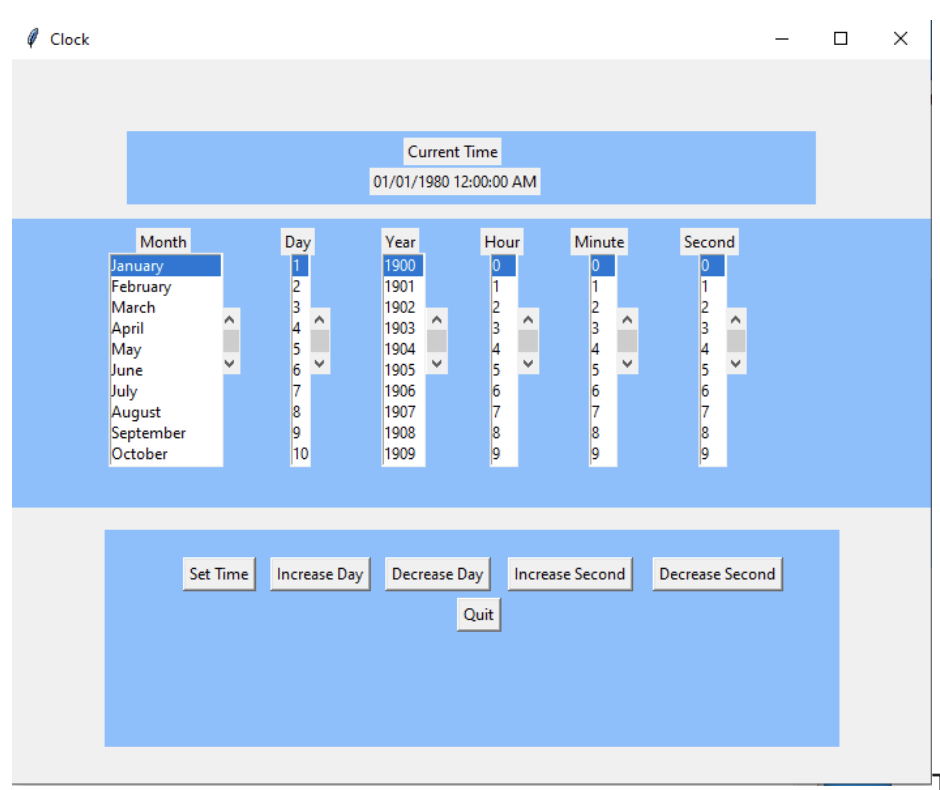
Question: This GUI was created using 3 frames inside a canvas. The top frame contains 2 labels. The second label contains the output of Clocks _
This GUI was created using frames inside a canvas. The top frame contains labels. The second label contains the output of Clocks str method and will change based on the buttons that are clicked in the bottom frame. The middle frame contains labels, each placed above their corresponding Listbox. You do not have to use a canvas or frame to create and arrange your GUI. The contents of the list boxes are:
Month: January thru December Day: thru Year: thru Hour: thru Minute & Second: thru
The bottom frame contains buttons. The first five buttons represent the public method in the Clock class and the last button causes the GUI to quit and disappear.
You may choose not to use separate frames. It might be a little easier.
When the program containing the GUI runs, it creates a Clock object and displays the DateTime in the top frame.
The first entry in each Listbox is selected by default. If the user makes selections from these Listboxs and clicks the Set Time button, your program should collect the entries from each Listbox and use them as parameters to Clocks setClock method. If setClock returns True, display the new DateTime in the top frame. Otherwise, display Invalid DateTime in the top frame. The user might select November which is not a valid date
If the user clicks any of the other buttons, your program will call the corresponding Clock method and display the new DateTime in the top frame. The Quit button terminates the GUI and closes the window.
Notes:
Make sure you include comments in your code and place your name as comment at the top of your code
The above GUI was created using the place method to arrange the widgets. You can use whatever layout
manager you choose pack place, grid as long as it approximates the look of the GUI above
The first entry in each Listbox should be selected by default.
Only submit your GUI program. Do not submit Clock or TimeType.
The GUI above was created with a height of and a width of
in python lang please.
Step by Step Solution
There are 3 Steps involved in it
1 Expert Approved Answer
Step: 1 Unlock

Question Has Been Solved by an Expert!
Get step-by-step solutions from verified subject matter experts
Step: 2 Unlock
Step: 3 Unlock
 Study Help