







Question: This has to be a python program Objectives .Create an input loop to enter data .Stop input when the user chooses to end it Validate
This has to be a python program
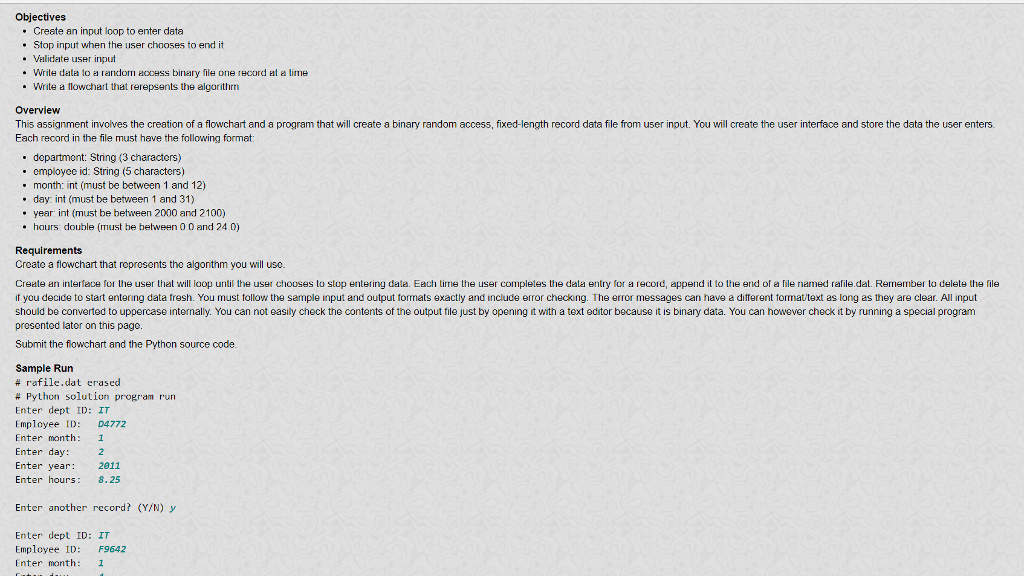
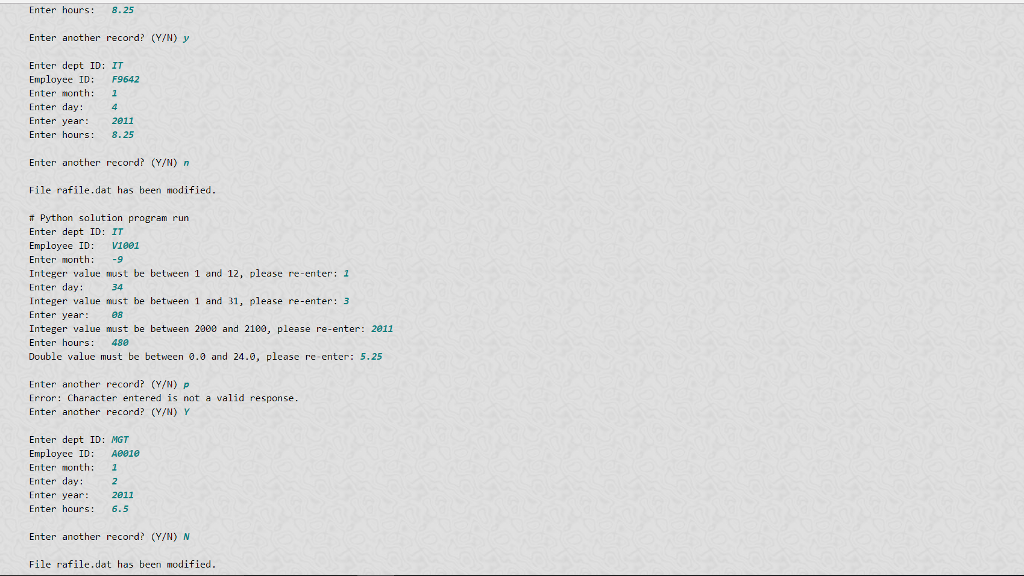
Objectives .Create an input loop to enter data .Stop input when the user chooses to end it Validate user input * write dala lo a random eocess binary file one record el e lime Write a flowchart that rerepsents th algorithm Overview This assignment involves the creation of a flowchart and a program that will create a binary random access, fixed-length record data file from user input. You will create the user interface and store the data the user enters. Each record in the file must have the following format . department: String (3 characters) . employec id: String (5 characters) month: int (must be between 1 and 12) . day: int (must be between 1 and 31) year int (must be between 2000 and 2100) hours: double (must be between 0 0 and 24 0) Requirements Create a flowchart that represents the algonthm you will use. Creale an interface for the user that will loop until the user chooses to stop entering dala. Each tirme the user compleles the dala entry for a record, append it to the end of a file named rafile.dat. Remember to delele the file if you decice to start entering data fresh. You must tollow the sample input and output formats exactly and include error checking. The error messages can have a ditferent tormat/text as long as they are clear. All input should be converted to uppercase internally. You can not easily check the contents of the output tile just by opening it with a text editor because it is binary data. You can however check it by running a special program presented later on this page Submit the flowchart and the Python source code Sample Run # rafile.dat erased # Python solution proram run Enter dept ID: IT Employee I D4772 Enter month: I Enter day Enter year Enter hours: 8.2 2811 Enter another record? (Y/N) y Enter dept ID IT Employee ID F9642 Enter month 1 Objectives .Create an input loop to enter data .Stop input when the user chooses to end it Validate user input * write dala lo a random eocess binary file one record el e lime Write a flowchart that rerepsents th algorithm Overview This assignment involves the creation of a flowchart and a program that will create a binary random access, fixed-length record data file from user input. You will create the user interface and store the data the user enters. Each record in the file must have the following format . department: String (3 characters) . employec id: String (5 characters) month: int (must be between 1 and 12) . day: int (must be between 1 and 31) year int (must be between 2000 and 2100) hours: double (must be between 0 0 and 24 0) Requirements Create a flowchart that represents the algonthm you will use. Creale an interface for the user that will loop until the user chooses to stop entering dala. Each tirme the user compleles the dala entry for a record, append it to the end of a file named rafile.dat. Remember to delele the file if you decice to start entering data fresh. You must tollow the sample input and output formats exactly and include error checking. The error messages can have a ditferent tormat/text as long as they are clear. All input should be converted to uppercase internally. You can not easily check the contents of the output tile just by opening it with a text editor because it is binary data. You can however check it by running a special program presented later on this page Submit the flowchart and the Python source code Sample Run # rafile.dat erased # Python solution proram run Enter dept ID: IT Employee I D4772 Enter month: I Enter day Enter year Enter hours: 8.2 2811 Enter another record? (Y/N) y Enter dept ID IT Employee ID F9642 Enter month 1
Step by Step Solution
There are 3 Steps involved in it

Get step-by-step solutions from verified subject matter experts
 Study Help